Looking for a Raspberry Pi case that pairs cooling performance with easy access to ports? This guide targets buyers who want solid protection, reliable heat management, and straightforward assembly. The top picks suit different Pi models and use cases—home servers, media centers, educational kits, or hobby projects. The table below highlights five strong options with their key strengths for quick comparison.
| Product | Model | Best For | |
|---|---|---|---|
| Geekworm P173 Heavy Duty | Raspberry Pi 4 | Users needing passive cooling with a rugged metal chassis | Passive heatsink case |
| iUniker Case for Pi 4 | Pi 4 with Cooling Kit | Users who want an all-in-one kit with active cooling | 4 cm fan + heatsinks |
| Miuzei Pi 4 Case | Pi 4 with Fan | Power users needing effective cooling under load | 3A 5V fan + heatsinks |
| Raspberry Pi Official Case | Pi 5 | Official option with integrated fan and heatsink | Integrated fan + heatsink |
| Argon NEO Aluminum Case | Pi 4 | Owners seeking passive cooling with easy GPIO access | Passive aluminum heatsink |
Geekworm P173 Heavy Duty Passive Cooling Aluminum Case

The Geekworm P173 is a heavy-duty passive cooling enclosure designed specifically for Raspberry Pi 4 Model B variants (1GB/2GB/4GB/8GB). It uses built-in heatsink pillars and a net weight around 174 grams to improve passive heat dissipation without a fan. The design ensures easy access to all ports, GPIO, and TF card slots, making it suitable for headless setups or projects requiring frequent GPIO access. Best for users who want silent operation and rugged housing in environments where noise or power draw is a concern. A potential limitation is the reliance on passive cooling, which may be less effective under sustained high workloads or overclocking.
Miuzei Case for Raspberry Pi 3 with Fan
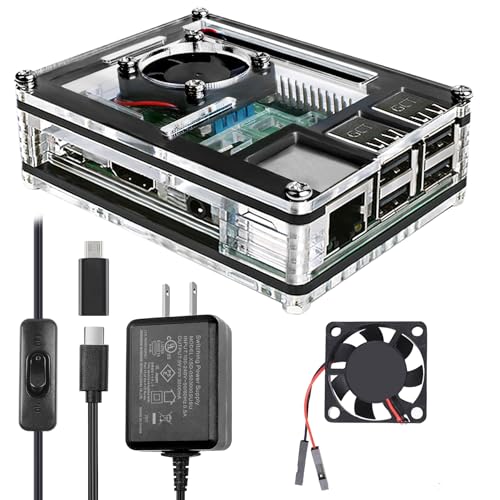
The Miuzei Pi 3 case is a clear acrylic enclosure with a 5V, 3A fan and three aluminum heatsinks. It is designed specifically for Raspberry Pi 3 models and includes a power supply with an on/off switch. This kit-style option is ideal for learners or educators who want visible internals and reliable cooling for Pi 3 projects. Choose this if you need an all-in-one starter kit; avoid if you are targeting newer Pi models (Pi 4 or later) without verification of compatibility.
iUniker Case for Raspberry Pi 4 with Cooling Fan
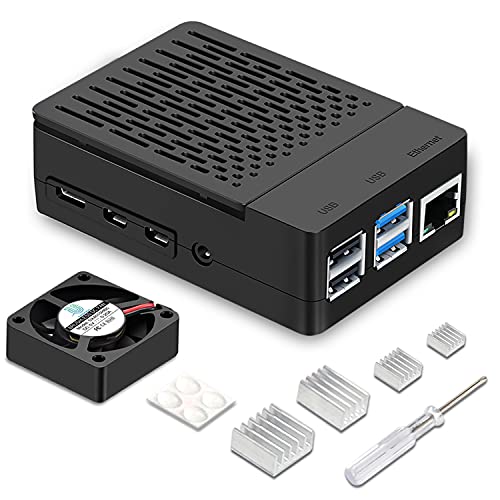
This iUniker all-in-one kit for Raspberry Pi 4 includes an ABS case, a 40mm cooling fan, 4 aluminum heatsinks, screws, feet, and a screwdriver. It provides active cooling suitable for media centers, home servers, classrooms, and light robotics. The simple removable top cover allows GPIO access without fully removing the board. Best for quick setup and active cooling; consider the variable noise and fan speed in quiet environments as a potential limitation.
iUniker Raspberry Pi 3B+ Case – Transparent with Heatsink
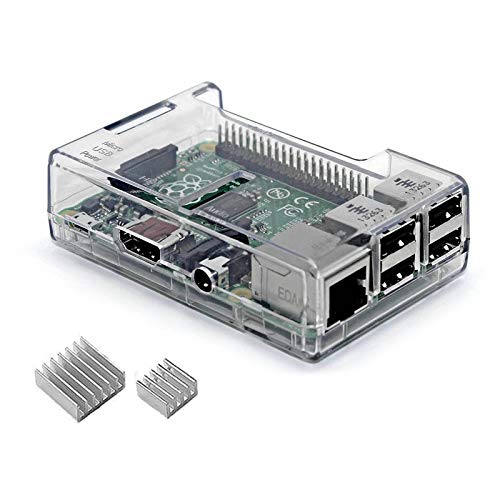
This clear ABS case for Raspberry Pi 3 Model B+, 3B, and 2B offers transparent protection while housing a heatsink. It provides straightforward access to ports and resembles a compact protective shell. Best for demonstrations or educational kits where visibility of the board matters; not compatible with Raspberry Pi 4, which requires a different case design.
Miuzei Case for Raspberry Pi 4 with Fan

Designed for Raspberry Pi 4, this Miuzei case is a clear acrylic shell built to fit Pi 4 (8GB/4GB). It includes a silent 5V fan and four aluminum heatsinks for double cooling efficiency. A 5V 3A power supply with On/Off switch is included, facilitating easy operation and safe power management. Best for users who need sustained performance with good visibility of the internals; avoid if you require a purely passive cooling solution.
Raspberry Pi Official Raspberry Pi 5 Case

The official Raspberry Pi 5 case features a cooling fan with PWM control and a heatsink, plus an ABS/PC build for durability. It supports stacking and additional HATs via an integrated mounting system, and the lid is removable for easy access to the fan and GPIO ports. This option is best for users who prefer official compatibility and straightforward setup for Pi 5 workloads; consider its size and mounting options if you plan a compact build with multiple HATs.
KKSB Case for Raspberry Pi 5

KKSB’s Pi 5 case emphasizes expansion with space for hats, add-on boards, a cooler, and NVMe hats. It features a removable cover for easy HAT installation and side-wall modifications for various connectors. External start button simplifies powering on without opening the case. Best for projects requiring multiple HATs and powerful cooling options; approach if you plan extensive HAT configurations, and verify compatibility with your exact Pi 5 setup.
Buying Guide
What should you consider when choosing a Raspberry Pi case?
- Model compatibility: Make sure the case supports your Pi model (Pi 3, Pi 4, Pi 5) and RAM variant.
- Cooling needs: Decide between passive heatsinks, active fans, or upgradeable cooling. For long-running workloads, active cooling reduces throttling risk.
- Access to GPIO and ports: Look for cases with easy GPIO access or removable lids if you frequently modify connections.
- Build material: Aluminum cases excel at passive cooling, while ABS or acrylic cases can be lighter and cheaper.
- Expansion options: If using HATs or NVMe adapters, verify space and mounting compatibility.
- Noise and power: Fan-driven cases add noise and power draw; for silent setups, prioritize passive designs or PWM-controlled fans.
Quick decision tips
- Best for silent operation: Geekworm P173 (passive cooling) or Argon NEO (passive, easy GPIO access).
- Best for active cooling and visibility: iUniker Pi 4 Case or Miuzei Pi 4 Case with Fans.
- Best for official compatibility and Pi 5 workloads: Official Raspberry Pi 5 Case.
- Best for HAT-heavy builds: KKSB Case for Raspberry Pi 5.
FAQs
- What is the difference between passive and active cooling in Pi cases?
Passive cooling uses heatsinks and metal bodies to dissipate heat without a fan, while active cooling uses a fan to actively move air and remove heat. - Can I reuse a Pi 4 case for Pi 5?
Cases are model-specific; Pi 5 uses different dimensions and port spacing, so check compatibility before reuse. - Do these cases require assembly?
Some include all parts and hardware in a kit, while others arrive as a ready shell needing basic assembly. - Are official Pi cases better for support and updates?
Official cases align with the latest Pi models and long-term compatibility. - Is it necessary to use a cooling fan for Pi 4 under load?
While not required, active cooling helps prevent throttling during intensive tasks. - What about HAT compatibility?
Choose a case with space and clearances for your HATs if you plan to use add-on boards.