Answering the needs of small business owners, this guide highlights practical software options to manage finances, invoicing, client data, and everyday administrative tasks. Each product is suited to a different buyer type—from solo entrepreneurs needing simple invoicing to small teams requiring robust accounting. Read on to compare core strengths, limitations, and ideal use cases to help you pick the right solution.
| Product | Best For | |
|---|---|---|
| Smart Business Pack | Businesses needing a compact suite of tools | Multiple titles bundled, simplifies basic business operations |
| Express Invoice Billing and Invoicing Software Free | Freelancers and small teams prioritizing invoicing | customizable invoices and mobile access |
| MySoftware Company, Mysoftware My Database | Users wanting templates and extensive media assets | Templates, clipart, fonts for personalized documents |
| SAGE 50 Pro Accounting 2026 | Small businesses needing solid accounting | Established accounting workflow with real-time reports |
| SAGE 50 Premium Accounting 2026 | Single-user accounting with scalability | Enhanced invoicing and cost tracking for projects |
Smart Business Pack by Avanquest
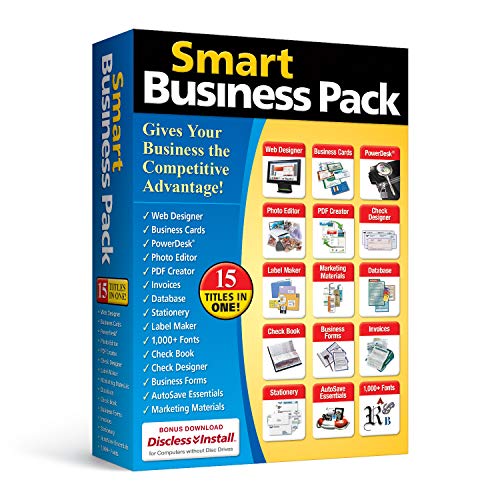
Features include 15 essential software titles for business, tools to manage information and legal transactions, and capabilities to create checks and oversee finances. Best for small teams needing a bundled suite without searching across many programs. The product consolidates core administrative functions, reducing the need to switch between apps. Caution: the bundled mix may include overlapping tools that some users do not need, which could complicate setup.
Express Invoice Billing and Invoicing Software Free

Best for freelancers and small teams that need fast invoicing. It lets you create invoices, orders, and quotes with customizable logos, headings, and notes. The web interface is accessible on mobile devices for on-the-go work, and it supports emailing, printing, and faxing from the app. Limitation: the free version may have feature gaps compared to paid options, so verify needs like tax handling or multi-user access if required.
MySoftware Company, My Database

Best for users who want ready-made templates and rich media resources. This option provides pre-designed templates for business and personal use, plus 10,000 clipart images and 100 fonts, along with a notes table for history and tasks. Choose this if you value aesthetic customization and a built-in asset library. Limitation: it may be overkill for teams focusing primarily on accounting or CRM rather than document design.
SAGE 50 Pro Accounting 2026 U.S. Retail Edition

Best for established small businesses seeking reliable accounting workflows. Sage 50 Pro Accounting offers straightforward setup for one user, customizable charts of accounts, real-time reports, and integrated bill payment and invoicing. It’s a mature option favored by accountants for decades. Caution: real-time collaboration features may be limited in single-user configurations; assess whether a multi-user upgrade is needed for growth.
SAGE 50 Premium Accounting 2026

Best for small teams that need stronger project tracking alongside standard accounting. This edition builds on the Pro version with enhanced cost tracking and invoicing across jobs. It’s well suited for users who require more granular project accounting. Limitation: premium features may be underutilized by solo operators or businesses with simple needs.
Buying Guide: Picking the Right Small Business Management Software
What core functions do you need?
Identify must-have capabilities: invoicing, accounting, client management, or document creation. If you mainly invoice clients, prioritize billing features and mobile access. If accounting drives your operations, focus on chart of accounts, reports, and bill payment.
How many users and collaboration do you require?
Consider whether you need multi-user access or single-user simplicity. Some options are tailored for one user with easy setups, while others support team collaboration with shared ledgers and roles.
How important is customization and design?
Templates, fonts, and media assets can save time for documents and proposals. If branding matters, tools with design templates may be beneficial. Balance aesthetic needs with core business tasks.
What is your budget and plan flexibility?
Bundled software can reduce the number of separate licenses. Evaluate whether you prefer a bundled package or best-in-class standalones. Consider upgrade paths as your business grows.
Performance and accessibility considerations
Mobile access, cloud vs. desktop installation, and data security are key. For teams on the go, cloud or web-enabled options with reliable access are advantageous. For sensitive financial data, ensure appropriate security measures.
Summary of recommended fits
- Best overall balance: Sage 50 Premium Accounting 2026 — robust accounting with growth potential.
- Best invoicing focus: Express Invoice Billing and Invoicing Software Free — fast, flexible invoicing on mobile.
- Best bundled value: Smart Business Pack — multiple titles in one package for basic operations.
- Best for templates and assets: MySoftware Company, My Database — design-rich documents and media.
- Best for single-user accounting: Sage 50 Pro Accounting 2026 — straightforward setup and real-time reporting.
Frequently Asked Questions
- What is small business management software?
It is a set of tools to handle essential tasks like invoicing, accounting, customer records, and document creation in one or a few applications. - Do I need cloud-based options?
Cloud options offer easier remote access and updates; on-premises options can provide tighter data control. - Is multi-user access important for small teams?
Yes if more than one person needs to work in the system simultaneously; otherwise a single-user setup can be simpler and cheaper. - Can these tools replace dedicated accounting software?
For many small businesses, these tools cover core needs, but very complex tax scenarios or audits may require specialized solutions or expert consultation. - How do I evaluate compatibility with my existing processes?
List key workflows (invoicing, payroll, reporting) and compare how each product handles those tasks with your current method. - What is the typical implementation time?
It ranges from a few hours for basic setups to several days for multi-user or customized configurations.