Answering the needs of on‑the‑go workers, students, and home office setups, these portable laptop stands elevate screens to eye level, improve airflow, and reduce neck and shoulder strain. The top picks below are selected for versatility, portability, and sturdy construction. Each entry notes who it’s best for and why it stands out, plus a practical caution to guide your choice. This guide focuses on stands that travel well, fit most laptops, and provide ergonomic benefits in varied environments.
| Product | Best For | Why It Stands Out |
|---|---|---|
| Tonmom Laptop Stand for Desk, Adjustable Laptop Riser | Home and Office Professionals | Wide height range; sturdy triangle support; good heat dissipation |
| Gogoonike Adjustable Laptop Stand, Portable Riser | Remote Workers and Students | Balanced dual-support; clear venting; versatile height levels |
| OMOTON LA10 360° Rotating Laptop Stand | Collaborators and Busy Teams | 360° rotation; tool-free setup; folds compactly for travel |
| Amazon Basics Sturdy and Portable Ergonomic Laptop Stand | Budget-Smart Buyers | Adjustable height; wide compatibility; durable aluminum |
| Viozon Portable Laptop Stand for Desk | Students and Travelers | Foldable, 3-in-1 design; 8 height levels; magnetic phone holder |
Tonmom Laptop Stand for Desk

Best for: Home and office workers who need a tall, stable riser. This stand elevates a notebook from 2.78″ to 6.5″ (7 levels) to align with eye level, supporting posture correction and reduced neck fatigue. The triangle base offers stability, and a large anti-slip silicone pad protects the device from scratches. It improves airflow with an open design to help cool laptops during operation.
Why selected: The adjustable height and sturdy construction address common ergonomic needs while remaining simple to set up. It’s a reliable choice when portability is needed without sacrificing stability.
Caution: Balance may require ensuring the laptop is evenly supported on the two contact points to avoid tipping on uneven surfaces.
Gogoonike Adjustable Laptop Stand

Best for: Remote workers and students who value portability and easy setup. Elevates from 4.34″ to 6.59″ with six levels for a comfortable viewing angle. The design emphasizes stability with triangle supports and anti-slip pads to guard against slips and scratches.
Why selected: It provides a compact footprint with a simple, balance-focused design, making it a good choice for quick rearrangements between desks or cafés.
Caution: Ensure both side supports are locked at the same level to maintain balance on uneven surfaces.
OMOTON LA10 360° Rotating Laptop Stand

Best for: Collaboration and video calls where screen sharing or shifting viewpoints is frequent. Features 360° rotation with an adjustable height from 1.8″ to 10.4″, plus tool-free tilt adjustment. The foldable design and included pouch enhance travel readiness.
Why selected: Its rotation capability and light weight make it ideal for teams and remote work where quick angle changes are common without cluttering the workspace.
Caution: The compact base may be less stable with very large or heavy laptops; use with suitable devices within recommended sizes.
Amazon Basics Sturdy and Portable Ergonomic Stand

Best for: Budget-conscious buyers seeking broad compatibility and portability. Offers up to 7 inches of height adjustment, aligning with many 10–15.6″ laptops. Aluminum construction provides light weight and rust resistance, with non-slip pads and protective hooks for stability.
Why selected: It provides essential ergonomic adjustment and broad device compatibility at a competitive price, making it a practical baseline option.
Caution: Heavier laptops or uneven surfaces may impact balance; use on flat, solid surfaces for best stability.
Viozon Portable Laptop Stand for Desk
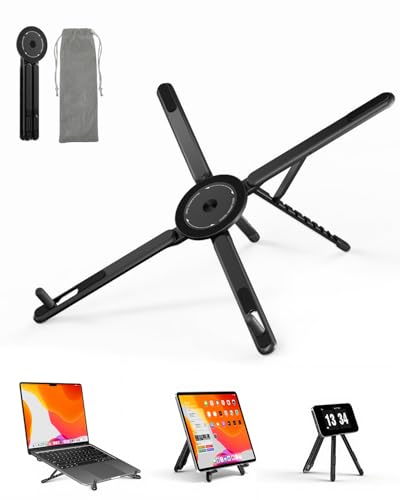
Best for: Students and travelers who switch between desk setups and travel environments. This stand folds compactly and includes a magnetic phone holder, combining laptop elevation with device organization.
Why selected: The 3‑in‑1 versatility — laptop stand, adjustable riser, and phone holder — adds value for portable workspaces, especially when space is limited.
Caution: The foldable design may require occasional rechecking of joints to ensure stability after frequent folding and unfolding.
Buying Guide: Key Purchase Considerations
- Adjustability: Look for multiple height levels and tilt options to match your eye level and seating position. If you frequently share a screen, a rotating stand can be advantageous.
- Portability: For travel, prioritize foldable designs, light weight, and compact footprints. A carrying pouch is a plus.
- Stability and Build: Triangle or reinforced bases improve stability. Aluminum bodies are common for lightweight strength.
- Ventilation: An open design or vented surface helps prevent laptop overheating during use.
- Device Compatibility: Check supported laptop sizes (in inches) and weight to ensure the stand remains stable with your model.
- Additional Features: Magnetic phone holders or extra padding reduce the risk of device scratches. Tool-free adjustments save time.
FAQ: Quick Answers for Buyers
- What is the main benefit of a portable laptop stand?
It raises the screen to eye level, reducing neck and shoulder strain and improving airflow around the laptop. - Are these stands compatible with large laptops?
Most stands support common laptop sizes (10–15.6 inches). Always check maximum supported dimensions and weight. - Do I need tools to adjust these stands?
Several options offer tool-free adjustments for quick setup, while some may require only simple locks. - Is a 360° rotating stand better for collaboration?
Yes, it simplifies angle changes during calls or demonstrations, but may be bulkier than basic stands. - What should I avoid when choosing a stand?
Avoid stands with unstable bases for heavy devices or those that do not provide adequate ventilation or padding. - How do I improve laptop cooling on a stand?
Choose stands with open designs or vented surfaces and place the setup on a flat, hard surface to maximize airflow.