When protecting digital assets, a hardware wallet is the best option for long-term security. This guide highlights five top options suitable for different buyer needs—ranging from beginner-friendly to experienced users who want high-end security and multi-coin support. The chosen products cover popular hands-off backups, Bluetooth/mobile compatibility, and offline storage. Use the buying guide below to compare features, security levels, and ease of use before choosing the right wallet for your portfolio.
| Product | Best For | Key Benefit | Limitations |
|---|---|---|---|
| Ledger Nano X (Classic Crypto Wallet with Bluetooth) | All-rounders seeking mobile access | Bluetooth, 15,000+ coins in one dashboard | Bluetooth can add attack surface; requires care with companion device |
| TANGEM Crypto Wallet Pack of 2 | Users prioritizing offline, card-based security | No cables or batteries; 14,100+ coins | Limited on-device display; need phone for management |
| Trezor Safe 5 | Security-focused users needing a color touchscreen | Secure Element, passphrase, large touchscreen | Setup may be more complex for newcomers |
| Ledger Nano S Plus | Budget-conscious buyers needing broad asset support | thousands of assets; passwordless 2FA | No Bluetooth; USB-C only |
| Trezor Safe 7 | Power users wanting advanced protection | Dual-chip, quantum-ready architecture | Higher learning curve; more features to manage |
Ledger Nano X – Classic Crypto Wallet with Bluetooth
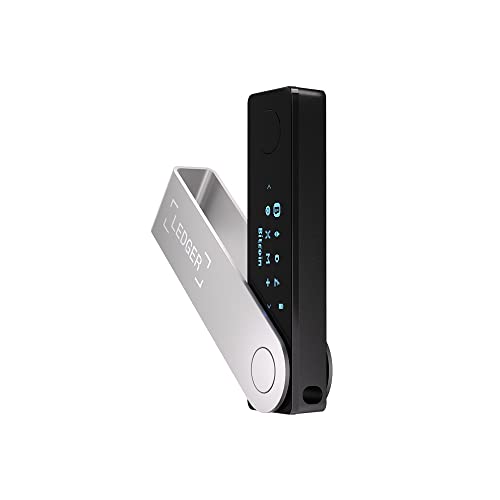
The Ledger Nano X provides mobile-friendly access with Bluetooth and a secure, offline storage design. It supports a broad range of blockchains through the Ledger Wallet app, enabling actions like buy, sell, send, receive, swap, and stake all in one dashboard. Best for users who want on-the-go management and real-time market tracking in a single interface.
Best for: Buyers who want seamless mobile use and a wide coin portfolio in one place. Better for those who value convenience and cloud-like portfolio management without sacrificing security. Caution: Bluetooth connectivity introduces an additional potential risk vector, so ensure device security and regular firmware updates.
TANGEM Crypto Wallet Pack of 2 – Trusted Cold Storage Hardware Wallet

TANGEM Pack of 2 emphasizes offline, card-based storage with no cables, batteries, or setup. It supports access to 14,100+ coins and tokens and can serve as backup keys with end-to-end encryption. This option is ideal for users seeking durable cold storage and simple backup recovery across multiple blockchains.
Best for: Those who want a robust, cable-free, offline approach and easy backup strategy. Choose this if you favor a card-based solution that minimizes online exposure. Caution: Management relies on a smartphone app; ensure you keep both cards secure to avoid loss of access.
Trezor Safe 5 – Crypto Hardware Wallet

Trezor Safe 5 combines a secure element with a color touchscreen and haptic feedback for precise, on-device confirmations. It’s designed for straightforward navigation while maintaining high security across thousands of coins and tokens. Best for users who want a tactile, intuitive interface along with strong cryptographic protections.
Best for: Buyers who prioritize a high-security device with an easy-to-use display. Avoid this if you prefer a small form factor or minimal on-device interaction.
Trezor Safe 7 – Crypto Hardware Wallet

Trezor Safe 7 introduces dual-chip architecture with a quantum-ready design and a high-resolution touchscreen. This combination aims to deliver transparent defense against physical attacks and a richer user experience for transaction reviews. Best for advanced users seeking top-tier security features and future-proofing against emerging threats.
Best for: Power users who require best-in-class security with future-ready protections. Caution: Higher complexity may demand more time to learn and configure properly.
Buying Guide
What security level do you need?
- Secure Element: Look for devices with a certified secure element (EAL6+). It adds an extra layer of protection for private keys.
- Authentication features: Passphrase support and multi-factor options improve resilience against theft or loss.
How important is ease of use?
- Color touchscreen and intuitive interfaces help reduce setup mistakes and improve on-device confirmations.
- Card-based or USB-only devices may appeal to different comfort levels with technology.
What about connectivity?
- Bluetooth enables mobile use but may introduce additional attack vectors; weigh convenience against risk.
- USB-C or USB-A connections are typically more standalone and offline-friendly.
Which wallets support my coins?
- Check the list of supported coins and tokens; some wallets cover thousands of assets while others excel with primary chains like Bitcoin and Ethereum.
- Consider DeFi, staking, NFTs, and cross-chain compatibility if you engage in advanced activities.
What is backup and recovery like?
- Backup options vary: seed phrases, backup cards, or secure backends. Opt for a solution with straightforward recovery in case of loss or theft.
- Smart backups across devices (like Tangem) can minimize the chance of losing access when a single card is lost.
FAQ
- Q: Do hardware wallets support all cryptocurrencies?
- A: Most support thousands of coins and tokens, but always verify specific asset compatibility for your portfolio.
- Q: Is Bluetooth on wallets safe?
- A: Bluetooth adds convenience but requires careful device and firmware hygiene to minimize risk.
- Q: Can I use a hardware wallet with mobile devices?
- A: Some models support mobile apps or Bluetooth; others are USB-only. Check compatibility before buying.
- Q: What happens if I lose my wallet?
- A: Recovery typically relies on backup keys or seed phrases; ensure you have secure, accessible backups.
- Q: Are all wallets easy for beginners?
- A: Some models emphasize simplicity (color screen, guided setup), while others target experienced users with advanced features.
- Q: Do these wallets require internet access?
- A: Hardware wallets operate offline for key storage; some features (like transactions) require connection to a connected app or device.