Looking for a reliable SATA hard drive to expand storage, upgrade a desktop, or outfit a NAS? This guide highlights five solid options in various capacities and use cases. Each product is described with who it’s best for, why it stands out, and any notable limitations. This makes it easier to compare performance, capacity, and value for tasks like bulk storage, media libraries, backups, or server-grade workloads.
| Product | Capacity | Best For | Key Benefit |
|---|---|---|---|
| Seagate 8TB BarraCuda Internal Hard Drive | 8 TB | Power users and gaming desktops | High capacity with proven BarraCuda reliability |
| WD Blue 10TB Internal Hard Drive | 10 TB | Bulk data storage and media libraries | Large capacity with dependable WD performance |
| WD Blue 1TB PC Internal Hard Drive | 1 TB | Everyday computing | Balanced speed and price for standard PCs |
| Seagate ST2000NM0055 Enterprise 2TB (Renewed) | 2 TB | Servers and RAID arrays | Enterprise-class design in a renew model |
| Hitachi Ultrastar 4TB 3.5″ (Renewed) | 4 TB | NAS and backup storage | High-density drive for reliable heavy workloads |
Seagate 8TB BarraCuda Internal Hard Drive

Best for: Desktop builders and gamers who need ample space with reliable performance. Why selected: BarraCuda drives are a go-to for general-purpose storage with strong reliability and a wide range of capacities. The 8 TB model provides substantial capacity for games, media libraries, and desktop applications. Consider this if you want a single, high-capacity drive for everyday PC workloads needing sustained throughput near 190 MB/s. Limitation: Not a purpose-built enterprise drive; workload-intensive servers may benefit from higher endurance tiers.
Toshiba 1TB Notebook Hard Drive (MQ01ABD100V) with 5400 RPM

Best for: Upgrading an older notebook or compact PC with extra portable storage. Why selected: 1 TB capacity with 5400 RPM offers cost-effective, power-efficient storage for notebooks. Best for everyday computing tasks and media libraries on laptops with limited bays. Limitation: 2.5″ form factor and 9.5 mm height may constrain compatibility in thinner ultrabooks or newer slim laptops.
WD Blue 10TB Internal Hard Drive (WD100EAGZ)

Best for: Home or small business desktops needing large, dependable storage. Why selected: WD Blue offers reliable performance and a reputable track record. The 10 TB capacity helps consolidate media collections and backups. Limitation: 3.5″ form factor may not fit in compact builds without appropriate bay space and power connectors.
Seagate ST2000NM0055 Enterprise 2TB (Renewed)

Best for: Enterprise storage, server, or RAID environments on a budget. Why selected: Enterprise-class design in a renewed offering provides high-capacity per drive with robust SATA 6 Gb/s performance. Limitation: Renewed status implies potential variability in wear; verify warranty/return terms. Choose this if you need a cost-conscious option for bulk storage and reliability in larger storage arrays.
Hitachi Ultrastar 4TB 3.5″ Internal Hard Drive (Renewed)
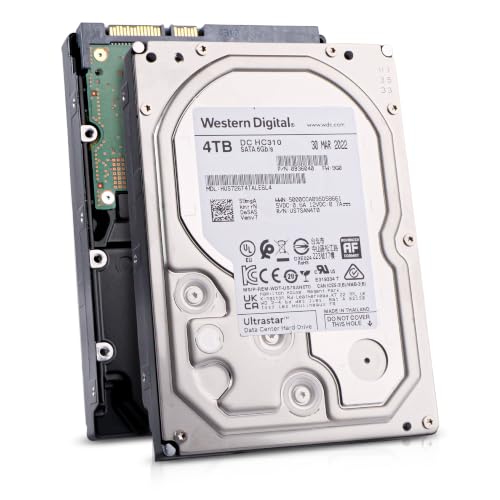
Best for: NAS, backup storage, and small business servers needing stable, high-capacity drives. Why selected: Ultrastar drives are designed for demanding workloads and long lifespans, making 4 TB a strong density choice. Limitation: Renewed status means inspection variances; ensure compatible server/RAID controllers and confirm warranty terms. Choose this if you require enterprise-style reliability in a renewed package.
Buying Guide: Key Purchase Considerations
What capacity do you need? Choose based on current data growth and anticipated expansion. For media libraries or backups, higher capacities like 8–10 TB reduce the number of drives needed.
What workload will you run? Desktop applications and gaming typically benefit from large caches and steady sequential throughput. Enterprise-grade drives suit servers with sustained heavy workloads.
What is your form factor? Desktop 3.5″ drives fit most towers; laptop 2.5″ drives fit notebooks or compact enclosures. Ensure you have the right bay space and connector principles.
Renewed versus new. Renewed drives offer cost savings but may have varied wear. Check warranty terms and return policies before purchase.
Reliability and warranty. Look for established brands with a history of consistent performance. Consider warranty length and data recovery options when selecting drives for critical data.
Cache and speed. Larger caches (e.g., 64 MB or more) help with burst transfers and responsive performance in multi-tasking scenarios.
Frequently Asked Questions
- What is the difference between SATA 3.0Gb/s and 6.0Gb/s? SATA 6.0Gb/s offers higher theoretical data transfer speeds than SATA 3.0Gb/s, improving throughput in modern systems.
- Are renewals reliable for servers? Renewed drives can be suitable for non-critical servers or backups, but they may carry higher risk of early failure; check warranty terms and monitor SMART data.
- Is 3.5″ better than 2.5″ drives for desktops? Yes, 3.5″ drives typically offer higher capacities and better cost per gigabyte for desktops, with adequate power supplies and space.
- Should I use multiple drives or a single large drive? Multiple drives enable RAID configurations, redundancy, and parallel performance; a single large drive minimizes physical space but offers less fault tolerance.
- What should I consider when buying for NAS? Look for drives designed for continuous operation, good MTBF, and compatibility with your NAS model; larger capacities help consolidate storage pools.
- Do I need a warranty for hard drives? A warranty protects against defects and helps with replacement; for critical data, pair drives with backups and a disaster-recovery plan.