If you’re starting out in scuba or freediving, a reliable dive computer makes the difference between planning confusion and safer, more enjoyable dives. This guide highlights beginner-friendly models that balance intuitive controls, clear displays, and essential safety features. Ideal buyers include new divers seeking easy mode switching, robust alarms, and readable screens. Below is a quick comparison of five solid choices to help you pick with confidence.
| Product | Best For | Key Benefit |
|---|---|---|
| Cressi Leonardo 2.0 (Black/Blue) | Novice divers who want simple navigation | Single-button operation with Air/Nitrox/Gauge modes |
| Cressi Leonardo 2.0 (White/Black) | Budget-conscious beginners who prefer backlit display | Same easy controls, strong readability |
| Garmin Descent X30 | Tech-forward beginners needing large data display | 2.4″ color display and surface GPS |
| Mares Puck Pro Ultra | Beginner divers who value clear visuals | High-contrast screen with Nitrox support |
| Suunto Zoop Novo | New divers seeking versatile modes | Air/Nitrox/Gauge modes with audible alarms |
Cressi Leonardo 2.0 Dive Computer – Black/Blue

Product overview: The Leonardo 2.0 offers straightforward dive management with a single-button interface. It supports Air, Nitrox, and Gauge modes, making it a versatile choice for beginners who want simple operation without sacrificing safety data. The device allows FO2 adjustments from 21% to 50% and PO2 from 1.2 to 1.6 bar, helping new divers tailor dives to comfort and capability.
Who it’s best for: Best for new divers who value a familiar, watch-style form factor and reliable backlit readability. The emphasis on three conservatism levels and clear audible alarms aids learning and confidence under real-world diving conditions.
Why selected: This model balances an intuitive, one-button UI with essential customization and safety indicators, reducing the learning curve for first-time users.
Caution: While feature-rich, the Leonardo 2.0 relies on its own internal display metrics. Users should confirm compatibility with their local diving environment and practice in shallow dives before deeper testing.
Cressi Leonardo 2.0 Dive Computer – White/Black

Product overview: This variant mirrors the Black/Blue model with the same intuitive controls and safety features, now available in a white/black aesthetic for visibility and style preference. It supports Air, Nitrox, and Gauge modes with customizable FO2 and PO2 values, plus CNS toxicity indicators and audible alarms for underwater safety awareness.
Who it’s best for: Ideal for beginners who prefer a lighter color option for visibility in bright shallow dives or those who like a distinct gear look while learning.
Why selected: The White/Black option offers the same dependable performance as the Black/Blue, ensuring consistent, easy-to-learn operation across variants.
Caution: Screen readability can vary in extremely bright conditions; use the backlight feature in daylight to maintain clarity.
Garmin Descent X30 Dive Computer
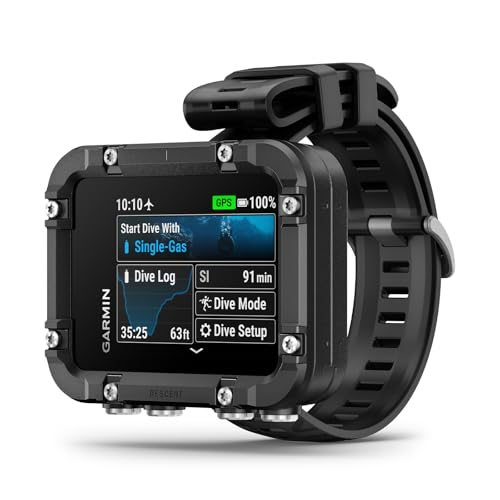
Product overview: The Descent X30 features a 2.4-inch color display and a rugged build using recycled ocean-bound plastics. It supports scuba single- and multi-gas profiles, including trimix, and offers multiple customizable data fields per page for rapid access to critical information during dives.
Who it’s best for: Best for tech-minded beginners who want a larger, highly legible screen and the option to customize data views for quick reference.
Why selected: Its large display and flexible screen customization help new divers learn data interpretation faster, reducing cognitive load during dives.
Caution: The larger size may be less comfortable for smaller wrists; consider fit when selecting a model for daily wear.
Mares Puck Pro Ultra Dive Computer

Product overview: The Puck Pro Ultra delivers a high-contrast screen with Nitrox compatibility from 21% to 50%. It uses a robust decompression algorithm to support safe ascent planning and features a straightforward interface that is accessible to beginners.
Who it’s best for: Choose this if you want a readable display and reliable gas options without extra bells and whistles that complicate learning.
Why selected: The Puck Pro Ultra emphasizes readability and dependable gas management, making it a practical step-up for learners expanding into Nitrox diving.
Caution: While versatile, it may lack some advanced multi-gas features found on higher-end models; assess if you plan to dive into complex gas mixes.
Suunto Zoop Novo Wrist Scuba Diving Computer

Product overview: The Zoop Novo offers multiple operating modes (Air, Nitrox, Gauge) with programmable oxygen mix settings from 21% to 50%, plus decompression stop data and audible alarms for safety under water. It supports both imperial and metric units for ease of use in different regions.
Who it’s best for: A solid option for beginners who want a traditional, reliable interface with flexible unit settings and strong alarms to guide dives.
Why selected: The Zoop Novo provides familiar controls with essential safety features, making it approachable for new divers transitioning to independent dive planning.
Caution: The display may appear smaller on some wrists; verify comfort and readability during practice dives.
Buying Guide
How to choose a beginner-friendly dive computer
- Display readability: Look for a large, high-contrast screen and backlight options to ensure data is legible underwater, especially in low-light conditions.
- Mode coverage: Ensure the device supports Air, Nitrox (with adjustable FO2), and a Gauge mode for practice and safety drills.
- Conservatism and alarms: Choose models offering adjustable conservatism levels and audible alerts to help you learn safe ascent profiles.
- Ease of use: Favor a simple interface (ideally single-button or minimal menu layers) to reduce cognitive load during dives.
- Display customization: The ability to tailor data fields per page helps you focus on essential metrics as you grow more confident.
- Durability and fit: Consider wrist size, wearability, and water resistance ratings appropriate for your diving environment.
Frequently Asked Questions
- What is the best dive computer for a complete beginner?
– A model with clear readouts, simple controls, and reliable alarms, like the Cressi Leonardo 2.0 variants, is well-suited for beginners. - Should I choose Nitrox-capable devices as a starter?
– Yes, if you plan to dive Nitrox at any point; many beginner models offer adjustable FO2 to acclimate safely. - Do beginner computers support multiple gas mixes?
– Some do (including Nitrox and gauge modes); advanced multi-gas features may appear in mid-range models. - Is a larger display better for learning?
– Generally, yes; larger displays improve readability and reduce mistakes when interpreting data underwater. - Are wrist computers better than console units for learning?
– Wrist computers are typically more convenient for everyday use and learning, but choose based on comfort and visibility. - What maintenance is required for these devices?
– Regular battery checks, proper rinsing after dives, and replacing seals as recommended by the manufacturer help maintain accuracy and longevity.