Find the ideal point-of-sale (POS) setup for bar environments with fast transactions, durable hardware, and reliable software. This guide highlights top choices designed for bars, focusing on speed, ease of use, and cash handling. Ideal buyers include: bar owners needing quick-order flow and robust cash drawers; managers seeking integrated printers and bar-specific software; and operators looking for flexible hardware that coordinates with existing devices.
| Product | Best For | Key Benefit |
|---|---|---|
| Touch Screen Computer Point of Sale POS System for Restaurant Bar Full Package | Small to mid-sized bars | All-in-one with built-in software and cash drawer |
| 19″ Touch Screen Computer POS System for Restaurant or Bar Full Package | Busy bars with menus and orders | Larger display with complete package |
| MUNBYN 12-inch POS Touchscreen Monitor | Customizable setups | Flexible ports and no built-in OS |
| ZHONGJI A3POS System for Restaurants Bar | Restaurants and bars needing strong hardware | Integrated printer, drawer, and software |
| Clover Station Duo | US-based bars with two-user workflows | Dual screens for staff and guests |
Touch Screen Computer POS System For Bar Full Package

This all-in-one POS includes a 17-inch touch screen, built-in POS software, and a cash drawer. Best for small to mid-sized bars that want a turnkey system with minimal setup. The large display supports quick navigation during busy hours. A potential limitation is that the system’s software and hardware are sold as a single package, which may limit customization.
19″ Touch Screen POS System For Restaurant Or Bar Full Package

Opt for this model when a larger 19-inch display helps staff manage tables, orders, and payments swiftly. It includes a complete POS controller and software, plus a cash drawer. Choose this for higher-traffic bars where screen real estate improves order accuracy and speed. Limitation: Size may require more counter space.
MUNBYN 12-inch POS Touchscreen Monitor

This monitor offers flexible integration with existing mini PCs or laptops and supports Windows 10/11 with ten-point multi-touch. It’s best for bars that want to pair a separate display with their own computer. Limitation: No built-in operating system means extra setup is required.
ZHONGJI A3POS System For Restaurants Bar
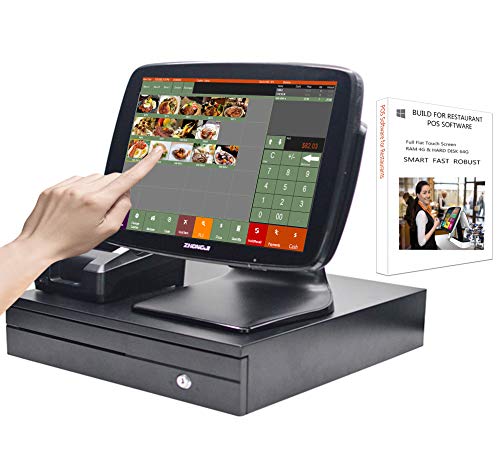
Designed as a full package for bars and restaurants, this system combines a 15-inch touch screen, thermal printer, cash drawer, and MSJ POS software. It’s suitable for operators seeking an all-in-one solution with robust hardware. Caution: The bundle may require compatible peripherals and setup to fully utilize the software suite.
Clover Station Duo

This two-screen system supports staff and guest interaction with a 14″ display for staff and an 8″ screen for customers. It’s best for US-based bars that require a dual-display workflow and integrated software with a cash drawer. Limitation: Processor and merchant account setup are required to operate with Powering POS.
HNBYLMM Cash Register With POS System

All-in-one design with a 15.6-inch touch screen, built-in 58mm receipt printer, and a dual-core i5 CPU. Best for small businesses needing a compact, self-contained POS with an integrated printer. Limitation: System language support and software compatibility may vary by region.
ZHONGJI Cash Register With Built-in Printer

Includes a built-in 58mm thermal printer, cash drawer, and MSJ POS software for billing and order management. Best for bars needing a traditional register feel with modern software. Caution: The bundled software may require verification for your specific business type (restaurant vs. retail).
MUNBYN 15-inch POS Touch Screen Monitor

This true-flat, seamless monitor pairs with a host computer and supports HDMI/VGA. Best for bars that want a clean, professional display without a built-in OS. Suitable for varied Windows environments. Limitation: Requires a compatible host PC and OS to operate effectively.
Buying Guide: Key Considerations for Bar POS Systems
- Hardware durability: Bars demand rugged hardware, splash resistance, and stable stands to endure busy shifts.
- Display size: Larger screens improve speed for crowded bars; smaller screens save counter space while staying functional.
- Software integration: Look for MSR-friendly software, loyalty, and order management features aligned with bar workflows.
- Cash handling: Ensure a secure, reliable cash drawer and printer combination that matches daily cash flow needs.
- Connectivity: Choose POS solutions with flexible ports (HDMI, VGA, USB) to fit existing devices.
- Setup flexibility: Systems without built-in OS offer customization but require compatible host devices.
- Expansion potential: Consider future needs like kitchen printers or additional tablets for servers or bartenders.
- Support and updates: Verify available software updates and vendor support for hospitality environments.
Frequently Asked Questions
- What features are most important for a bar POS?
Key features include fast transaction processing, durability, cash drawer integration, kitchen/printer connectivity, and easy staff use. - Should I choose an all-in-one system or a modular setup?
All-in-one systems offer quick setup; modular setups provide higher customization to fit existing hardware. - Is a larger display better for a bar?
Yes, a larger display can speed orders during rush hours, but it requires more counter space. - Do these POS systems require ongoing software subscriptions?
Some systems include built-in software; others rely on third-party software or Windows-based options that may require licenses. - Can I reuse existing devices with these POS systems?
Some monitors support integration with your own PC or tablet, offering flexible reuse of equipment you already own. - What about support for multiple payment methods?
Most bar POS setups support various payment methods; verify compatibility with your payment processor during procurement.