When you need to restore lost or accidentally deleted files, this guide highlights effective deleted-file recovery software options. Best for individuals needing quick, straightforward recovery, professionals recovering business documents, and photographers restoring memories. Below you’ll find five carefully selected tools, each with clear benefits and practical limitations. A quick summary table follows to help compare core capabilities at a glance.
| Product | Platform | Best For | Notes |
|---|---|---|---|
| Data Recovery software compatible with Windows 11, 10, 8.1, 7 | Windows | General file recovery on PC | Good all-around option for various file types |
| Data Recovery Stick for Windows | Windows | Users seeking a plug-and-play recovery starter | Requires minimal setup; supports many formats |
| Stellar Data Recovery Professional for Windows | Windows | Comprehensive recovery across devices | Broad file-type support and external drive recovery |
| Advanced File Recovery by Systweak | Windows | Recovering from multiple external devices | Strong on lost and deleted file recovery |
| Stellar Data Recovery Professional for Mac | Mac | Mac-specific data restoration | Mac-first tools and bootable media support |
Data Recovery Software for Windows – All-Liles Recovery

Brand: Markt + Technik. Features include retrieving lost files, easily recovering documents, audios, videos, photos, and emails, plus rescuing data deleted from the recycling bin. This option is best for Windows users who want a straightforward tool to recover a wide range of file types after accidental deletion or bin emptying. A potential limitation is that it may not offer advanced recovery scenarios or bootable media in its base version.
Data Recovery Stick for Windows
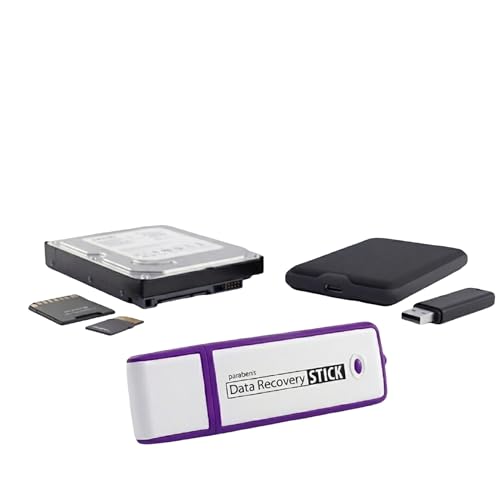
Brand: Paraben Consumer Software. This USB-stick style recovery tool requires no technical skills—just plug in, start, and scan. It supports Windows Vista through 11 and retrieves many common file types, including photos, Office documents, PDFs, music, and more. It works across hard drives, USB drives, SD cards, and other storage formats using FAT or NTFS. Caution: a media reader is required for micro SD cards and certain mass storage devices. Best for: casual users needing quick, on-hand recovery without software installation.
Stellar Data Recovery Professional for Windows

Brand: Stellar. This professional-grade Windows tool can recover nearly every file type from PCs and external drives, including HDDs, SSDs, USBs, and optical media. It supports extensive data-loss scenarios such as corruption, missing partitions, and formatting, and can handle NTFS, FAT variants, and exFAT. Best for: users needing broad format support and the ability to recover from multiple storage devices. Limitation: may be more feature-rich than necessary for casual users.
Advanced File Recovery by Systweak

Brand: Systweak. This tool recovers deleted files, photos, documents, audio, and videos from PCs and external devices such as hard drives, USBs, and SD cards. It helps restore files from formatted or crashed drives and supports various file formats. Best for: users who need a solid, all-purpose recovery solution across multiple devices. Caution: interface clarity and advanced options may vary by version, so review the feature list before purchasing.
Stellar Data Recovery Professional for Mac

Brand: Stellar. This Mac-centric version offers safe and fast recovery for a wide range of Mac systems and storage drives. Features include bootable media creation, drive monitoring, HDD cloning, and pause/resume scanning. It can recover permanently deleted files from emptied trash and supports non-booting or crashed Macs via a bootable recovery drive. Best for: Mac users needing robust recovery with recovery-from-boot options. Limitation: Mac-focused feature set may be less intuitive for Windows-only users.
Buying Guide
What should you consider when choosing deleted-file recovery software?
- Platform compatibility: Ensure the tool supports your operating system (Windows or macOS) and the storage devices you use (HDD, SSD, USB, SD cards).
- File-type coverage: Look for broad support for documents, photos, videos, emails, and archives, plus any specific formats you rely on.
- Scan depth and speed: Consider whether the software offers quick scans for common recoveries and deep scans for more challenging cases, such as formatted drives.
- Bootable recovery: For non-booting systems, a bootable recovery option can be crucial to retrieve data from the startup disk.
- User skill level: Plug-and-play options suit casual users; more advanced tools suit IT professionals needing granular control.
- External device recovery: If you frequently work with cameras, USBs, or memory cards, verify recovery performance on those media.
- Data integrity safeguards: Look for features like file previews, selective restoration, and integrity checks to avoid overwriting data.
Which tool is best for which user?
- Best for Windows beginners: Data Recovery Stick for Windows or the Markt + Technik option for straightforward recovery on PC.
- Best for Windows professionals: Stellar Data Recovery Professional for Windows, with broad device support and robust formats.
- Best Mac-focused recovery: Stellar Data Recovery Professional for Mac, especially if bootable media and Mac-specific workflows matter.
- Best all-around recovery on multiple devices: Advanced File Recovery by Systweak offers solid coverage across drives and external media.
Frequently Asked Questions
- Q: Do these tools recover overwritten files? A: Most data recovery tools can recover files deleted or lost due to formatting, partition loss, or corruption, but once data is overwritten, recovery becomes unlikely.
- Q: Can I recover data from a crashed drive? A: Yes, several tools support scanning crashed or non-booting drives, especially with bootable recovery options.
- Q: Is bootable media necessary for Mac recovery? A: It can be beneficial for non-booting Macs or when the OS cannot start, enabling recovery from the startup disk.
- Q: Do these tools restore all file types? A: Most listed products cover a wide range of formats—check the specific file-type list if you rely on rare formats.
- Q: Can I preview files before restoring? A: Many tools offer file previews to confirm items before recovery, reducing the risk of restoring unwanted data.
- Q: Are there any limitations to try-before-you-buy versions? A: Some products offer trial scans with limited restoration; verify what the trial includes before purchasing.