The best budget power supplies deliver steady power, solid efficiency, and essential protection without breaking the bank. This guide highlights five cost-conscious options that suit budget-conscious buyers building standard office PCs, multimedia rigs, or entry-level gaming systems. Each option targets a different use case: compact office builds, mid-range gaming, or upgrade-ready systems. The following table summarizes the top picks and their core strengths.
| Product | Brand | Watt | Notable Feature |
|---|---|---|---|
| Thermaltake Smart 500W | Thermaltake | 500W | Active PFC, 80+ White |
| Thermaltake Smart 600W | Thermaltake | 600W | 80+ Certified, compact cooling |
| ARESGAME AGV 500W | ARESGAME | 500W | 80+ Bronze, 5-year warranty |
| Apevia Venus 500W | Apevia | 500W | All protections, auto-therm 120mm fan |
| Apevia Spirit 600W | Apevia | 600W | 120mm fan, full connectors |
Thermaltake Smart 500W 80+ White PSU

Powerful yet affordable, the Thermaltake Smart 500W delivers continuous 500 watts suitable for budget builds. It adheres to ATX 12V 2.31/EPS 12V 2.92 standards and carries 80 PLUS certification with typical-load efficiency around 80%. The Active PFC helps stabilize power delivery for basic systems. Best for small office PCs or entry-level gaming rigs with modest GPU needs.
Who it’s best for: compact desktops, budget gaming PCs, or upgrades that require stable 500W power without overprovisioning. Why selected: reliable basic efficiency, widely compatible connectors, and a quiet 120mm cooling fan help keep both cost and noise in check.
Caution: not ideal for systems with power-hungry GPUs or future-proof multi-GPU configurations due to its 500W rating and single 12V rail assumptions.
Thermaltake SMART 600W ATX PSU

This 600W Thermaltake model offers continuous output with similar reliability to the 500W variant but with extra headroom for mid-range builds. It respects ATX 12V 2.31/EPS 12V 2.92 standards and provides 80 PLUS certification for respectable efficiency. The 120mm fan and Active PFC contribute to quieter operation during gaming or heavier workloads.
Who it’s best for: users planning modest GPU upgrades or mid-range gaming setups that require more than 500W. Why selected: extra wattage without drastic price increase, good thermal design, and balanced efficiency.
Caution: still not ideal for high-end GPUs or power-hungry configurations that push beyond 600W under load.
ARESGAME AGV Series 500W

The ARESGAME AGV 500W is an 80 PLUS Bronze certified unit offering solid efficiency and essential protections. With 500W continuous output and a 5-year warranty, it aims to balance price and reliability for budget builds. It also includes heavy protective features such as overvoltage and short-circuit protection.
Who it’s best for: budget-conscious builders seeking a Bronze-rated PSU with a longer warranty. Why selected: reliable protection features and reasonable efficiency for everyday computing or light gaming.
Caution: Bronze certification means efficiency is good, but not as high as Gold-rated units under all loads; expect modest heat under sustained gaming sessions.
Apevia Venus 500W

The Apevia Venus 500W provides a versatile set of connectors and an auto-thermally controlled 120mm fan for practical system builds. It supplies 500W continuous power and includes a broad range of connectors (SATA, PCIe, Molex) for flexibility in component combinations.
Who it’s best for: mid-range office builds or compact gaming rigs needing a robust set of connectors at a reasonable price. Why selected: good connector variety and active cooling for reliable operation.
Caution: non-modular design means more cable management effort and potential clutter in smaller cases.
Apevia Spirit 600W
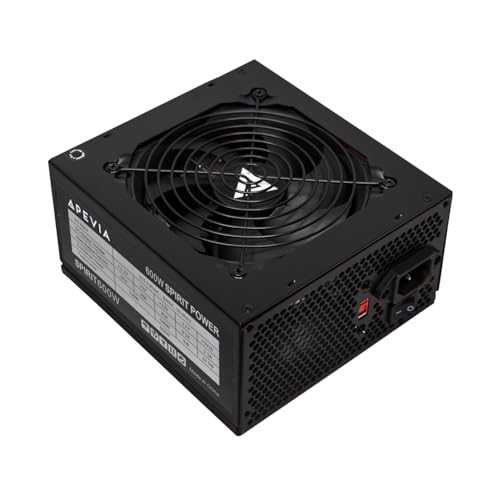
The Apevia Spirit 600W is a 600W ATX supply designed for gaming or multi-component systems. It includes a 120mm auto-thermally controlled fan and multiple connectors to support a range of builds, including GPUs that demand higher 12V current. It’s suitable where headroom and cooling quality matter.
Who it’s best for: budget-conscious gamers or workstations needing more stable power than a basic 500W unit. Why selected: stronger 12V output and robust airflow help maintain performance under load.
Caution: non-modular design may lead to cable clutter; plan cable routing accordingly.
Buying Guide
What Wattage Do You Really Need?
Choose wattage based on your total system draw. For typical budget builds with a mid-range GPU, 500–600W is usually sufficient. For upgrade-ready rigs or future GPU additions, consider 600–700W to provide headroom.
80 PLUS Certification Level
80 PLUS Bronze or Gold indicates better efficiency than basic 80+ White. Higher efficiency reduces heat and electricity use, contributing to quieter operation over time. If you expect long gaming sessions or higher workloads, a Bronze or Gold unit is wise.
Modularity And Cable Management
Modular or semi-modular designs simplify cable management, especially in smaller cases. If you value a clean build and airflow, prefer a modular unit even on a budget.
Protection Features
Look for over-voltage, short-circuit, over-current, and over-temperature protections. These guard both components and the PSU itself, reducing risk during power spikes or component faults.
Compatibility And Connectors
Ensure the PSU provides the necessary PCIe, SATA, and CPU power connectors for your build. Budget units typically include standard 24-pin, 4+4 CPU, and at least one PCIe connector; verify beyond the basics if you plan multiple drives or GPUs.
Cooling And Noise
A 120mm fan is common in budget models and helps maintain lower temperatures. Units with better fan profiles or lower idle noise are preferable for quiet setups, particularly in living spaces or bedrooms.
Reliability And Warranty
Budget power supplies vary in warranty length. A longer warranty often correlates with greater confidence in durability. Review warranty terms and what’s covered when evaluating options.
Practical Buying Tips
- Match wattage to your system’s peak draw, not just the GPU’s needs.
- Avoid overly long cables in compact cases; consider shorter, tidy routing.
- Prioritize units with solid protection features and reputable brands within budget ranges.
FAQ
- What is a budget power supply best for?
Best for entry-level builds, basic office PCs, or budget gaming rigs needing reliable power without premium features.
- Is 500W enough for gaming PCs?
Often yes for builds with mid-range GPUs and non-enthusiast CPUs. If planning upgrade paths or high-end GPUs, 600W or more is safer.
- Should I choose modular or non-modular on a budget?
Modular improves cable management and airflow but usually costs more. If budget allows, pick modular; otherwise, plan cable routing carefully.
- What does 80 PLUS Bronze vs. Gold mean for my bill?
Bronze and Gold indicate higher efficiency. Gold typically wastes less energy, produces less heat, and can reduce operating costs over time.
- How long should a budget PSU last?
Well-made budget PSUs can last several years with proper cooling and modest workloads. Warranty length commonly reflects expected durability.