Looking for a reliable Bluetooth keyboard and mouse combo? This guide covers top options that pair quickly, stay comfortable during long use, and work across multiple devices. Ideal buyers: students needing portability, remote workers seeking quiet typing, and multi-device users who switch between Windows and macOS. Below, you’ll find five dependable picks with clear pros, best-use cases, and practical cautions. A quick buying table helps you compare key traits at a glance.
| Product | Connectivity | Best For | Notes |
|---|---|---|---|
| Logitech MK250 Graphite | Bluetooth | Casual writers, home offices | Long battery life |
| Logitech MK270 Black | 2.4 GHz USB receiver | Reliable, plug-and-play users | Full-size layout with number pad |
| seenda COE200 | Bluetooth & 2.4G USB | Hybrid multi-device users | Wide OS compatibility |
| Logitech MK250 Rose | Bluetooth | Style-conscious writers | Same core features as graphite variant |
| Logitech MK345 Black | 2.4 GHz wireless | Home/office multitaskers | Full-size with palm rest |
Logitech MK250 Wireless Bluetooth Keyboard and Mouse Combo – Graphite

The MK250 Graphite offers fast Bluetooth pairing without dongles, making it a convenient pick for budget-conscious buyers who want simplicity. Best for light to moderate typing tasks and everyday browsing. The design emphasizes durability with spill resistance and a battery-friendly keyboard that lasts up to 12 months under typical use. The layout favors comfortable typing with deep-profile keys and an adjustable tilt, suitable for home offices, dorm rooms, and shared desks. A limitation is that the combo relies on Bluetooth compatibility; if your device lacks Bluetooth, consider an alternative or adapter.
Who it’s best for: Students, casual home offices, and first-time Bluetooth keyboard shoppers who prioritize quick setup and reliability over advanced features.
Logitech MK270 Full Size Wireless Keyboard and Mouse Combo – Black

This full-size combo uses a reliable 2.4 GHz USB receiver for a steady connection up to 33 feet. It suits buyers who want a traditional keyboard layout with full-size keys, a number pad, and quiet typing. The spill-resistant keyboard and sturdy tilt legs contribute to long-term comfort during longer work sessions. Best for desktop setups or home offices where a stable connection and familiar keyboard feel are priorities. Note: It uses a USB receiver rather than Bluetooth, so device compatibility should be considered if USB ports are limited.
Who it’s best for: Home office users who value plug-and-play simplicity and a classic full-size keyboard with a reliable wireless link.
seenda COE200 Wireless Bluetooth Keyboard and Mouse Combo with Wrist Rest

The COE200 stands out with dual connectivity: Bluetooth 5.0 and a 2.4G USB receiver, plus a spacious wrist rest for comfort. It supports a broad range of operating systems, including Windows, macOS, iPadOS, and Android, which makes it a versatile choice for mixed-device households or students with multiple devices. The ability to pair with two Bluetooth devices plus a USB receiver helps manage multi-device workflows. Caution: Bluetooth 4.0 compatibility and platform-specific quirks may affect setup on older devices.
Who it’s best for: Hybrid users who switch between Windows and Mac, or students managing school and personal devices across platforms.
Logitech MK250 Compact Wireless Bluetooth Keyboard and Mouse Combo – Rose
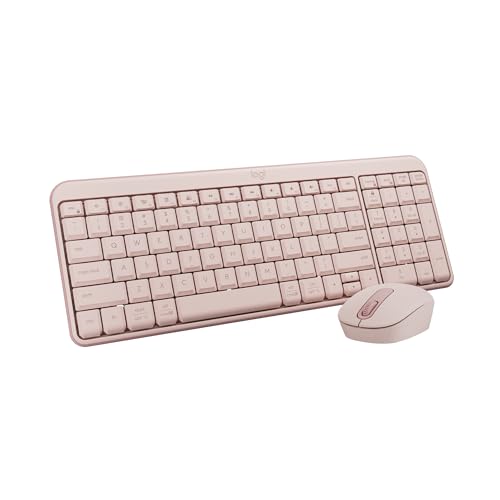
This Rose variant mirrors the Graphite MK250 in core features: quick Bluetooth pairing, spill-resistant keys, and a long-lasting battery. The compact form factor suits smaller desks or portable use while keeping a comfortable typing experience. Best for individuals who want the same reliability as the graphite model but prefer a color accent for style. Limitation: both MK250 variants share similar performance, so choose color primarily for aesthetics rather than functionality.
Who it’s best for: Style-conscious buyers prioritizing a compact setup without sacrificing reliability.
Logitech MK345 Full Size Wireless Keyboard and Mouse Combo – Black

The MK345 uses a 2.4 GHz wireless connection with a comfortable full-size layout and built-in palm rest. It’s designed for steady, all-day typing and easy navigation with accessible media keys. This combo is well-suited for home offices and workplaces where a robust, distraction-free setup is desired. Best for users who prefer a traditional desk keyboard with a dependable wireless signal and multi-OS compatibility. Caution: 2.4 GHz connectivity may be susceptible to interference in crowded wireless environments.
Who it’s best for: Office workers and students who value a quiet, full-size keyboard with convenient media controls and a sturdy palm rest.
Buying Guide: Key Considerations For Your Bluetooth Keyboard And Mouse
- Connectivity options: Bluetooth only vs. 2.4 GHz USB receivers. Bluetooth offers device-wide pairing and multi-device switching; USB receivers can provide a very stable connection in busy wireless spaces.
- Device compatibility: Check OS support (Windows, macOS, ChromeOS, iPadOS/Android). Some combos offer dual-mode (Bluetooth and USB) to maximize compatibility.
- Layout and comfort: Full-size keyboards with palm rests and adjustable tilt reduce fatigue; compact variants save desk space but may sacrifice a number pad or extra keys.
- Durability features: Spill-resistant keyboards and sturdy key caps extend lifespan in busy workspaces or shared desks.
- Battery life: Long-lasting keyboard batteries reduce maintenance. Consider models with energy-efficient keys and auto-sleep features.
- Multi-device support: For hybrid setups, look for options that allow easy switching between devices and operating systems without relearning layouts.
- Portability: If you travel or study in different locations, lightweight builds and compact footprints help.
Common Scenarios And Recommendations
- Small desk or student setup: Logitech MK250 Graphite or Rose provide reliability with compact footprints.
- Home office with Windows and Mac: seenda COE200 or seenda SKM64-3 offer dual connectivity and cross-OS layouts.
- Desks that prioritize comfort during long sessions: MK345 Black and MK850 provide palm rests and multi-device switching.
FAQ
- Q: Do these combos work with Chromebooks?
A: Yes, many support ChromeOS via Bluetooth or 2.4 GHz USB receivers, but verify the specific product’s OS compatibility. - Q: Is Bluetooth connection slower or less reliable than a USB receiver?
A: Not inherently; Bluetooth offers flexibility for multi-device setups, while USB receivers can be more stable in crowded wireless environments. - Q: Can I pair the same keyboard with multiple devices at once?
A: Some models allow multi-device pairing and quick switching, but check the product’s pairing features for the exact workflow. - Q: Do these keyboards have backlit keys?
A: The listed models do not emphasize backlighting; if backlight is essential, search for models specifically listing backlit keys. - Q: Are these keyboards spill-resistant?
A: Several models in this selection feature spill-resistant designs for added durability in everyday use. - Q: How do I decide between Bluetooth vs. 2.4 GHz?
A: If you need universal device compatibility and minimal setup, Bluetooth helps. If you require rock-solid reliability in a busy wireless area, a USB 2.4 GHz receiver may be preferable.