Finding the right card reader for a small business means balancing ease of use, payment types, and total cost of ownership. This guide highlights five solid options that cover both mobile and stationary setups, with clear guidance on who they’re best for. Whether you operate a pop-up, a counter service, or a storefront, you’ll find choices that handle contactless, chip, magstripe, and online payments. Below is a quick summary to compare key picks.
| Product | Best For | Connection Type | Notes |
|---|---|---|---|
| Square Reader for contactless and chip (2nd Gen) | Small businesses needing quick, versatile payments | Bluetooth / offline mode | Contactless, Apple Pay, Google Pay; offline payments up to 24 hours |
| Square Terminal | Counter sales with built-in printing | Wi-Fi / Ethernet | All payments with receipts; no separate device |
| SumUp Plus Card Reader | Mobility with NFC/RFID and broad card support | Bluetooth | Low rate, no long-term contract |
| SumUp Solo Card Reader | Remote sales with full touch interface | Wi-Fi / mobile data | Free SIM card and data; charging station |
| Square Reader for magstripe (USB-C) | Legacy magstripe setups | USB-C | Direct POS integration; simple receipts |
Note: Each option has its own strengths around offline capability, speed, and device compatibility. The best fit depends on whether you prioritize countertop reliability, portability, or a low-cost entry into card-present payments.
Square Reader for contactless and chip (2nd Generation)
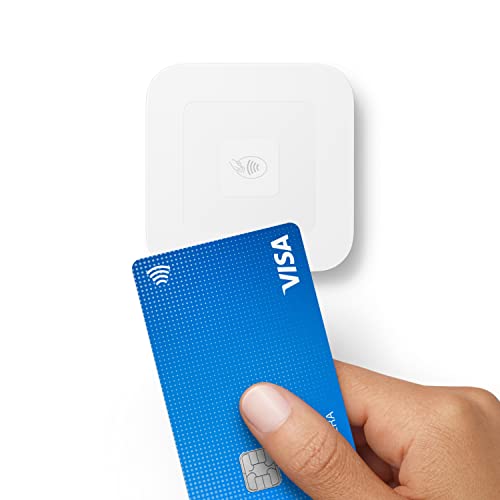
The Square Reader for contactless and chip (2nd Gen) is designed for fast, versatile payment acceptance. Best for small stores or service desks that need a portable, reliable device and straightforward pricing. It accepts contactless payments, chip cards, Apple Pay, and Google Pay with improved connectivity and extended battery life. It supports offline payments for up to 24 hours, which helps during temporary network outages. This makes it a solid choice for mobile vendors and retailers with curbside or on-site service.
Best for: merchants who want a compact, flexible reader for both in-store and on-the-go transactions. Limitations: offline mode lasts up to 24 hours; long-term data sync relies on an internet connection for full features.
Square Terminal – Credit Card Machine to Accept All Payments

Square Terminal consolidates selling, payment processing, and receipt printing into a single, portable unit. It’s best for counter setups and low-friction workflows that require a robust, all-in-one device. It accepts all major cards and digital wallets at a single, transparent rate, with no long-term contracts or hidden fees. Chip card processing is fast—often just a couple seconds—making it ideal for quick service environments. The downside is it’s a larger device, so it’s less ideal for tiny kiosks or field service.
Best for: retailers seeking a dedicated, stand-alone payment terminal with built-in printing. Limitation: bulkier footprint compared to handheld readers.
SumUp Plus Card Reader, Bluetooth

The SumUp Plus Card Reader is a mobile solution that supports major credit and debit cards with a single, predictable rate. It’s best for small businesses that need a flexible, Bluetooth-connected reader to take payments anywhere. There are no hidden fees or long-term contracts, which is attractive for startups or seasonal businesses. A limitation to consider: while highly portable, you’ll rely on a compatible mobile device for the full SumUp experience.
Best for: field teams or storefronts needing a compact, straightforward card-present solution with easy setup. Limitation: depends on a mobile device and Bluetooth connectivity for full functionality.
SumUp Solo Credit Card Payment Card Reader

SumUp Solo offers a full touch-screen interface and a portable card reader with built-in Wi-Fi and mobile data. It includes a free SIM card and mobile data so payments can be processed anywhere, plus an additional charging station for extended use. It’s best for merchants who need a more interactive, standalone device with reliable connectivity. A caution: data plans may incur incidental costs, so confirm coverage in your typical operating regions.
Best for: businesses needing an all-in-one handheld device with a richer interface and reliable connectivity. Limitation: potential data costs and reliance on cellular service.
Square Reader for magstripe (with Lightning connector)
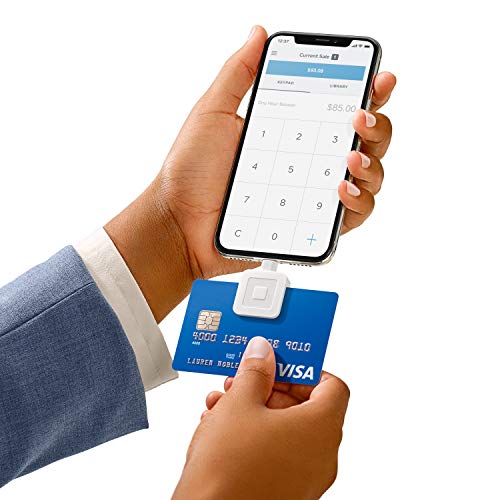
This magstripe reader is designed for devices that rely on magstripe payments and has a Lightning connector for iOS devices. Best for legacy setups where magstripe is still common. It offers a single transparent rate per swipe for major networks and supports sending receipts and applying discounts. It’s not ideal if you’re moving away from magstripe or into broader digital wallets, but it remains a practical option for certain customer segments. Caution: magstripe technology is being phased out by some merchants; plan migration accordingly.
MSR90 USB Swipe Magnetic Card Reader
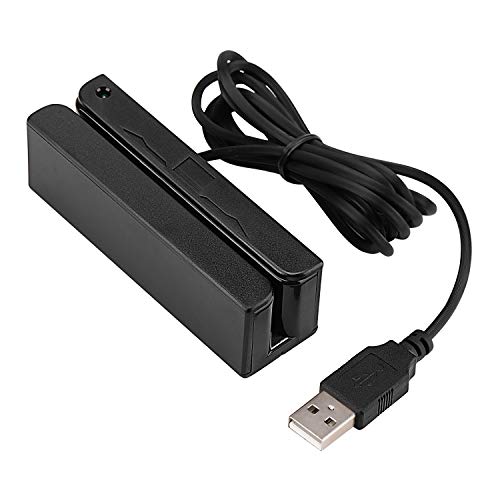
The MSR90 USB Swipe Magnetic Card Reader offers plug-and-play use without drivers, reading up to 3 tracks. It’s best for keyboard-emulation setups where a simple USB connection is all that’s needed. This is suitable for businesses that only require magstripe input with no encoding or chip functionality. Limitation: does not support chip cards or NFC payments, which limits future-proofing.
Symcode Magnetic Card Reader
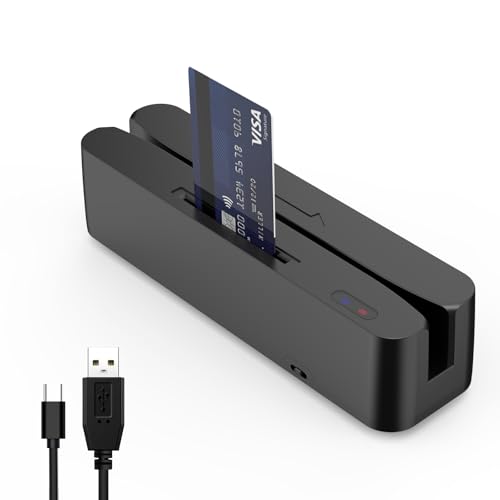
Symcode’s multi-function reader handles magnetic cards and memory chips, with USB magnetic reading and NFC sensing options. Best for cashier setups that need simple magnetic card input plus chip card support through compatible software. Caution: it reads magnetic cards but is not an encoder, so chip encoding requires separate tools or devices.
Buying Guide
- Payment methods supported: If you need broad support (NFC, chip, magstripe), pick a reader that covers contactless, chip, and magstripe capabilities. Square readers emphasize contactless and chip, SumUp options emphasize simple rates and mobility.
- Connectivity: Bluetooth works well for mobile operations; Wi-Fi or Ethernet suits countertop setups. Consider offline capabilities if you frequently encounter unstable connections.
- Portability: For on-the-go selling, favor handheld readers with long battery life and lightweight profiles. For a fixed counter, a terminal with built-in printing can streamline receipts.
- Fees and contracts: Look for transparent rates and no long-term commitments. Some options advertise no monthly fees but may have higher per-transaction costs.
- Software ecosystem: Ensure compatibility with your existing POS or inventory system. Some readers pair best with their brand’s full POS app, while others work with third-party apps.
- Future-proofing: As magstripe and some older methods fade, prioritize readers with NFC and EMV chip support to avoid obsolescence.
FAQ
- What is the most versatile card reader for a small shop? A reader that supports contactless, chip, and magstripe with an offline or semi-offline mode is most versatile for varying network conditions and customer preferences.
- Do these devices require long-term contracts? Most of the listed options offer no long-term contracts; they typically charge per transaction with a transparent rate schedule.
- Can I print receipts with these devices? Some devices like Square Terminal include receipt printing; others rely on digital receipts or integration with compatible apps.
- Will these work with existing POS software? Many options are designed to work with their brand’s POS ecosystem or popular third-party apps, but always verify compatibility before purchasing.
- Is magstripe still relevant for small businesses? Magstripe remains common in some markets, but the industry trend emphasizes contactless and chip (EMV). Consider a mixed setup if legacy cards are prevalent in your area.
- How do I compare total cost of ownership? Compare per-transaction rates, monthly fees, hardware costs (if any), and any data plan or SIM card charges for mobility-focused devices.