Looking for a dependable 14 inch laptop that covers daily productivity, light AI tasks, and long battery life? This guide highlights five strong choices and explains who each one suits best. Each pick is rated for on-the-go use, classroom or home office setups, and multitasking with solid RAM and SSD options. The following table compares the core specs and intended user types to help you choose at a glance.
| Product | CPU / RAM | Storage | Display | Best For |
|---|---|---|---|---|
| HP OmniBook 3 14″ | Snapdragon X X1-26-100 | 256 GB SSD | 2K OLED, 1920×1200 | On-the-go professionals needing AI features |
| Dell Latitude 5420 14″ | Core i7-1165G7 | 1 TB SSD | FHD | Power users and professionals seeking upgrade headroom |
| HP 14 Laptop for Students | Intel N150 | ~384 GB total with expansion | HD 14″ | Students and casual home use |
| Dell Latitude 5420 14″ (Renewed) | Core i5-1145G7 | 256 GB SSD | FHD | Budget-conscious professionals needing reliability |
| Acer Aspire 14 AI Copilot+ | Intel Core Ultra 7 | 1 TB SSD | 14″ WUXGA 1920×1200 | AI-enabled productivity and creative tasks |
HP OmniBook 3 14 inch Next Gen AI PC

2K OLED display delivers vivid colors and sharp text, suitable for professionals who need accurate visuals for documentation or media tasks. The Snapdragon X X1-26-100 processor emphasizes efficiency and AI capabilities, making this model a strong pick for mobile workers who value battery life and AI-assisted productivity. Battery life claims reach up to 41 hours, with HP Fast Charge restoring from 0 to 50% in about 45 minutes. Best for: remote workers, students, or travelers who want long days between charges. Caution: OLED panels can be more prone to burn-in over extended periods with static UI elements; practice screen-time management if you use persistent on-screen graphics. This configuration targets on-the-go productivity with a focus on energy efficiency and AI features.
Dell Latitude 5420 14″ Laptop (Renewed)

Certified Refurbished with testing and basic cleaning, this Dell Latitude 5420 offers a reliable platform for professionals who need a robust core. The top-tier 11th Gen Intel Core i7 variant provides solid performance for multitasking, while 32GB RAM helps with memory-heavy workloads. Storage is 1TB NVMe for fast boot and file access. Best for: seasoned multitaskers, remote workers, and professionals who want a strong, durable machine at a lower price point. Caution: refurbished units may have cosmetic wear and variable packaging; verify the included accessories when ordering. Selection favors reliability and strong multi-use performance.
HP 14 Laptop for Students and Home Use

This HP 14 inch notebook is designed for daily tasks and light multitasking, powered by an Intel N150 processor with 16GB RAM. Storage includes 128GB UFS plus 256GB expansion for a total around 384GB, offering room for documents, projects, and media. Best for: students, seniors, or first-time laptop users seeking a dependable, straightforward device for web browsing, classes, and streaming. Caution: storage capacity can be tight if you store large media libraries locally; consider cloud storage as a backup. This model emphasizes easy everyday use with flexible storage options.
Acer Aspire 14 AI Copilot+ PC
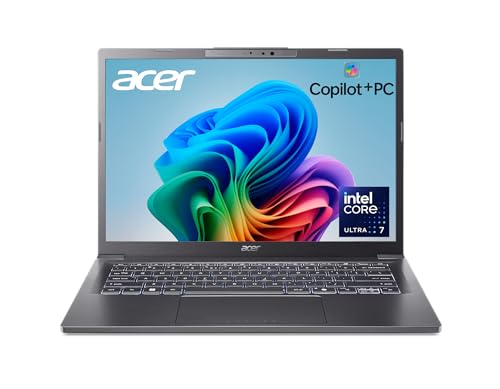
Equipped with Intel Core Ultra 7 and AI-oriented Copilot features, this 14″ AI-enabled laptop targets productivity, creativity, and security tasks. It includes a 1TB SSD and 16GB LPDDR5X RAM, offering ample space and responsive performance for multitasking. Best for: power users who want AI enhancements, developers, or students engaging in computational tasks and content creation. Caution: AI Copilot features may require ongoing software updates and compatibility with certain tools; confirm current software support before purchasing. The design focuses on delivering AI-assisted workflows across diverse tasks.
Buying Guide
What should you consider when choosing a 14 inch laptop?
- Display quality and size: If you do color-critical work or media viewing, a 2K OLED panel (as in the HP OmniBook 3) offers richer colors and sharper text than standard HD screens.
- CPU and RAM: For productivity and light AI tasks, choose at least 8–16GB RAM and a modern multi-core CPU. Higher RAM helps with multitasking and faster file handling, especially in business apps.
- Storage: SSD capacity affects launch times and data access. A 256GB SSD is common; 512GB or 1TB is preferable for professionals with large files, music libraries, or design work.
- Battery life: Long battery life is essential for travel and classroom use. Some models advertise 41+ hours; real-world life depends on display brightness and workload.
- Portability and build: If you travel often, lighter weight and durable chassis are valuable. Look for 14″ form factors with good hinge design.
- Refurbished vs. new: Renewed models can lower costs but may have cosmetic wear and shorter warranty windows. Check seller notes and return policies.
- AI features: Some models include AI copilots or enhanced security tools. Confirm which features are available and how they integrate with your workflow.
How to compare near-term needs
- Best for remote work: HP OmniBook 3 offers long battery life and AI features for on-the-go productivity.
- Best for students on a budget: HP 14 Laptop for Students provides adequate power with flexible storage expansion.
- Best for reliability and enterprise features: Dell Latitude 5420 Renewed emphasizes professional-grade performance with robust endurance.
- Best for AI-assisted productivity: Acer Aspire 14 AI Copilot+ targets AI-enabled workflows and large storage needs.
- Best value overall: Dell Latitude 5420 14″ FHD (Renewed) balances performance and cost with a strong CPU and RAM profile.
Frequently asked questions
- What is the typical difference between 14″ laptops with OLED vs. LCD displays? OLED offers deeper blacks and richer color, but can consume more power and may pose burn-in risks with static UI elements; LCDs are generally more power-efficient and stable for long sessions.
- Do 14″ laptops handle multitasking well? Yes, models with 16GB RAM or more and multi-core CPUs handle web, office apps, and light AI tasks well, especially in business environments.
- Is refurbished a good option for business use? Refurbished devices can be reliable and cost-effective but verify warranty length and the seller’s return policy before purchasing.
- Should I prioritize storage or RAM for fast performance? For most users, ample RAM (16GB or more) improves multitasking, while SSD storage impacts boot and file access speeds. A balanced combination is best.
- What features matter most for AI-enabled laptops? Look for processors with integrated AI acceleration, sufficient RAM, and robust cooling to sustain longer AI workloads.
- Are 14″ laptops suitable for students? Yes, they offer portability and enough screen real estate for coursework and video calls, with varied storage and RAM configurations to fit different budgets.