Students need versatile, reliable laptops that adapt to classes, labs, study sessions, and group work. The following 5 2-in-1 laptops are well-suited for students who want portability, budget-friendly performance, and flexible modes for note-taking, video calls, and tablet-style reading. This guide highlights who each model is best for, plus practical trade-offs to consider when choosing.
| Product | Screen | CPU | RAM | Storage | Best For |
|---|---|---|---|---|---|
| HP 14 2-in-1 Chromebook 14b-Renewed | 14″ FHD IPS | Intel N100 | 4GB | 64GB | Budget-friendly students who mainly browse, take notes, and stream |
| Lenovo IdeaPad Flex 3i Chromebook 12.2″ | 12.2″ IPS | Intel N100 | 4GB LPDDR5 | 128GB | Lightweight carry with long battery life for daily classes |
| Lenovo Chromebook 2-in-1, 14″ | 14″ IPS Touch | Intel N150 | 4GB | 128GB | Everyday multitasking and reliable performance |
| Dell Latitude 3190 11.6″ | 11.6″ HD | Intel Celeron N5030 | 8GB | 128GB | Rugged use and classroom durability for heavy note-taking |
| HP 14” Laptop Ultra-Portable (Lavender) | 14″ HD | Quad-Core Intel N150 | 4GB | 628GB (128GB SSD + 500GB External) | Students needing extra local storage and Windows Pro toolkit |
The picks balance price, portability, and everyday performance. If you need primarily web-based tasks, Chromebooks are compelling. If you require Windows-specific software, consider the Windows-ready options. The table above helps you compare core specs at a glance.
HP 14 2-in-1 Chromebook 14b-Renewed

Features include a 14-inch FHD IPS touchscreen with a 360-degree flip, Intel graphics, and an Intel N100 processor. It offers 4GB DDR5 RAM and 64GB storage. This model includes one USB-C port, one USB-A port, and a headphone/mic jack. Best for: students who need an affordable, durable Chromebook for note-taking, browsing, and streaming. Limitation: storage is modest, so plan to rely on cloud storage or external drives for large files.
Lenovo IdeaPad Flex 3i Chromebook 12.2″
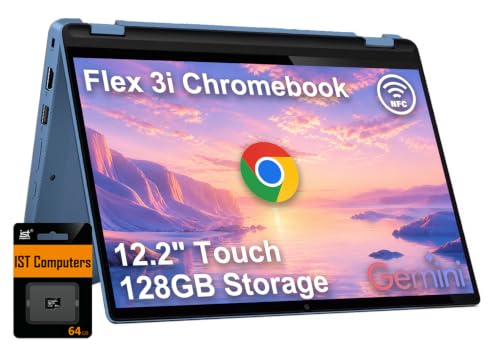
Best for: students who value versatility in a compact form with long battery life. Features include a 12.2″ WUXGA IPS touchscreen, 4GB LPDDR5 RAM, and 128GB total storage (64GB eMMC plus 64GB SD card). The device supports multiple modes (Laptop, Yoga, Flip, Tablet) for varied study scenarios. Caution: on-device storage is modest; cloud storage or microSD expansion is recommended for large coursework files.
Lenovo Chromebook 2-in-1 – 14″
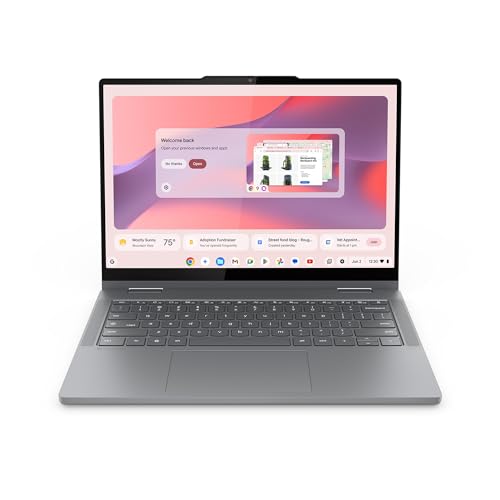
Best for: students who need a balance of portability and performance with 128GB storage. This model emphasizes a thin, lightweight build and robust daily performance, driven by an Intel Core processor and 128GB storage. Choose this if you want a Chromebook that boots quickly and handles multitasking across online classes and document work. Limitation: battery life varies with workload and brightness; plan for occasional charging during long school days.
Dell Latitude 3190 11.6″ 2-in-1

Best for: students seeking a compact Windows option with durable design and 8GB RAM for smoother multitasking. The model uses an Intel Celeron N5030 CPU and 1.1 GHz base speed with boost, plus 128GB storage. Caution: performance will be modest on heavier tasks; this is best for light productivity, online classes, and document work.
HP 14” Laptop Ultra-Portable (Lavender)

Best for: students needing more local storage and Windows capability, with 628GB total storage (128GB SSD plus 500GB external). It runs on a Quad-Core Intel N150, with 4GB RAM and a 14″ HD display. This model is suitable for students who want offline storage for coursework plus the flexibility of Windows. Limitation: 4GB RAM may limit heavy multitasking; consider external storage or cloud services for larger projects.
Buying Guide: Key Considerations For Student 2-In-1 Laptops
- Operating System: Chromebooks excel for web-based tasks and classroom apps; Windows devices support desktop software and full-featured productivity suites. Choose based on software needs.
- Screen Size And Weight: Smaller screens improve portability for backpacks and buses, but larger screens help with reading and note-taking. Balance display real estate with weight.
- Battery Life: Long battery life reduces the need for frequent charging between classes. Look for devices with all-day endurance under typical usage.
- RAM And Storage: 4GB RAM is common for budget 2-in-1s; 8GB RAM offers smoother multitasking. Storage varies from 64GB to 628GB total; consider cloud storage or external drives for large files.
- Durability And Build: Students may encounter rough handling; options with MIL-STD or rugged designs offer added reliability.
- Ports And Expandability: USB-C and USB-A ports support peripherals. An SD card or microSD slot can expand storage in Chromebooks.
- Price vs. Performance: Budget-friendly models provide essential features for classwork, while mid-range options offer better multitasking and future-proofing.
FAQs
- What should I consider when choosing a 2-in-1 for college?
Prioritize battery life, RAM, storage, and compatibility with required software. If you mainly need web apps, a Chromebook may be best; for Windows-only software, a Windows 2-in-1 is preferable.
- Is 4GB RAM enough for school tasks?
For light multitasking and classroom apps, 4GB can be adequate, especially on Chromebooks. For Windows tasks or multitasking with multiple apps, 8GB is more comfortable.
- Do 2-in-1s handle note-taking and video calls well?
Yes, most models with touchscreens and good webcams perform well for notes and classes. Look for models with a responsive display and reliable wireless connection.
- Should I choose storage over cloud backup?
Cloud storage is useful for on-the-go access and backup. If local storage is limited, pairing with external drives or cloud services helps manage large files.
- Are Chromebooks more affordable for students?
Chromebooks are often budget-friendly with quick boot times and simple interfaces. They work best when coursework relies on web apps and Google Workspace.
- What is the benefit of a 2-in-1 device for students?
A 2-in-1 provides laptop productivity and tablet-style interaction for reading, drawing, or presenting, which can be advantageous for varied study tasks.