Looking for a versatile 2-in-1 laptop that blends tablet portability with laptop productivity? These five options are strong picks for different needs, from budget-friendly students to business-minded professionals. Each choice is best for a distinct use case—explore which one fits your workflow, whether you prioritize portability, performance, display quality, or long battery life.
| Product | Best For | Key Specs |
|---|---|---|
| HP 14 2-in-1 Chromebook 14in FHD | Budget students or light Web-based work | 14″ FHD, IPS touchscreen, 4-core Intel N100, 4GB RAM, 64GB storage |
| Dell Latitude 7420 2-in-1 | Business users who need reliability | 14″ FHD, Core i5, 16GB RAM, 512GB SSD, Windows 11 Pro |
| 2-in-1 Laptop Tablet, 12″ 2K | Lightweight travel and note-taking | 12″ 2K touch, Intel 6500Y, 12GB RAM, 512GB SSD |
| HP OmniBook X Flip 2-in-1 Copilot+ | Premium AI-enabled productivity | 14″ 2K OLED, Ryzen AI 5, 16GB RAM, 512GB SSD, Wi‑Fi 7 |
| Lenovo Chromebook 2-in-1 | Lightweight chromeOS with Google apps | 14″ WUXGA IPS, Intel N150, 4GB RAM, 128GB storage |
HP 14 2-in-1 Chromebook 14in FHD

The HP 14 2-in-1 Chromebook is best for students or casual users who need an affordable, versatile device for web browsing, streaming, and light productivity. Its 14-inch FHD IPS touchscreen with a 360-degree hinge supports laptop and tablet modes, while the Intel N100 processor and 4GB RAM handle everyday tasks. Caution: limited local storage (64GB) means cloud storage or external drives are recommended for larger files.
Dell Latitude 7420 2-in-1

This Dell Latitude 7420 model targets business users who value robust performance and security. With 16GB RAM and 512GB SSD, it offers responsive multitasking and ample storage, plus a 14″ FHD touchscreen and Windows 11 Pro. Best for professionals who need a reliable 2-in-1 for presentations, video calls, and office software. Limitation: renewed/refurbished status may affect anticipated longevity and warranty specifics.
2-in-1 Laptop Tablet, 12″ 2K

This 12″ 2K 2-in-1 is ideal for ultralight travel and on-the-go note-taking. The detachable keyboard, compact form, and 12GB RAM with 512GB SSD support multitasking and file storage without bulk. Choose this if you prioritize mobility and a crisp touch experience; caution: smaller screen may not suit detailed design work or extensive multitasking.
HP OmniBook X Flip 2-in-1 Copilot+

HP’s OmniBook X Flip targets power users who want AI-assisted productivity. Its 14-inch 2K OLED touchscreen delivers vivid visuals, and Ryzen AI 5 with a dedicated NPU enhances content creation and multitasking. With 16GB RAM and 512GB SSD, it supports demanding workloads. Best for creators and professionals seeking advanced AI features; limitation: premium OLED requires careful screen care and potential burn-in considerations.
Lenovo Chromebook 2-in-1
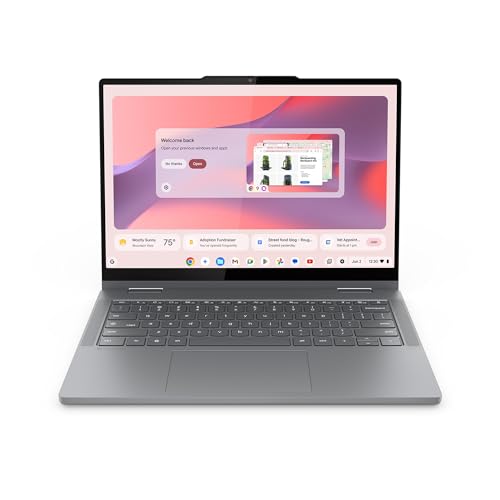
The Lenovo Chromebook 2-in-1 blends portability with Google-based productivity. It uses an Intel N150 CPU, 4GB RAM, and 128GB storage, making it a simple and secure option for students and those who rely on web apps. Best for users who prefer Chrome OS and Google Workspace, with a caution that local software compatibility is limited compared to Windows-based devices.
Buying Guide
What should you consider when shopping for a 2-in-1 laptop?
- Operating system: Windows offers broad software compatibility; Chrome OS emphasizes speed and simplicity; OLED displays look stunning but may require care.
- Processor and RAM: For smooth multitasking, aim for at least 8GB RAM in Windows models; 4GB can suffice for light browsing and word processing on Chrome OS.
- Storage: SSDs improve boot and load times. 256GB is a practical baseline for Windows; 128GB can be enough for Chromebooks with cloud storage.
- Display and form factor: 2-in-1s with 12–14 inch screens balance portability and usability; consider 2K or OLED for sharper visuals if you value media and design work.
- Battery life: Look for devices advertised with at least 8–10 hours of real-world use for all-day productivity.
- Durability and build quality: If you travel often, prioritise metal chassis and reliable hinges; check warranty and renewal status where relevant.
FAQ
- What is a 2-in-1 laptop? A device that can function as a laptop and a tablet, using a 360-degree hinge or detachable keyboard.
- Is a 2-in-1 better for students? It can be ideal for note-taking, reading, and presentations, especially when portability matters.
- Should I choose Windows or Chrome OS? Windows is more versatile for software; Chrome OS is fast and secure for web-based tasks and apps.
- Do OLED displays matter on 2-in-1s? OLED offers richer color and contrast but may have higher price and burn-in risk with static images.
- Are renewed or refurbished models reliable? Many are, but verify warranty terms and return policies when possible.
- What’s a practical RAM goal? 8GB is solid for Windows laptops; 4GB can work for Chrome OS with light workloads.