Answering the question “What is the best 3D printer for beginners?” with practical, actionable choices. This guide highlights five beginner-friendly printers, explaining who they suit, and why each stands out. It covers hobbyists, students, and first-time makers who want reliable prints with minimal setup. Below is a quick summary table of the chosen models to help you compare at a glance.
| Product | Best For | Key Advantage | Build Volume |
|---|---|---|---|
| FLASHFORGE Adventurer 5M | Absolute beginners and rapid prototyping | Fully automatic leveling for flawless first layers | 220x220x220 mm |
| ANYCUBIC Photon Mono 4 | Detail-focused users and educators | 7″ 10K mono LCD for ultra-smooth surfaces | 6.04″ x 3.42″ x 6.49″ |
| Entina Tina2C | Kids and classrooms | WiFi control, cloud app access, large model library | Compact size, built-in features |
| Portable 3D Printer (Generic) | Traveling makers and quick experiments | Removable build plate, simple assembly | 100x100x100 mm |
| Bambu Lab A1 mini | Beginning to intermediate users seeking quality | Full auto calibration, quiet operation | Compact footprint, versatile |
FLASHFORGE Adventurer 5M 3D Printer

The Adventurer 5M targets new users who want a stress-free start. It features one-click automatic bed leveling, eliminating the common first-layer headaches that beginners encounter. The CoreXY all-metal frame supports fast moves while maintaining precision, making it suitable for quick drafts, school projects, and hobby prototyping. The printer’s direct extrusion and heated nozzle support versatile materials up to 280°C, broadening the range of beginner-friendly experiments. This model is ideal for learners who want reliable prints with minimal manual calibration.
Best for: absolute beginners who value automatic leveling and predictable first layers. Limitations: while high-speed capability exists, beginners should focus on mastering basic printing before attempting maximum speeds to avoid failed prints.
ANYCUBIC Photon Mono 4 Resin 3D Printer

The Photon Mono 4 is optimized for high-detail models, making it a strong pick for educators and hobbyists who care about surface finish. Its 7″ 10K monochrome LCD and stable LighTurbo light source significantly reduce layer lines, delivering ultra-smooth surfaces. The printer’s medium build volume is suitable for detailed miniatures, jewelry prototypes, and small functional parts. This model is best for users who value precision and fine features over large-scale builds.
Best for: users prioritizing print detail and smooth finishes. Limitation: smaller effective build volume compared with FDM options, and resin handling requires post-processing discipline.
Entina Tina2C 3D Printer

The Tina2C is designed for kids and beginners, with a guided setup via the Poloprint Cloud app. It promises a fast start—within minutes—thanks to simplified onboarding and a shared model library. It supports WiFi printing and offline TF card mode, which helps with classroom environments and family workshops. The built-in modules promote STEM learning, making it a practical classroom or home educational tool.
Best for: families and classrooms seeking an approachable, cloud-enabled printer. Caution: app-centric workflows may require some initial device compatibility checks for offline use.
Portable 3D Printer – Compact FDM

This compact, beginner-friendly model is designed for quick setup and simple prints. It includes a removable build plate, easy assembly, and compatibility with PLA and TPU filaments. The 0.4mm nozzle and adjustable layer height from 0.05 to 0.3 mm allow for versatile project types, from simple toys to more refined desk decor. It’s a good entry point for travel-minded users who want a lightweight, portable option.
Best for: beginners who need a portable, all-in-one starter printer. Limitation: smaller build volume may constrain larger projects, and the assembly may require careful supervision for absolute beginners.
Bambu Lab A1 Mini
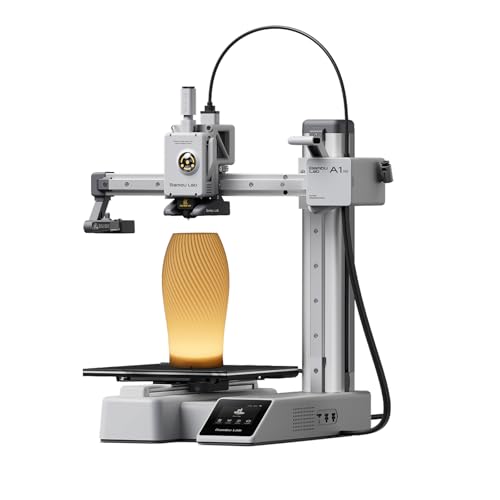
The A1 mini combines beginner-friendly features with a modern ecosystem. It offers full auto-calibration and active flow rate compensation to improve print reliability and reduce the learning curve. The quieter operation and access to MakerWorld’s model library support steady progression from basic to more complex projects. This model suits users who want a robust, future-ready platform with scalable capabilities.
Best for: newcomers who anticipate growing into more ambitious projects and want a connected ecosystem. Caution: higher upfront investment may be a consideration for casual hobbyists.
Buying Guide: Practical Steps To Pick The Right Beginner Printer
What should you consider first when choosing a beginner 3D printer? Start with your typical project size, material options, and how much you value ease of use versus expandability.
- Print technology: FDM printers are typically easier for beginners and cheaper to run; resin printers offer higher detail but require post-processing and handling care.
- Bed leveling and calibration: Automatic leveling saves time and reduces failures. Look for machines that advertise one-click calibration or auto-bed leveling.
- Build volume: Beginners often start with small parts. If you plan larger parts or multiple smaller models, choose a printer with a bigger usable build area.
- Software and ecosystem: Cloud-based libraries, app control, and compatibility with common slicers simplify learning and expansion.
- Materials supported: PLA is the easiest, but if you want flexibility, check for printers that support PLA, PETG, and flexible filaments where possible.
- Maintenance and support: A strong user community, clear manuals, and reliable customer support help new users troubleshoot quickly.
FAQ
- What is the easiest type of 3D printer for beginners?
– FDM printers are typically easiest for beginners due to simpler maintenance, lower material costs, and forgiving printing behavior with common filaments like PLA. - Do I need a resin printer for beginners?
– Resin printers provide superb detail but require post-processing and careful handling. They are best for users who specifically need high-detail models and are comfortable with additional steps. - Is automatic bed leveling essential for beginners?
– It greatly reduces failed prints and the time spent dialing in first layers, making it highly beneficial for new users. - Can I print with multiple materials as a beginner?
– Start with PLA or PLA+; as you gain experience, you can explore PETG and other materials. Check your printer’s nozzle and bed temperature capabilities for compatibility. - How important is online support and model libraries?
– Very important for beginners. Access to ready-to-print models and clear troubleshooting guides helps learners progress faster and with less frustration. - What safety considerations should I know?
– Ensure proper ventilation when using resins, avoid touching hot components, and follow manufacturer guidelines for electrical and mechanical safety.