Finding the right 61-key MIDI controller hinges on how you work: studio producers prioritizing integration with DAWs, performers needing expressive keys and wheels, or beatmakers seeking handy pads and quick access. This guide highlights five solid options and explains who each is best for. The table below compares core strengths to help you decide quickly.
| Product | Best For | Key Strengths |
|---|---|---|
| Nektar SE61 | Budget DAW integration users | DAW control, comprehensive MIDI features |
| M-Audio Keystation 61 MK3 | Beginners and plug-and-play users | Semi-weighted keys, simple control layout |
| Novation Launchkey 61 MK4 | Ableton-centric workflows | DAW integration, pads, versatility |
| Arturia KeyLab Essential mk3 | Creative producers needing presets | Scale/Chord/Arpeggiator, Analog Lab V |
| M-Audio Oxygen Pro 61 | Advanced control and NI integration | NKS integration, assignable zones |
Nektar SE61 USB MIDI Controller Keyboard

The Nektar SE61 emphasizes deep DAW integration and comprehensive MIDI functionality at a value-focused price. It is especially suited for producers who want built‑in control mappings for popular DAWs and straightforward computer-based music creation without extra gear. Best for budget-conscious creators who still require robust software integration.
- Pros: Solid DAW integration, broad MIDI capabilities, approachable for new users
- Cons: Limited physical controls compared to premium boards
Who this is for: Beginners or budget-minded producers who want a 61-key keyboard with ready-to-map controls for major DAWs. Avoid if you need advanced multisurface layouts or premium keybeds.
M-AUDIO Keystation 61 MK3 USB MIDI Controller

The Keystation 61 MK3 offers a straightforward, plug-and-play experience with full-size velocity-sensitive keys and essential controls. It’s best for players who want a natural-feeling keyboard with minimal setup and reliable MIDI routing to any DAW. Choose this if you value simplicity and a traditional piano-like touch.
- Pros: Natural-feeling keys, easy to use, no driver required
- Cons: Fewer tactile controls; lacks extensive DAW-specific features
Best for: Beginners or musicians who need a dependable, easy-to-use 61-key controller without complex mappings. Better for: users prioritizing immediacy over advanced control surfaces.
Novation Launchkey 61 MK4 USB MIDI Keyboard Controller

The Launchkey 61 MK4 blends premium keybeds with a robust set of performance pads and quick DAW controls. It shines for producers who want seamless Ableton Live workflows and a versatile range of 16 FSR pads that support clip launching and finger drumming. Best for: Ableton-centric studios and live rigs needing quick arrangement ideas on the fly.
- Pros: Deep DAW integration, expressive pads, versatile performance features
- Cons: May be more complex for absolute beginners
Who this is for: Ableton users or anyone seeking a feature-rich controller with strong clip-launching capabilities. Choose this if you want an all-in-one production and performance device. Avoid if you prefer a simpler setup with fewer controls.
Arturia KeyLab Essential mk3 — 61 Key USB MIDI Keyboard

The KeyLab Essential mk3 blends hands-on control with top-tier software including Analog Lab V. It provides Scale Mode, Chord Mode, and an Arpeggiator to streamline composition and beat-making. It’s ideal for creative producers who want integrated presets and expressive, immediate control over their DAW. Best for: composers and beat-makers who rely on built-in sounds and quick modulation.
- Pros: Creative features for quick composition, strong DAW integration
- Cons: Premium features may require learning some new workflows
Who this is for: Creators seeking creative modes and a broad preset library. Choose this if you want Analog Lab V alongside a capable MIDI keyboard. Avoid if you need pure portability or minimal software dependencies.
M-AUDIO Oxygen Pro 61 USB MIDI Keyboard Controller
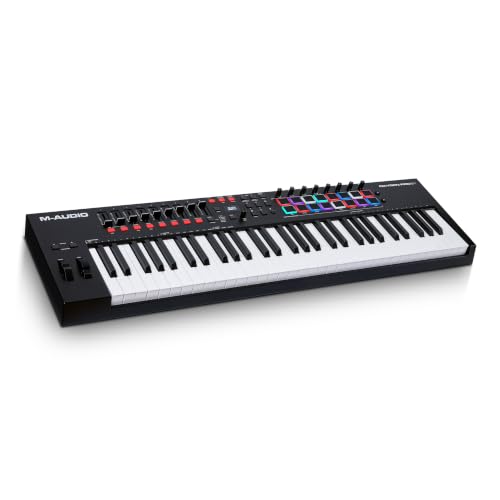
The Oxygen Pro 61 emphasizes advanced control with Native Kontrol Standard (NKS) integration and assignable zones for playing multiple synths and plugins. It’s a strong choice for users who want direct access to Native Instruments presets and a cohesive workflow across software synths. Best for: Producers who run NI software and want deep, map-friendly control. Limitation: NKS content and bundles can add complexity for new users.
- Pros: NKS integration, flexible zones, solid build
- Cons: More features mean steeper learning curve
Who this is for: Advanced producers and NI users who want streamlined control over multiple plugins. Choose this if you rely on Native Instruments libraries. Avoid if you prefer a simple, minimal control surface with fewer bells and whistles.
Buying Guide: Key Purchase Considerations
- DAW compatibility: If you use Ableton Live, FL Studio, Logic, or others, prioritize controllers with strong DAW integration and script support.
- Key action: Decide between piano-style, semi-weighted, or non-weighted keys based on playing style and budget.
- Controls and pads: Consider whether you need faders, wheels, transport controls, and drum pads for your workflow.
- Software bundle: Some models include rich software suites (Analog Lab, Komplete bundles, or full DAW scripts) that add value.
- Transport and performance features: Wheels, aftertouch, and afterbeat assignable controls can boost expressiveness for recording and live use.
- Portability vs. depth: Lighter controllers are easier to travel with; feature-rich boards suit studio setups with dedicated spaces.
Frequently Asked Questions
- What’s the main difference between 61-key controllers and other sizes? – 61-key controllers offer extended range for bass and high-register parts while staying relatively compact compared to 76- or 88-key boards.
- Are 61-key keyboards suitable for beginners? – Yes, especially models with simple layouts and strong DAW integration. They provide a natural feel without overwhelming complexity.
- Do I need weighted keys for MIDI production? – Weighted keys are beneficial for piano practice and expressive playing, but non-weighted or semi-weighted keys are common and adequate for most production tasks.
- Is DAW integration important? – DAW integration saves setup time and provides seamless control over tracks, clips, and effects within your main software.
- Can these controllers work with iOS devices? – Some models support iOS connections via adapters; check each product’s compatibility notes.
- What’s better for beat-making: pads or keys? – Pads enable quick drum programming and finger drumming, while keys are essential for melodic ideas; many models offer a balance of both.