Answering the search for big-button, simple mobile phones for seniors, this guide highlights five reliable options designed for clarity, ease of use, and essential safety features. These phones are best for: seniors needing straightforward calling and texting, caregivers seeking reliable devices for daily communication, and users who prefer physical keypads over touchscreen navigation. The table below offers a quick compare at a glance.
| Product | Best For | Key Benefit |
|---|---|---|
| artfone A400 Big Button Cell Phone | Seniors needing large keys and SOS | Uncomplicated dialing with raised keypad and hearing aid friendly mode |
| LIVELY Jitterbug Flip2 | Flip-phone fans seeking caretaker support | One-touch speed dial and 24/7 Urgent Response option |
| LIVELY Jitterbug Smart4 | Users wanting a simple large-display smartphone | Easy navigation with real-time captioning and Urgent Response |
| Tracfone TCL Flip 3 | Reliable basic flip phone with long battery life | Dual displays and clear call quality |
| artfone G6 Flip Phone | Durable flip option with extra-large keypad | Backlit, oversized buttons and hearing-friendly features |
artfone A400 Big Button Phone For Seniors

The A400 is a large-button, unlocked 4G LTE feature phone with a dedicated SOS button. It emphasizes tactile usability with a raised backlit keypad and prominent red/green call buttons. Best for seniors who want a simple device focused on calls and SMS, without internet browsing. A caution: it does not support CDMA networks and may require carrier compatibility checks before purchase.
LIVELY Jitterbug Flip2

The Jitterbug Flip2 is a rugged flip phone designed for simple calling with a high-contrast screen and large keypad. It includes a one-touch speed dial and a dedicated help button. Best for users who want a reliable, straightforward device with easy access to caregiver support through Lively services. Best for independent seniors who still want a traditional flip phone experience. Limitation: Requires Lively phone service for full functionality.
LIVELY Jitterbug Smart4 Senior Smartphone

The Smart4 is a simplified smartphone with a larger 6.7” screen and pre-installed SIM card, offering real-time captioning and Urgent Response. It suits seniors who want an easy-to-use device with modern features while keeping access to essential services. Choose this if you want a smartphone experience that remains simple and supportive; avoid if you need a completely offline device or prefer a non-touch keypad.
Tracfone TCL Flip 3

The TCL Flip 3 offers a modern flip-phone experience with dual displays and noise-canceling mic. It supports long talk times and a robust 1850 mAh battery. Best for users seeking practical flip-phone reliability with clear calls. Limitation: It’s locked to Tracfone, which may affect carrier flexibility.
artfone G6 Flip Phone For Seniors
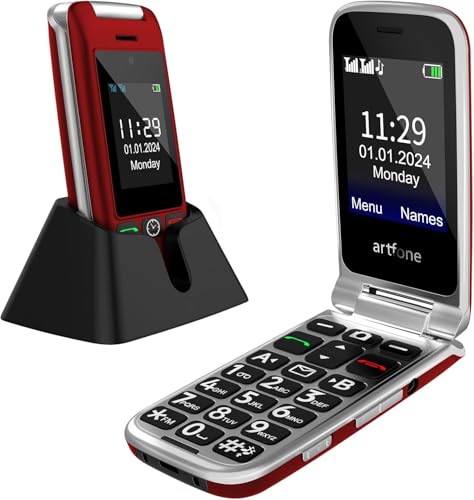
The G6 Flip combines 4G LTE capability with a durable flip design and a large backlit keypad featuring 21 oversized buttons. It includes a built-in hearing assistance function for clearer conversations. Best for seniors who value a traditional flip-phone form factor with enhanced accessibility. Caution: Carrier compatibility should be verified before purchase.
Buying Guide
What to Consider When Choosing a Big-Button Phone
Key factors include keypad size and clarity, SOS and emergency features, and whether the device supports the user’s mobile network.
- Keypad and display: Look for oversized, backlit buttons and high-contrast screens for easier dialing and reading.
- Emergency features: A dedicated SOS button or Urgent Response service adds safety for daily use.
- Network compatibility: Ensure the device works with the user’s carrier and supports their SIM type (GSM vs. CDMA).
- Voice and hearing support: Built-in hearing assistance or amplified microphones help seniors in conversations.
- Battery life and durability: Long battery life and a sturdy chassis reduce maintenance and avoid frequent charging.
Phone Type And Use Case
Classic keypads suit basic calling and texting, while some devices offer optional simple-smartphone features. Choose a model based on whether the user prioritizes pure simplicity or a modest set of smart capabilities with accessibility aids.
Connectivity And Accessories
Check if a charging dock, lanyard, or other accessibility add-ons are included. A dock ensures easy charging and daily use for less technical users.
Carrier And Plan Considerations
Some models are locked to specific carriers or services. Verify compatibility and plan options before purchasing to avoid service interruptions.
Quick FAQ
- Do big-button phones require internet access? Some models are basic phones focused on calls/texts and may have no internet; others use 4G LTE and offer simple web access or apps.
- Can I use these phones without a SIM? Some options include a pre-installed SIM or are unlocked, but checking carrier compatibility is essential.
- What is Urgent Response? A service that provides 24/7 assistance and emergency support when activated with the provider.
- Are flip phones better for seniors than smartphones? Flip phones offer simplicity and can be more durable; smartphones provide apps but may require more navigation.
- Which phone is best for hearing aid users? Phones with built-in hearing assistance modes or compatible accessibility features are preferable.
- Do these phones require ongoing fees? Many are linked to a service plan; consider total monthly costs when choosing a model.