Looking for a reliable Blu-ray player that delivers sharp 1080p/4K options, strong audio, and broad format support? This guide highlights five solid choices that suit different buyers, from casual movie watchers to those with large USB libraries. Each entry explains who benefits most and why it was chosen, plus a quick buying snapshot.
| Product | Best For | Key Strength | Limitations |
|---|---|---|---|
| Panasonic Blu-Ray Player (DMP-BD84P-K) | Small spaces, USB media users | Compact size with wide file-format support | Basic remote controls |
| Sony BDP-S1700U | Full HD movie streaming from Blu-ray and DVDs | HD upscaling and easy setup | No 4K output |
| N NUTROMO Blu Ray DVD Player (1080P Full HD) | Region A/1 disc fans | Dolby TrueHD/DTS-HD with HDMI upscaling | May require external power for large HDDs |
| WSJSYH DVD Player (HDMI, All Regions) | Region-free multimedia play | Supports many formats and USB playback | Build quality varies by unit |
| N NUTROMO Blu Ray DVD Player (1080P Full HD, HDMI/AV) | Legacy TV users and USB media | 1080p upscaling and multi-output | Limited built-in memory |
Panasonic Blu-Ray Player With Full HD Picture Quality

The Panasonic DMP-BD84P-K targets buyers who want a compact, light footprint without sacrificing file compatibility. It supports external storage use for sharing media via USB and HDMI-CEC control for simpler setups. This model is best for viewers who need a space-saving player that handles common formats like MKV and MP4 with good sound via Hi-Res Dolby Digital.
- Best for: Small living rooms or media carts where space is at a premium.
- Why selected: Its compact size and broad format support make it a practical all-rounder.
- Caution: The unit focuses on essential features; advanced streaming apps may be limited compared to newer smart players.
Sony BDP-S1700U Full HD Blu-ray Player

Sony’s BDP-S1700U is positioned for buyers who want straightforward Full HD Blu-ray playback with reliable upscaling. It includes an HDMI output for easy connection and a simple setup process. Pros focus on user-friendly operation and solid image quality while delivering standard Blu-ray and DVD playback.
- Best for: Those who value simple, reliable setup and strong DVD-to-Blu-ray upscaling.
- Why selected: It emphasizes ease of use and dependable performance for everyday movie nights.
- Caution: It does not offer 4K or advanced streaming features found in newer models.
N NUTROMO Blu Ray DVD Player: Region A/1
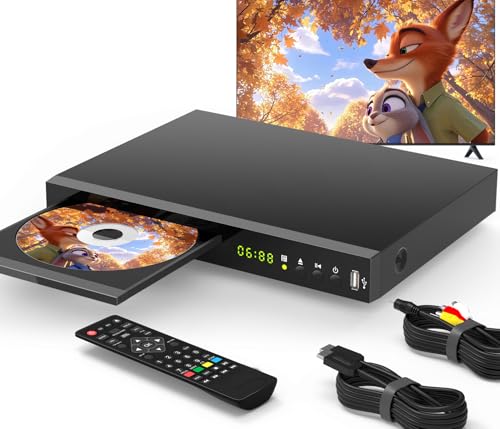
This N NUTROMO model targets region-conscious buyers who need Region A playback and robust 1080p video with Blu-ray disc support. It uses Dolby TrueHD and DTS-HD for immersive audio, and it supports rapid HDMI upscaling of non-Blu-ray DVDs to near 1080p. It’s a strong pick for dedicated Blu-ray collectors.
- Best for: Viewers who want reliable Region A playback and strong audio quality.
- Why selected: Combines high-quality video with premium audio formats for a cinema-like home theater experience.
- Caution: May require careful setup to optimize region settings and upscale performance.
WSJSYH DVD Player With HDMI And USB

WSJSYH’s player emphasizes region-free playback with support for a wide range of formats, including CDs, DVDs, and USB media. It’s best for households that want a versatile, all-regions-capable unit that can handle MP3, JPEG, and a variety of disc types without compatibility concerns.
- Best for: Users who want broad format support and regional flexibility.
- Why selected: It offers strong compatibility for mixed media libraries and simple USB playback.
- Caution: Region-free capabilities can vary by disc; verify disc compatibility if you own unusual formats.
N NUTROMO Blu Ray DVD Player: 1080P Full HD With HDMI/AV

This model from N NUTROMO emphasizes compatibility with legacy TV setups by offering both HDMI and AV outputs. It upscales DVDs to 1080p via HDMI and supports Dolby Digital, DTS-Master Audio, and other formats. It’s best for homes with older displays needing a smooth upgrade path.
- Best for: Users with older TVs seeking modern upscaling and versatile audio support.
- Why selected: The dual output options simplify integration into diverse home entertainment setups.
- Caution: External drives may require powered connections for stability with large media libraries.
Buying Guide
What matters most when choosing a Blu-ray player depends on how you watch, store, and connect media. Here are practical considerations to help you compare models:
- Video resolution and upscaling: If you have a 4K TV, prefer players that upscale DVD content and offer full HD Blu-ray playback with robust Dolby or DTS audio.
- Disc compatibility vs. USB playback: Decide if you need all regions, Region A/B/C support, or broad USB drive compatibility for MP3, JPEG, and video files.
- Connectivity: Look for HDMI-CEC compatibility for single-remote control setups and HDMI output quality. Some models also offer AV outputs for older displays.
- Format support: Consider MKV/MP4 video files, FLAC/ALAC/WAV audio formats, and photo playback when gathering a shared media library on USB drives or external HDDs.
- Space and placement: If you have a compact cabinet, a compact player can fit neatly; otherwise, prefer a model with robust build quality for frequent use.
Frequently Asked Questions
- Do Blu-ray players play all region discs? Answer: Some models are region-free or Region A/D/E, but others are locked to specific regions. Check the product details before buying.
- Is 4K support necessary for a Blu-ray player? Answer: Not always. If you only watch Blu-ray discs, 1080p Blu-ray playback with good upscaling is sufficient on many TVs; 4K is for newer discs and players.
- Can a Blu-ray player connect to USB drives? Answer: Many players offer USB ports to play media files from USB drives or external HDDs, often with size limits noted in specs.
- Will a non-smart Blu-ray player still stream content? Answer: Some models lack built-in apps; you may rely on connected devices or media from USB drives unless the model provides smart features.
- How important is HDMI-CEC? Answer: It simplifies control by letting one remote navigate multiple devices, an important convenience for home theater setups.
- What is upscaling and why does it matter? Answer: Upscaling improves the perceived quality of lower-resolution DVDs by approximating higher-resolution output on modern displays.