The best budget all-in-one PCs deliver solid performance for everyday tasks like web browsing, streaming, document editing, and light multitasking without breaking the bank. This guide highlights five cost-conscious options that balance compact design with usable power. The top picks are suited for students, home offices, and small workspaces. Below, you’ll find quick comparisons, product specifics, and a practical buying guide to help you decide which all-in-one fits your needs and space.
Summary of chosen products
| Product | Why It’s Budget-Friendly | Best For |
|---|---|---|
| BlairTech ChromeOS Flex All-in-One | ChromeOS Flex on a compact AI-ready setup; renewed price | Light browsing, education, cloud-based work |
| Cybrimax 24″ All-in-One | Balanced i5, 256GB SSD, 24″ display | Professional multitasking, remote work |
| MECHAZER 19” All-in-One | Small footprint, 8GB RAM, 256GB SSD | Tiny desks, basic productivity |
| SAINTDISE 19” All-in-One | Core i5, 256GB SSD, WiFi 6 | Home office, space-limited setups |
| Dell OptiPlex 7450 All-in-One | 8th-gen i7, 256GB SSD, refurbished | Legacy software, business tasks |
BlairTech ChromeOS Flex All-in-One Desktop PC

Best for light cloud-based tasks and classrooms, this BlairTech setup runs ChromeOS Flex rather than Windows. It’s powered by an Intel Core i5 processor with 8GB RAM and a 128GB SSD to ensure smooth web browsing, streaming, and schoolwork. The 24″ monitor is integrated with a space-saving design, making it ideal for compact desks.
Who this is best for: students, educators, and home users who rely on web apps and cloud storage rather than traditional Windows programs. Why selected: ChromeOS Flex emphasizes quick boot times, security, and simple management in a budget package. Caution: It does not run traditional Windows programs, which may limit software compatibility for certain professionals.
Cybrimax 24″ Full HD All-in-One Desktop

This Cybrimax model pairs an i5 CPU with 8GB RAM and a 256GB SSD on a 24″ Full HD display. It supports privacy-conscious video calls through its webcam and includes modern connectivity like WiFi 6 and BT 5.3. It’s a practical pick for professionals who need reliable multitasking and ample local storage in a single, space-saving unit.
Who this is best for: remote workers and students who want a capable all-in-one with a larger display and solid storage. Why selected: strong balance of performance and storage in a mainstream budget tier. Caution: Being an all-in-one, upgrading RAM or storage later can be limited by design.
MECHAZER All-in-One Desktop Computer 19 Inch

This compact unit uses a Core i5 processor up to 3.7GHz with 8GB RAM and a 256GB SSD. The 19″ screen provides adequate workspace for everyday tasks, and built-in surround speakers offer enhanced media playback. Its small footprint makes it ideal for tight desks or shared spaces.
Who this is best for: users who need a tiny all-in-one with decent multitasking power. Why selected: a strong balance of processor speed and storage in a compact form. Caution: The smaller screen may not suit long document work for some users.
SAINTDISE 19” All-in-One Desktop Computer
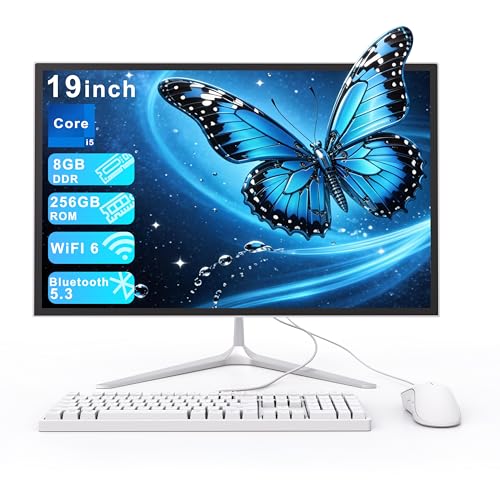
Equipped with a Core i5, 8GB RAM, and a 256GB SSD, this 19″ all-in-one aims to maximize office productivity while maintaining a slim footprint. It supports WiFi 6 and Bluetooth 5.3 for fast wireless connectivity, making it suitable for home offices and study spaces with limited desk area.
Who this is best for: home office users who want a compact, capable PC with modern wireless tech. Why selected: solid mid-range performance and up-to-date connectivity in a budget-friendly package. Caution: The 19″ display may feel cramped for heavy multitasking with multiple documents.
Dell OptiPlex 7450 All-in-One

The Dell OptiPlex 7450 All-in-One combines an 8th Gen Core i7 with 8GB RAM and a 256GB SSD. It’s a renewed option that targets business users who need reliable performance for multitasking and data tasks. It provides a 23.8″ FHD display with a range of connectivity options, including WiFi 6 and Bluetooth 5.0.
Who this is best for: small businesses or power users who want a more capable processor in a refurbished package. Why selected: higher-end CPU within a budget reconditioned option. Caution: Refurbished devices may have wear or cosmetic imperfections and limited warranty details.
Buying Guide
What should you consider besides price?
Display size and resolution affect desk space and readability. For most budget all-in-ones, a 19–24 inch screen with Full HD (1080p) provides a comfortable view for work and media.
Operating system and software needs
ChromeOS Flex options prioritize web apps and cloud storage. If you rely on Windows programs, a Windows-based all-in-one may be unavoidable, though it may cost more.
Processor, memory, and storage
Most budget all-in-ones use mid-range CPUs (i5 or equivalent) with 8GB RAM as a practical baseline. A 256GB SSD offers snappy boot times and enough space for documents and media; upgradeability varies by model.
Future-proofing and upgradability
Consider whether you may need more RAM or storage later. All-in-one designs often limit internal upgrades; plan around this and prioritize models with accessible RAM or larger SSD options if available.
Connectivity and peripherals
WiFi 6 and Bluetooth 5.x improve wireless performance. Check USB ports, HDMI or DisplayPort outputs, and webcam quality if video calls are important to you.
Buyer tips by use case
- Best for cloud users and students: BlairTech ChromeOS Flex model for simple, secure web-based tasks.
- Best for multitasking on a budget: Cybrimax or SAINTDISE with 8GB RAM and 256GB SSD.
- Best space-saving option: MECHAZER 19” or SAINTDISE 19” for tiny desks.
- Best value refurbished business option: Dell OptiPlex 7450 All-in-One for Windows-heavy workloads.
Frequently asked questions
- What is an all-in-one PC?
- Is ChromeOS Flex suitable for everyday work?
- Do budget all-in-ones have upgrade options?
- What should I avoid if I have a small desk?
- Is a renewed or refurbished unit a good idea?
An all-in-one PC combines the computer components and display in a single unit, saving desk space and often reducing cable clutter.
Yes, it’s designed for web apps, cloud storage, and everyday tasks, but it may not run traditional Windows software.
Upgrade options vary by model; many budget units offer limited RAM or storage upgrades after purchase, while some are not easily upgradable.
Avoid larger displays and models with bulky bases; look for compact form factors and mount-friendly designs.
Refurbished units can offer significant savings but may come with limited warranties or cosmetic wear; check the seller’s policy.