Answering the search for affordable, capable laser engravers, the BlazeX M3, Carverall K15 Pro, ACMER S2, Twotrees TS1 Mini, and CREALITY FALCON 10w offer practical entry points for beginners and hobbyists. These models balance cost with decent materials compatibility, safety features, and ease of use. This guide highlights who each product is best for and what to watch out for. Below is a quick comparison to help you decide at a glance.
| Product | Best For | Materials | Key Benefit | Limitation |
|---|---|---|---|---|
| BlazeX M3 | Beginner DIYers, small crafts | Wood, leather, glass, coated metal | Ultra-precision 0.01mm | Enclosed not portable for travel |
| Carverall K15 Pro | Small businesses, makers who want offline use | Wood, coated metal, acrylic, glass | True 10W power with cooling | Setup may feel involved for absolute beginners |
| ACMER S2 | Detail-oriented projects, versatile materials | Wood, leather, acrylic, coated metal | 0.01mm precision, 12W power | Requires compatible software setup |
| Twotrees TS1 Mini | Classroom or family workshop | Thin materials like wood, acrylic | Fully enclosed, safe for kids | 3W head limits deeper cuts |
| CREALITY FALCON | Projects needing rotary engraving | Wood, metal, acrylic | High power with rotary roller | Class 4 laser requires extra safety considerations |
BlazeX M3 10W Laser Engraver

The BlazeX M3 combines a 10W laser with 0.01mm precision, spanning materials such as wood, leather, glass, and coated metals. It functions as a two-in-one cutter and engraver, making it well-suited for beginners pursuing DIY projects, personalized jewelry, and small-batch items. The included enclosure, honeycomb bed, and starter kit support stable, clean results. Best for creators who want desktop convenience with strong detail capability. Caution: monitor air flow and enclosure integrity during longer runs to avoid heat buildup.
Carverall K15 Pro Laser Engraver

The K15 Pro emphasizes true 10W output with a 300+ material range and active cooling to support longer jobs. It ships with a full starter kit and offline file handling via TF card, enabling batch work without constant PC connection. Best for makers who value offline operation, helpful tutorials, and a supportive community. Choose this if you want a turnkey setup with extensive materials compatibility; avoid if you need ultra-compact size or ultra-simplified software.
ACMER S1 Laser Engraver

The S1 offers a compact 2-in-1 engraving and cutting with a 2.5W diode and Acmerstudio software. It supports multiple workflows, including LightBurn and LaserGRBL, and achieves up to 10,000 mm/min engraving speed with 0.01mm accuracy. Best for small, detail-focused projects on wood, bamboo, and plastics. Limitations include a smaller work area and lower power compared to higher-end models.
ACMER S2 Laser Engraver

The S2 uses a true 12W module to tackle more demanding tasks across 100+ materials, including deeper cuts with multiple passes. It pairs a 0.01mm precision spot with compatibility for ACMER Studio, LightBurn, and LaserGRBL. Best for users who want stronger performance and broader material support; consider this if you need deeper cuts, or avoid if you need ultra-simple, plug-and-play operation with limited power demands.
Twotrees TS1 Mini 3W Laser Engraver
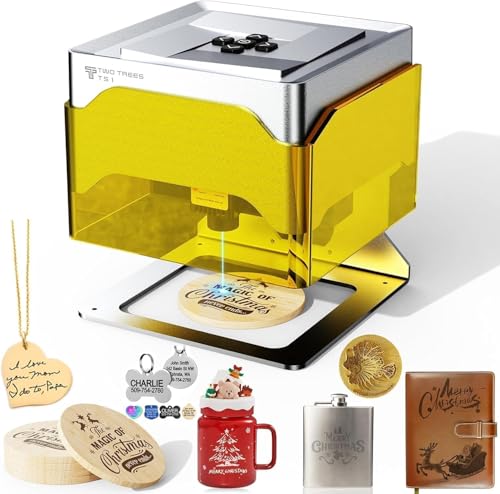
The TS1 Mini focuses on safety and simplicity with a fully enclosed design and a 3W adjustable laser. It is ideal for classrooms and family workshops, enabling basic engraving on thin materials with a 0.1mm precision. Best for beginners and educational settings; avoid if you plan heavy cutting or thick materials because of the modest power head.
CREALITY FALCON 10w Laser Engraver

The CREALITY FALCON offers high-precision, 10W output with a rotary roller for cylindrical objects. It can handle wood, metal, and acrylic with fast pass-throughs for productivity. Best for users needing rotary engraving and larger-format projects; safety features and assembly speed are important considerations for unsupervised environments.
Buying Guide
What should you consider when choosing a budget laser engraver?
- Purpose and materials: Identify your primary materials (wood, acrylic, metal) and whether you need cutting capability or only engraving.
- Power and precision: Higher wattage generally enables deeper cuts and faster work, while 0.01mm precision supports fine details on small surfaces.
- Safety and enclosure: Fully enclosed designs reduce exposure and debris, especially for family use or classrooms.
- Software compatibility: Look for models with familiar workflows (LightBurn, LaserGRBL) and offline options for batch jobs.
- Work area: Larger beds support bigger pieces; compact desks fit small spaces but limit projects.
- Support and ecosystem: Starter kits, materials, and active communities help beginners progress faster.
Frequently Asked Questions
- What is the difference between a diode laser and a CO2 laser in budget models?
– Diode lasers are typically smaller, more affordable, and better for engraving on lightweight materials; CO2 lasers offer higher power and cutting capability but at a higher cost and larger footprint. - Do budget laser engravers require safety gear?
– Yes, safety glasses rated for the specific wavelength and proper ventilation or enclosure use are recommended. - Can I engrave metal with these budget machines?
– Some can engrave coated metals or metals with marking sprays, but many are optimized for wood, acrylic, and leather. Deep metal cutting usually requires higher power and specialized setups. - Is offline operation important for beginners?
– Offline functionality can simplify workflows and batch jobs, which is helpful for learning and small businesses. - Are these easy to upgrade or expand later?
– Many offer compatible software and accessory options, but power and beds sizes may be fixed by the model line.