Looking for an affordable, reliable wireless keyboard that covers basic typing needs and fits cramped desks? This guide highlights budget-friendly options that balance cost with practical features like full-size layouts, quiet keys, and steady wireless connections. Each pick targets common buyers: students, home offices, and productivity users who want a dependable keyboard without breaking the bank. Below you’ll find concise product sections, a quick comparison table, and a practical Buying Guide to help you decide.
| Product | Key Benefit | Ideal For |
|---|---|---|
| Logitech K270 | Full-size layout with Unifying receiver | Desktop users who may later expand with other devices |
| Logitech MK270 | Combo with mouse, reliable 33 ft range | Complete wireless workstation setup |
| Logitech K250 | Compact, Bluetooth connection | Tidy desks and mobile Bluetooth use |
| Soueto RGB Keyboard | RGB backlight and device holder | Kids, gamers, or desk aesthetics |
| Harburfine USB Silent Keyboard | 2.4G wireless, quiet keys | Shared workspaces and quiet environments |
Logitech K270 Full Size Wireless Keyboard

- Full-size layout with numeric keypad; eight hotkeys
- Unifying receiver enables connecting additional Logitech devices
Best for: Home office or classroom users who want a dependable full-sized keyboard with expandability via the Unifying receiver. The included receiver supports adding other Logitech peripherals, reducing USB clutter. The keyboard emphasizes stable wireless performance with basic keying comfort.
Why selected: It balances a traditional layout with reliable connectivity and a straightforward setup, making it a solid starter option for budget buyers.
Caution: Some users may prefer quieter or more compact designs for small workspaces.
Logitech MK270 Full Size Keyboard and Mouse Combo

- Full-size keyboard with a mouse; reliable USB receiver
- 33 ft wireless range; low-profile, quiet keys; durable, spill-resistant design
Best for: Users seeking a complete wireless workstation with an included mouse and dependable range for desktop setups or shared spaces.
Why selected: The combo streamlines setup and keeps typing comfortable with a familiar layout, making it better for multi-device or multi-user environments.
Caution: The included mouse is basic; advanced mouse features may require a separate upgrade for gamers or design professionals.
Logitech K250 Compact Wireless Keyboard with Number Pad

- Compact design with number pad; quick Bluetooth pairing
- Spill-resistant design; durable, deep-profile keys
Best for: Users with limited desk space who still want full functionality and a dedicated number pad for data entry or budgeting tasks.
Why selected: The compact footprint preserves desk real estate while offering practical features for everyday typing.
Caution: Bluetooth pairing can be less stable in crowded wireless environments; consider a wired backup if interference is a concern.
Soueto Wireless Keyboard With RGB Backlight

- RGB backlit with 7 colors and 4 modes; adjustable brightness
- 8.7″ device holder for phone or tablet; tactile, quiet keystrokes
Best for: Buyers who want a budget keyboard with visual flair and a convenient device holder for multitasking or entertainment setups.
Why selected: The added backlighting and device holder offer a practical upgrade for those who value aesthetics and desk organization.
Caution: The keyboard’s backlight features may be more appealing than essential for some users; ensure you actually need RGB lighting in a budget model.
EDJO Wireless Keyboard And Mouse Combo

- Full-size keyboard with numeric keypad; 12 multimedia shortcuts
- Shared USB receiver with the mouse; 33 ft range
Best for: Home offices or students who want a complete entry-level wireless setup without software installation.
Why selected: The combo reduces clutter and aligns with budget-conscious buyers who need both keyboard and mouse functioning together.
Caution: The keyboard’s built-in compatibility notes indicate standard 2.4 GHz behavior; verify operating system support if you rely on specific shortcuts.
EDJO Wireless Keyboard K258 – 2.4G
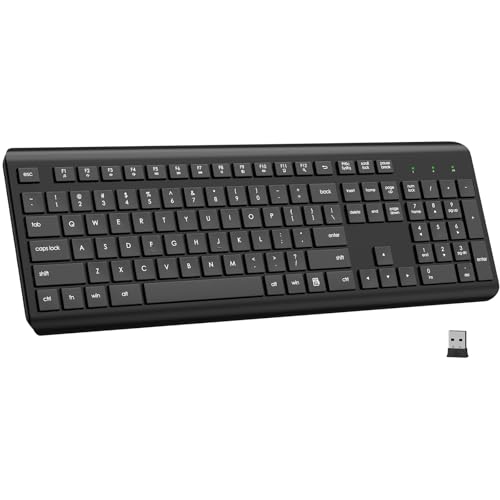
- Ergonomic tilt legs; 12 multimedia keys; long battery life
- Stable 2.4G wireless connection; plug-and-play; USB receiver stored in keyboard
Best for: Users who want ergonomic features and easy setup without software requirements.
Why selected: The combination of tilt adjustments, long battery life, and a hidden USB receiver makes it a practical, unobtrusive budget option.
Caution: Some users may prefer Bluetooth for newer devices; if your device supports Bluetooth, a Bluetooth-only keyboard could reduce USB usage.
Buying Guide: Key Considerations For Budget Wireless Keyboards
Choosing the right budget wireless keyboard hinges on typing comfort, connection stability, and your workspace needs. Consider these practical questions as you compare options:
- What is the primary use case? Basic typing, data entry, or multimedia control? If you need a full layout with a numeric keypad, prioritize full-size models like the K270 or MK270.
- What is your preferred connection type? 2.4 GHz receivers tend to offer reliable ranges; Bluetooth keyboards provide portability but can require pairing steps.
- Do you need an accompanying mouse? If yes, a combo like MK270 or EDJO bundles can simplify setup and reduce desk clutter.
- Is desk space a constraint? Compact models save space, but you may trade off some comfort or key travel.
- How important are backlit keys or macros? RGB backlighting (Soueto) adds ambiance; macro capability (AULA) suits gamers but may be less essential for typical office work.
Practical tips: check the number of multimedia shortcuts you rely on, confirm battery life expectations, and verify compatibility with your operating system. If you share a workspace, look for quiet keys and stable wireless performance to minimize interruptions.
Frequently Asked Questions
- What’s the advantage of a wireless keyboard over a wired one for budget users? Wireless keyboards reduce desk cable clutter and offer flexible placement, often at a lower upfront cost in budget ranges.
- Can a budget wireless keyboard work with both Windows and Mac? Many budget keyboards support Windows and macOS, but layout differences and shortcut keys may vary. Check compatibility notes in product descriptions.
- Is a USB receiver more reliable than Bluetooth for budget keyboards? USB receivers typically deliver stable connections with predictable range; Bluetooth can be more convenient for devices without USB-A ports.
- Do budget wireless keyboards have long battery life? Battery life varies, but many models use standard AAA or coin cells. Look for auto-sleep features to maximize longevity.
- Should I buy a keyboard-mouse combo or separate devices? Combos save space and setup time; separate devices can offer more customization and upgrades over time.
- What should I avoid when shopping budget keyboards? Be cautious of keyboards with questionable build quality, inconsistent key travel, or weak wireless ranges in busy environments.