We answer the search for a compact, dependable card machine that fits a small business. This guide highlights five options that cover countertop, handheld, and mobile use cases. The top picks are best for retailers, food-service pros, and service-based businesses needing efficient payments, offline capability, and simple setup. Each option is evaluated for who it’s best for, plus practical caveats to consider before you buy.
| Product | Best For | Why It Stands Out |
|---|---|---|
| Square Terminal | Retail counters and mobile staff | All-in-one payment, receipt printing, and portability |
| Square Reader (2nd Gen) | Low-cost, flexible payments | Contactless/Chip, offline mode, no monthly fees |
| Square Handheld | Tableside service and on-the-go sales | Pocketable, durable, with built-in barcode scanning |
| SumUp Plus Card Reader | Simple, low-rate card acceptance | Fixed, transparent rates and mobile-use |
| MUNBYN IMP001 Receipt Printer | Android-based receipt printing | Compact, Android POS compatibility (not iOS) |
Square Terminal — Credit Card Machine to Accept All Payments

Best for: Retail counters, pop-up shops, and staff who need a single device for selling and printing receipts. Square Terminal accepts all major cards and provides a single low rate with no long-term commitment. It processes chip cards quickly (about two seconds) and can function at the register or away from the counter. The integrated printer streamlines checkout and reduces trips to a separate printer.
Why selected: Combines payment acceptance, receipt printing, and mobility in one unit. The device supports a straightforward pricing model and eliminates hardware fragmentation. If you want a centralized, easy-to-use terminal without extra accessories, this is a strong choice.
Caution: Users should verify power availability for longer shifts since the device relies on battery life and may require charging between uses.
Square Reader for Contactless and Chip (2nd Generation)
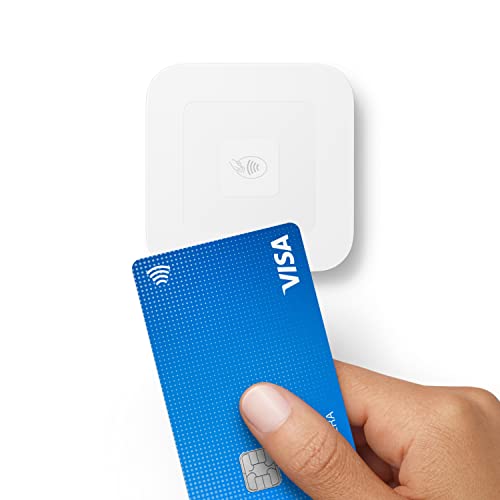
Best for: Small businesses needing flexible, affordable card acceptance with offline capability. This reader supports contactless payments, chips, Apple Pay, and Google Pay, with improved connectivity and longer battery life. There are no monthly fees, and offline payments can be stored for up to 24 hours, which helps in busy or spotty-connectivity environments.
Why selected: It’s a scalable step-up from basic readers, suited for entrepreneurs who travel or work across a single venue. The offline mode is a practical feature for markets, pop-ups, or events where Wi-Fi isn’t guaranteed.
Caution: Some users may outgrow the device if they require a full POS system with extensive inventory and reporting integrations.
Square Handheld — Portable POS for Restaurants, Retail, and Services

Best for: Service-based businesses that need tableside payments, quick checkouts, or mobility within a store. The handheld unit is slim, pocketable, and designed for on-the-go use. It supports tableside ordering and includes a built-in barcode scanner for quick item lookup, making it a versatile tool for restaurants, salons, and retail.
Why selected: Combines portability with practical features like offline payments and a durable build to withstand everyday use. It’s an ideal pick for teams that move between locations or need a compact device that still offers robust payment functions.
Caution: It may be more expensive than simple card readers, so businesses should ensure the extra features align with their workflow and budget.
SumUp Plus Card Reader, Bluetooth — NFC/RFID for Smartphones

Best for: Small business owners who want simple, predictable pricing and mobile card acceptance. The SumUp Plus supports major card brands at a low rate with no hidden fees or long-term contracts. It’s designed for use with a smartphone, making it ideal for mobile vendors and pop-up shops.
Why selected: The model emphasizes transparency and affordability. It’s a clean, straightforward option for those who want quick setup without ongoing commitments, making it a practical entry point into electronic payments.
Caution: The SumUp system may offer fewer advanced POS features compared with full-service ecosystems, depending on growth plans and needed integrations.
MUNBYN IMP001 Receipt Printer 58mm Mini Wireless POS

Best for: Android-focused small businesses needing a compact receipt printer in a mobile POS setup. The IMP001 is not compatible with iOS, iPad, or macOS, so choose this if your workflow runs on Android or a Windows PC via USB. It integrates with Loyverse POS and similar Android apps for receipt printing.
Why selected: It provides reliable, professional receipt printing in a small form factor. If your business operates primarily on Android devices and Loyverse or comparable POS software, this printer offers a cost-effective way to issue receipts on the go.
Caution: Not compatible with iOS devices or Square; verify your POS ecosystem before purchasing to avoid compatibility gaps.
Buying Guide
What should you consider when choosing a card machine for a small business?
- Payment methods: Look for support for chip, magnetic stripe, contactless, Apple Pay, and Google Pay. If you frequently serve customers who prefer mobile wallets, a reader with strong contactless support is essential.
- Mobility needs: Decide between countertop terminals, handheld devices, or fully portable mobile readers. For table service, a handheld or portable POS can speed up transactions and reduce lines.
- Offline capability: If you operate in areas with spotty connectivity, ensure the device can store payments offline and sync later, reducing lost sales.
- Pricing model: Compare upfront costs, monthly fees, and processing rates. Some devices have no monthly fees but charge higher per-transaction rates; others offer bundled services with lower rates but require contracts.
- Ecosystem and integrations: If you already use a POS or inventory system, verify compatibility and ease of data transfer. A cohesive ecosystem reduces manual work and errors.
- Receipt options: Consider whether you need printed receipts or digital receipts. An all-in-one solution that prints receipts reduces the need for extra peripherals.
- Durability and environment: For restaurants or dusty/workshop environments, prefer devices rated for durability and water/dust resistance. This minimizes downtime from damage.
Comparison Snapshot
Key distinctions help buyers choose quickly:
- Best all-in-one countertop and mobile use: Square Terminal
- Best budget-friendly, flexible payments: Square Reader (2nd Gen)
- Best tableside and on-the-go: Square Handheld
- Best simple pricing: SumUp Plus Card Reader
- Best Android-oriented receipt printing: MUNBYN IMP001
Frequently Asked Questions
- What is the easiest card machine for a small business?
Square Terminal and Square Reader options are widely used for their straightforward setup and integrated payment processing.
- Do these devices require a monthly subscription?
Many offer no monthly fees, but some plans may have optional services. Always check current terms for each model.
- Can I use offline payments with these devices?
Yes, several models support offline payments and will sync data when connectivity is restored.
- Are there compatibility concerns with existing POS systems?
Yes. Some devices are Android-centric or Apple-centric and may not integrate with every POS. Verify compatibility with your chosen system.
- Which device is best for a mobile selling environment?
Handheld and portable readers are typically the best fit for mobile or tableside selling, offering easy portability and quick checkout.
- Do these devices print receipts, or are receipts digital only?
Some models include integrated printing; others rely on digital receipts. If you need printed receipts, choose a device with a printer or pair with a compatible printer.