If you’re looking for card making software to design greeting cards, invitations, and other personalized prints, you’ve found a solid starting point. The top picks here suit crafters, small business owners, and hobbyists who want a mix of templates, user-friendly guides, and royalty-free assets. This guide highlights five strong options, explains who each is best for, and notes practical considerations to help you decide. A quick buying table after the intro summarizes key strengths and ideal uses for quick scanning.
| Product | Best For | Key Strength |
|---|---|---|
| PrintMaster v8 Platinum | Crafters and small studios needing abundant templates | New templates, social media designs |
| Print Artist Gold 25 | Users needing extensive template libraries | Massive template and graphic library |
| Nova Development US, Print Artist Platinum 25 | Beginner-friendly, modern interface | Video tutorials and easy sharing |
| PrintMaster v7 Platinum for PC | Designers seeking versatile image and text tools | Updated UI and powerful text features |
| Hallmark Card Studio | Holiday and occasion-focused card design | Hallmark library and etiquette guide |
PrintMaster v8 Platinum For PC

Best for creators who want a broad set of templates and social media-ready designs. PrintMaster v8 Platinum offers greeting cards, invitations, labels, calendars, business cards, flyers, posters, bulletins, and party supplies. It emphasizes versatility with thousands of royalty-free images and templates plus new social media templates. The updated user interface and project wizard aim to simplify the design flow, making it a strong choice for users who value efficiency and variety in one package.
Who it’s best for: hobbyists and small teams who frequently produce varied print projects and social content. If you imagine it, this software should help you create it, thanks to extensive templates and a guided design process.
Why selected: The combination of templates, royalty-free assets, and an easier design flow makes it a practical all-in-one tool for multi-format projects. A potential limitation is the breadth of features, which may require a bit of time to master if you’re new to desktop design software.
Print Artist Gold 25

Best for users who need an immense library of templates and graphics. Print Artist Gold 25 provides 16,700+ professionally designed templates and 277,000+ graphics, along with 700+ premium fonts. The scale of assets makes it ideal for those who want to keep templates fresh and varied without sourcing outside content.
Who it’s best for: teachers, small business owners, or crafters who produce frequent card designs across multiple occasions and prefer a robust asset library.
Why selected: The sheer volume of templates and graphics supports rapid production and customization. A caveat is that the sheer number of options can be overwhelming for absolute beginners or those with simpler design needs.
Nova Development US, Print Artist Platinum 25

Best for beginners seeking a modern, approachable interface with guided learning. Print Artist Platinum 25 includes a new user interface designed for easier navigation, plus a video tutorial for a fast start and simple sharing to Facebook and YouTube. This makes it a solid entry point for those who want quick results and easy social integration.
Who it’s best for: new card designers and casual users who value straightforward tutorials and simple sharing workflows.
Why selected: The emphasis on learnability and social sharing helps new users become productive quickly. A potential limitation is that it may not offer as many advanced design controls as higher-end suites for power users.
PrintMaster v7 Platinum for PC

Best for designers who want robust typography and modern visuals. Print Master v7 Platinum emphasizes 10,000+ new royalty-free images and a sleek user interface. It adds powerful text handling capabilities, plus new photo fonts, paints, and styles. This makes it a good fit for projects that rely heavily on typography and visual polish.
Who it’s best for: those who design print materials with strong text emphasis and a need for updated visual tools.
Why selected: The combination of newer UI and enhanced text features can streamline complex layouts. A limitation could be that the Mac-specific experience is not the focus here, so Windows-centric workflows may be more seamless if you’re on PC.
Hallmark Card Studio
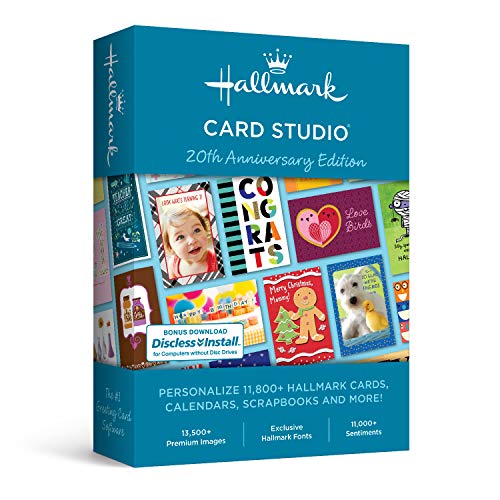
Best for holiday and occasion-focused crafting. Hallmark Card Studio packages 11,800+ cards and projects, covering birthdays, holidays, weddings, anniversaries, and more. It also includes a Hallmark writing etiquette guide and a video tutorial to learn browsing, editing, and customizing efficiently.
Who it’s best for: crafters who want ready-to-use Hallmark designs and guidance on writing and layout etiquette. A potential drawback is that the library emphasizes Hallmark-branded content, which may feel limiting if you want non-Hallmark styles.
Buying Guide: Key Purchase Considerations
What format suits you best: PC or Mac? Some titles skew toward PC with improved UI, while others offer strong Mac compatibility and retina-ready outputs. Consider your hardware and preferred operating system when choosing.
How large should your asset library be? If you value breadth, options like Print Artist Gold 25 provide massive templates and graphics. If you want guided workflows, Nova Development US’s Platinum 25 emphasizes tutorials and easy sharing.
Do you need social sharing built in? Several options include direct sharing to Facebook or YouTube. If social content is part of your strategy, prioritize those features.
Is typography a priority? Titles like PrintMaster v7 Platinum highlight advanced text handling and new fonts, making them better for typography-focused projects.
What is your budget and learning curve? For beginners, a modern UI with tutorials may reduce the initial investment in time. For power users, larger libraries and richer design controls justify a higher upfront commitment.
Frequently Asked Questions
- What is the main purpose of card making software?
To design, customize, and print or share greeting cards, invitations, and related print items using templates, images, and fonts.
- Which program is best for beginners?
Nova Development US, Print Artist Platinum 25 emphasizes a new user interface and video tutorials, aiding quick onboarding.
- Which software offers the most templates?
Print Artist Gold 25 provides a very large library of templates and graphics for varied projects.
- Can these programs export to social media?
Some options include built-in sharing to Facebook and YouTube, but capabilities vary by product.
- Are Hallmark Card Studio designs limited to Hallmark content?
It centers on Hallmark designs and etiquette guides, which is ideal for fans of that style but may feel limiting for non-Hallmark preferences.
- Do these tools support professional printing?
Most offer standard printing workflows and customizable card sizes, but always verify your printer compatibility and paper stock requirements before printing.