Answering your search for affordable gaming keyboards, this guide highlights five solid options that balance price with reliable performance. Whether you need a compact 60–65% layout for tight desks, a full-size workstation, or a versatile wired setup for gaming and productivity, there’s a budget-friendly pick here. Ideal buyers vary: space-efficient players, travel-focused gamers, office-starters, keyboard enthusiasts watching value, and those seeking a solid all-rounder. Below is a quick comparison table to help you decide at a glance.
| Product | Layout | Key Count | Connectivity | Best For |
|---|---|---|---|---|
| GEODMAER 65% Keyboard | 65% | 68 | Wired | Compact office/gaming on a budget |
| Guiheng Wired 60% Keyboard | 60% | 68 | Wired | Ultra-portable, travel-friendly gaming |
| DGG K60 61 Keys Keyboard | 60% | 61 | Wired | Minimalist, budget FPS gaming |
| GEODMAER 104 Keys Keyboard | Full Size | 104 | Wired | FullSetup, multimedia control |
| TECKNET Wired Keyboard | Full/Hybrid | 104 | Wired | Ergonomic, RGB versatility |
GEODMAER 65% Gaming Keyboard

The GEODMAER 65% Keyboard uses a compact 68-key design that omits the numpad while keeping essential function and media keys. This wired option aims at gamers and pocket-friendly office use, with a detachable Type-C connection for stability and low latency. Its 26-key anti-conflict layout helps prevent input clashes during fast play, and the keyboard features FN+Win lock to prevent accidental touches. The build emphasizes durability with UV-coated keycaps and a claimed 10,000,000+ keystroke lifespan. Best for space-conscious gamers and travelers who still want full function.
Who it’s best for: gamers with limited desk space, students, and professionals who need a compact yet capable keyboard. Caution: non-standard 65% layouts can take time to adjust if you’re used to full-size keyboards.
Guiheng Wired Portable 60% Keyboard

This 60% keyboard emphasizes portability with a compact 68-key design and a strong “mechanical feeling” through its key construction, even though it remains a membrane-style option. It offers rainbow backlighting and broad compatibility across Windows, Mac, Linux, and mobile OS environments, making it suitable for travelers, students, and remote workers who need a compact, plug-and-play device. Best for: users who want a small, travel-ready keyboard with functional backlighting. Caution: labeled as mechanical-feeling, but it is not a true mechanical switch.
DGG K60 61 Keys Keyboard
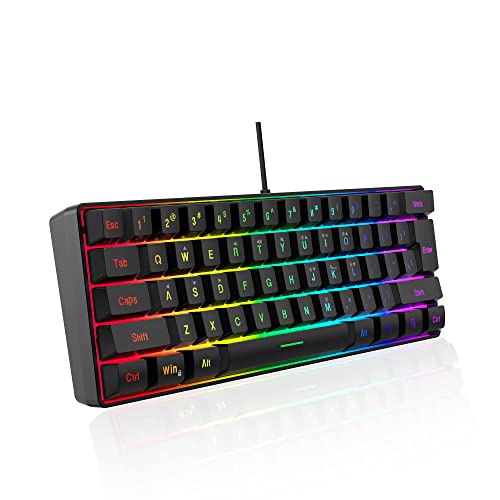
The DGG K60 61 Keys Keyboard is a minimalist 60% layout designed for budget-conscious FPS and travel use. It combines a “membrane with mechanical feeling” experience and a silicone bottom structure to improve key response and comfort. Ergonomically shaped for comfortable long sessions, this model prioritizes compactness while keeping essential gaming-ready keys within reach. Best for: gamers who want a light, space-saving keyboard and don’t require a full-size unit. Caution: “mechanical feeling” is synthetic—real mechanical switches are not present.
GEODMAER 104 Keys Gaming Keyboard

The full-size GEODMAER 104-key keyboard combines a classic layout with LED backlighting and 12 multimedia keys for quick volume and media control. It uses a wired connection and 19-key full anti-ghosting to support simultaneous keystrokes, which is helpful during intense gaming and fast typing. The FN+Win lock prevents accidental touches, keeping gameplay focused. Best for: players who want a traditional full-size setup with reliable multi-key input and backlit keys. Caution: bulkier compared to compact options.
TECKNET Wired Gaming Keyboard

The TECKNET keyboard features ergonomic design with a 7-degree input angle and a stepped key layout to reduce fatigue. It offers a 15-zone rainbow backlight with seven modes and four brightness levels, plus durable ABS keycaps and a sturdy metal base for long-term use. It emphasizes quiet operation and reliability, suitable for mixed gaming and office environments. Best for: users who want comfortable typing and customizable lighting on a durable wired keyboard. Caution: dual-use design may feel bulky for the tightest workspaces.
Buying Guide
What layout should you choose?
- 60% and 65% layouts save desk space, ideal for tight desks or portable setups. They sacrifice a few dedicated keys for portability.
- Full-size keyboards provide dedicated arrow keys and a complete number pad, useful for data entry and long typing sessions.
What should you consider about switches and feel?
- Budget “mechanical-feeling” keyboards use membrane or hybrid switches designed to mimic mechanical feel. For true mechanical typing, expect to spend more or choose a specialized model.
- Consider backlighting preferences: single-color, rainbow, or multi-mode effects, and brightness controls.
Is wired connectivity important?
- Wired keyboards offer lower latency and no battery concerns, which is ideal for competitive gaming and reliability.
- Detachable cables can improve portability and reduce desk clutter, but ensure compatibility with your devices.
Which features maximize value?
- Anti-ghosting and N-key rollover ensure multiple simultaneous keystrokes register correctly, essential for fast action games.
- Media keys and FN-shortcuts improve multitasking during gaming or work sessions.
FAQ
- Q: Are cheap gaming keyboards reliable for long-term use?
A: Many budget keyboards use robust membranes or hybrid switches intended for daily use; longevity varies by build quality and keycap durability. Look for higher keystroke life estimates and UV-coated keycaps where available. - Q: Do I need RGB lighting on a budget keyboard?
A: Not strictly. RGB adds aesthetics and some functional modes, but it increases cost and power use. If you don’t need lighting, opt for a backlit off model to save money. - Q: Is a 60% keyboard good for FPS gaming?
A: Yes, many players prefer compact layouts for faster mouse movement. Ensure the layout includes necessary function keys and media controls you rely on. - Q: Are wired keyboards better for gaming than wireless?
A: Generally, wired connections provide lower latency and consistent signaling, which is advantageous in competitive gaming and fast typing tasks. - Q: Should I choose a keyboard with an integrated USB passthrough or extra macro keys?
A: If you need extra convenience for peripherals, look for extra USB ports or dedicated macro keys. If not, prioritize compact or full-size layouts and build quality instead.