The right Chromebook can boost focus, speed up assignments, and simplify remote learning. This guide highlights five student-friendly options, explaining who each one is best for and why. Perfect for middle school, high school, and college students seeking a dependable, fast, and affordable device.
Summary of selected products:
| Product | Screen | RAM | Storage | Best For |
|---|---|---|---|---|
| HP 14″ HD Chromebook Laptop for Students | 14″ | 4 GB | 64 GB eMMC | General schoolwork, multitasking |
| Dell Chromebook 11 3100 | 11.6″ | 4 GB | 16 GB | Compact carry, younger students |
| HP Chromebook 14 Laptop | 14″ | 4 GB | 64 GB eMMC | All-around learning, longer tasks |
| Acer Gateway Chromebook 314 | 14″ | 4 GB | 64 GB eMMC | Balanced performance and storage |
| ASUS 2026 15″ FHD Chromebook | 15″ | 4 GB | 128 GB storage | Large-display work and media |
HP 14″ HD Chromebook Laptop for Students

Product summary: HP equips students with a 14″ HD display and an Intel Celeron N4120 quad-core processor, delivering reliable multitasking for classwork and research. The device ships with 4 GB RAM and 64 GB eMMC storage for essential apps and documents. Best for middle and high school students who need a dependable chromebook for daily assignments and Zoom classes.
Best for: Students needing a sturdy, affordable Chromebook for classroom tasks and light media consumption. Why selected: balanced performance and battery life align well with school workloads and online learning.
Caution: The 14″ HD display is adequate but not as sharp as Full HD displays on higher-priced models, which may affect detailed design work.
Dell Chromebook 11 3100

Product summary: Dell’s compact 11.6″ Chromebook focuses on portability and straightforward daily tasks. With 16 GB flash storage and Chrome OS, this option emphasizes quick boot times and easy project access. Best for younger students or anyone who travels light between classes.
Best for: Shorter tasks and frequent on-the-go use. Why selected: small footprint makes it easy to carry in backpacks and tote bags.
Caution: Limited local storage may require cloud-first workflows or external storage for large files.
HP Chromebook 14 Laptop

Product summary: This HP model pairs a 14″ HD display with quad-core performance and long battery life, supporting all-day school tasks and streaming in spare time. It is designed for home, work, and school use with reliable all-day performance.
Best for: Students who want a larger screen for note-taking and document work. Why selected: 14″ display offers comfortable viewing without sacrificing portability.
Caution: The HD display resolution is solid for reading and basic multimedia, but not as sharp as Full HD in some higher-end laptops.
Acer Gateway Chromebook 314

Product summary: The Gateway Chromebook 314 offers a 14″ Full HD display, Intel Celeron N4500, and 64 GB eMMC storage. Chrome OS provides fast startup, automatic updates, and access to Google apps like Docs and Drive. Best for students who want a vivid display and solid storage for coursework.
Best for: Balanced performance with better screen clarity for reading long documents. Why selected: Full HD resolution enhances clarity for essays and research sources.
Caution: The storage capacity is modest; plan for cloud storage or occasional external backups if many offline files are needed.
ASUS 2026 15″ FHD Chromebook
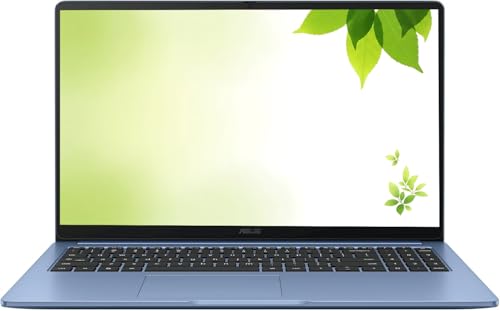
Product summary: This renewed ASUS model features a 15″ Full HD display, a capable processor up to 2.80 GHz, 4 GB RAM, and 128 GB storage. It includes essential ports like USB-C and HDMI, supporting multimedia tasks and extended project work. Best for students who prefer a larger screen for research and presentations.
Best for: Heavy document work and media viewing in a single device. Why selected: the larger display and higher storage offer a smoother experience for multi-window tasks.
Caution: Being renewed, the device may show minor signs of previous use; verify return and warranty terms before purchase.
Buying Guide: Key Considerations for Student Chromebooks
- Screen size and resolution: Larger displays (14″–15″) improve readability for long essays and multi-tab research, while 11″ models excel in portability for younger students.
- RAM and storage: 4 GB RAM handles everyday browsing and document editing. 64 GB eMMC or 128 GB storage helps store assignments and offline documents; consider cloud storage as a complement.
- Battery life: Look for devices that can last through a school day and into study sessions without frequent recharging.
- Processing power: Quad-core processors in the cited models balance performance with power efficiency for typical classroom tasks and video calls.
- Operating system and apps: Chrome OS offers seamless Google Workspace integration, automatic updates, and easy access to essential apps for school.
- Durability and weight: For students who carry devices daily, a robust chassis and light weight reduce wear and fatigue.
- Ports and connectivity: HDMI or USB-C support for external displays; reliable Wi-Fi and Bluetooth are important for online classes and smart devices.
- Renewed vs. new: Renewed models can offer value but check the warranty and device condition before purchase.
Frequently Asked Questions
- What is the best Chromebook for budget-minded students?
A model with 4 GB RAM, 64 GB storage, and a 11.6″–14″ display typically offers the best balance of price and performance for school tasks. - Do Chromebooks support Adobe or Microsoft Office apps?
Chrome OS supports Google Workspace apps and many web-based alternatives; Microsoft Office Online is accessible through the browser, with mobile apps available as needed. - Is a larger display worth the extra cost for students?
A larger screen improves readability and multitasking, which can boost productivity for essays, research, and presentations. - Should I choose renewed or new?
Renewed devices can provide substantial savings but verify warranty length, return policy, and device condition. - How important is storage on a Chromebook?
64 GB of local storage is usually sufficient for documents and offline apps; cloud storage via Google Drive or other services is common for larger files. - Can Chromebooks run school video conferencing apps?
Yes. Chrome OS supports Zoom, Google Meet, and other common video conferencing tools with browser or app versions.