Looking for a colour label printer that delivers sharp, easily readable labels for shipping, name badges, or crafts? This guide highlights top models that support black and red printing, vibrant dye-sublimation color, or clear thermal color output. Each pick serves different needs—from high-speed office labeling to all‑in‑one print-and-cut creativity. Suitable buyers range from small business shipper to DIY hobbyist and home organizers. See a quick comparison table below to help decide which model fits your workflow.
| Product | Best For | |
|---|---|---|
| Brother QL-800 | High-volume shipping labels | Dual‑color black & red printing up to 93 labels/min |
| Liene PixCut S1 Inspire Kit | All-in-one color prints with die-cut labels | Thermal dye-sublimation color printing and AI cutting |
| NIIMBOT B1 | Home labeling with Bluetooth, mobile printing | Bluetooth app, inkless thermal printing |
| Liene PixCut S1 Color Sticker Printer | DIY crafts with color stickers | All-in-one print and AI-driven auto-cut |
| SVANTTO Bluetooth 4×6 | Small business shipping labels on the go | Bluetooth + USB, up to 180 mm/s |
Brother QL-800 High-Speed Printer

The Brother QL-800 is a high-speed thermal label printer designed for busy workspaces. It offers up to 93 labels per minute at 300 dpi, making it a strong choice for shipping departments, warehouses, or any operation with heavy label throughput. The device supports black and red printing, enabling attention‑grabbing status labels or branding touches on shipping labels. Its versatility covers professional shipping, file labeling, name badges, and postage labels, helping streamline daily labeling tasks. Best for businesses that need fast, legible labels and occasional color accents.
Why selected: It excels in speed and color imprinting without requiring ink, and it’s compatible with multiple systems, making it a reliable workhorse for standard label needs. Caution: The top performance relies on compatible DK pre-sized label stock; ensure you select the appropriate label width for your workflow.
Liene PixCut S1 Inspire Kit

The PixCut S1 Inspire Kit combines color printing with cutting, letting you print high‑quality photos and then cut stickers or labels in one workflow. It supports Bluetooth connectivity, enabling you to edit and print from a smartphone, with a bundled stock of 36 photo papers and 144 sticker papers for immediate projects. This all‑in‑one design is ideal for sticker makers, crafters, and small studios seeking a compact solution for color labels and die-cut shapes. Best for creative labeling, personalized gifts, and quick prototyping.
Why selected: It streamlines color output and precise cutting in a single device, thanks to AI image extraction and edge‑accurate cutting. Caution: The kit’s extensive paper pack is great for ongoing projects but requires planning for storage and paper compatibility with your label types.
NIIMBOT B1 Bluetooth Label Printer
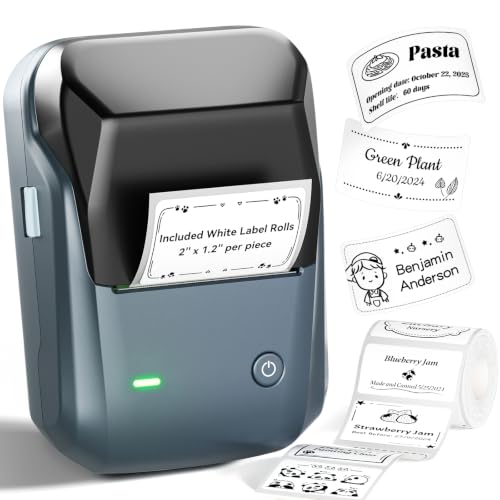
The NIIMBOT B1 focuses on home and small‑office labeling with Bluetooth connectivity. It works with iOS and Android via the NIIMBOT app, making label creation quick and intuitive. For PC use, USB is offered with available drivers. The B1 supports a wide range of fonts, borders, and symbols, enabling customized, stylish labels without ink. Best for home organizers, small offices, and quick household labeling tasks.
Why selected: It provides easy mobile printing and a no‑mess, inkless approach. Caution: Direct Bluetooth printing is not supported on desktops; USB is required for PC printing unless you use the mobile app.
Liene PixCut S1 Color Sticker Printer & Cutting Machine

This PixCut S1 model broadens the color label and sticker capabilities with an all‑in‑one workflow. It combines color printing with AI‑assisted auto‑cutting for precise edges on stickers, photos, and labels. The device uses thermal dye‑sub printing at 300 dpi for vibrant color and true‑to‑life results. Best for DIYers and small studios that want fast color output plus clean, professional cutting in one unit.
Why selected: The AI edge‑following cutting provides consistent results, reducing manual trimming. Caution: The color‑sticker focus means it excels with printed materials that suit dye‑sub outputs; heavy label stock may influence throughput.
SVANTTO Bluetooth 4×6 Thermal Label Printer

The SVANTTO Y42BT offers Bluetooth and USB connectivity, expanding compatibility with Windows, MacOS, ChromeOS, iOS, and Android. It prints at up to 180 mm/s and supports 4×6 shipping labels, with no ink or toner required due to direct thermal technology. Best for small businesses that need flexible device pairing and color‑free, high‑speed shipping labels. Caution: No Wi‑Fi support; ensure your devices can connect via USB or Bluetooth for printing.
Why selected: It’s versatile for platform variety and label sizes, suitable for frequent shipping label generation on the go or from a fixed workstation. Limitation: Bluetooth pairing is required for mobile use, which may require app updates or device compatibility checks.
Buying Guide
What to consider when choosing a colour label printer:
- Label types and sizes: Confirm the label width and material compatibility (thermal transfer vs. direct thermal).
- Color capabilities: Do you need full color dye‑sub output or selective color (black/red) printing?
- Connectivity: Evaluate USB, Bluetooth, Wi‑Fi, and cross‑platform compatibility with your devices.
- Speed and volume: How many labels per minute do you require? Higher speeds suit shipping hubs and busy offices.
- Software and app support: Look for intuitive apps, AI features, and templates that speed up workflows.
- Size and footprint: Ensure the device fits your workspace and storage needs, especially for DIY setups.
- Cost of consumables: Consider label stock availability and ongoing running costs beyond the printer itself.
FAQ
- What is the difference between direct thermal and thermal transfer printing?
Direct thermal prints use heat‑sensitive labels with no ribbon, while thermal transfer uses ribbon for longer‑lasting labels. - Can these printers handle both shipping labels and name badges?
Many models support a range of label types, but confirm label sizes and material compatibility for your exact use. - Do these devices require ink or toner?
Most listed options use thermal or dye‑sub printing and do not require traditional ink. - Is Bluetooth printing reliable for business use?
Bluetooth is convenient for mobility, but USB or Wi‑Fi may offer more stable connections in a busy workspace. - What is AI cutting in sticker printers?
AI cutting uses edge detection to precisely trim shapes, improving consistency and reducing manual finishing. - Are color sticker printers suitable for professional branding?
Yes, when color accuracy and durability meet your product requirements, dye‑sub color outputs can enhance branding.