Answering the common buyer question: which CPU water block should you choose for efficient, quiet, high-flow cooling in a custom loop? This guide highlights five top options that balance compatibility, heat transfer, and ease of integration for modern AMD and Intel systems. The selections cover AM5/AM4 readiness, copper and nickel-plated interfaces, and even advanced features like integrated filters or display panels. Ideal buyers include custom-loop enthusiasts, PC builders upgrading cooling, and anyone seeking reliable heat dissipation for overclocking or sustained workloads. The quick-reference table below compares key choices at a glance.
| Product | Best For | Key Feature |
|---|---|---|
| Thermal Grizzly Mycro Pro RGB | AMD/AM5 fans needing high fin density | 0.2 mm microfins, nickel-plated copper |
| Dracaena.io AMD Water Block | Wide AMD socket coverage | All-copper, 0.4 mm microfins |
| Alphacool Core 1 | Budget-conscious Intel/AMD builders | Black finish, AM4/AM5 compatibility |
| TRYX Panorama WB | Showcase builds with animated display | AMOLED 2K screen, GIPHY |
| EKWB Quantum Velocity 3 | Premium cooling with broad platform support | AM5/1700/1851, precise geometry |
Thermal Grizzly Mycro Pro RGB – High-Performance CPU Water Block
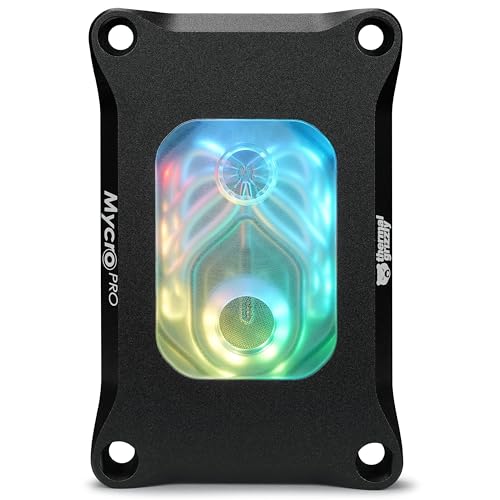
The Thermal Grizzly Mycro Pro RGB is designed for AMD AM5 systems and is compatible with AM4, making it a solid choice for users upgrading from older platforms or building a versatile loop. It features a nickel-plated copper cold plate with 68 microfins at a 0.2 mm structure, providing enhanced surface area for efficient heat transfer under load. An integrated fine mesh inlet filter helps maintain coolant cleanliness, supporting consistent flow through the microfin channels. This block is best for enthusiasts seeking high performance with reliable filtration in a compact footprint.
Who it’s best for: builders aiming for top-end cooling on AMD platforms, particularly those who want a precision-machined block with robust filtration. The Mycro Pro RGB is well-suited for custom loops where heat dissipation and clean flow matter most. Choose this if you prioritize high thermal transfer and compact design; beware of pricing versus simpler blocks if display features are not a priority.
Dracaena.io AMD CPU Water Block AM5/AM4

This block from greenDracaena delivers broad AMD socket support, covering AM5 (Ryzen 7000), AM4 (Ryzen 3000/5000), and even older AM3/AM2 variants without adapters. It uses a full copper water path with a 0.4 mm microfin base plate for strong thermal conductivity. The compact 63 mm by 63 mm form factor makes it suitable for tight builds or mid-tower cases. It’s compatible with any G1/4″ loop and emphasizes a copper-to-copper contact path, helping to minimize mixed-metal risk when paired with compatible components.
Who it’s best for: builders seeking maximum AMD compatibility with a copper-centric loop and straightforward mounting. It’s a solid pick if you want a simple, highly conductive base. Limitations: all-copper design may require careful anti-corrosion planning in mixed-metal systems and mounting hardware considerations.
Alphacool Core 1 CPU Water Block

The Alphacool Core 1 is a versatile block that supports both Intel and AMD sockets, including AM4 and AM5. It features a black finish and a straightforward, performance-focused design. The Core 1 is an attractive option for budget-conscious builds that still demand reliable heat transfer without complex customization. It pairs well with mainstream pump and radiator combos, and its simple mounting can speed up assembly for new loop builders.
Who it’s best for: first-time or budget builders who want reliable performance across multiple platforms. Better for: mid-range cooling setups where a proven, clean design matters. Cautions: color and styling are secondary to function, so you may miss some premium features found in higher-end blocks.
TRYX Panorama WB CPU Water Block with AMOLED Screen
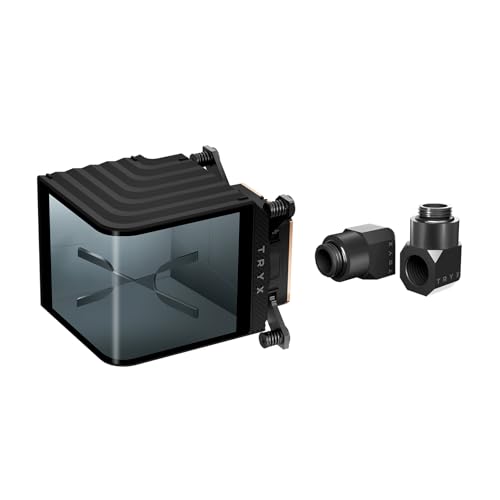
The TRYX Panorama WB introduces a 6.67″ AMOLED curved display to a CPU water block, delivering vivid visuals alongside cooling. It uses a G1/4″ connection standard and emphasizes an immersive display experience with 2K resolution (60Hz). The KANALI software enables GIPHY integration and screen adjustments, offering a unique way to customize the look of a liquid-cooled system. This block is best for showpiece builds or enthusiasts who want dynamic on-block visuals.
Who it’s best for: builders wanting a dramatic, display-focused cooling loop. Choose this if you value aesthetics and customization with real-time monitoring, but avoid this if you prefer pure cooling efficiency over display features or have limited space for a large block footprint.
EK-Quantum Velocity 3 CPU Water Block

The EK-Quantum Velocity 3 is a high-end water block designed for AMD AM5 and Intel LGA 1700/1851 platforms. Its optimized internal geometry and precise mounting pressure aim to maximize heat transfer efficiency, delivering notable performance gains over its predecessor. This block is positioned for demanding workloads and premium builds where peak cooling performance is a priority. It supports a wide range of modern sockets and emphasizes meticulous engineering and sealing integrity.
Who it’s best for: enthusiasts requiring top-tier cooling in multi-platform builds, especially with high-performance CPUs and heavy loads. Better for: power users pushing thermal limits. Limitation: premium pricing may be a consideration if your use case does not require extreme thermal performance or multi-socket compatibility.
Buying Guide: How To Choose The Right CPU Water Block
What socket and platform does it support?
Ensure the block is compatible with your CPU socket and motherboard platform (AM4, AM5, LGA 1700, etc.). Some units offer broad AMD compatibility, while others target Intel platforms. If you plan to upgrade CPUs soon, a versatile option is advantageous.
What material provides the best heat transfer?
Nickel-plated copper offers excellent thermal conductivity and corrosion resistance. All-copper paths maximize conductivity, but care is needed in mixed-metal loops. Blocks with layered microfins (e.g., 0.2 mm) improve surface area for heat exchange, especially under load.
Do you need filtration or flow-hardening features?
Some models include integrated inlet filters to trap particulates and maintain steady coolant flow. If your loop uses long runs or multiple components, a built-in filter can extend pump life and performance.
Is on-block display or aesthetics important?
Blocks like TRYX Panorama offer AMOLED displays for visual impact and software-driven customization. If aesthetics or showpiece builds matter, this can influence your choice even if it adds cost or complexity.
What is your budget and cooling target?
Higher-end blocks typically provide better thermal performance and more precise mounting, but mid-range options still deliver solid cooling for most workloads. Match the block’s performance to your CPU, cooling loop, and overclocking goals.
What are installation considerations?
Check mounting hardware compatibility, screw pattern, and the ease of installing a backplate or delidding considerations if applicable. A straightforward mounting system reduces risk during assembly and ensures even pressure across the cold plate.
Quick comparison by scenario
- Best overall performance for AMD AM5: Thermal Grizzly Mycro Pro RGB or EK-Quantum Velocity 3 for top-tier cooling with broad socket support.
- Best for wide AMD compatibility: Dracaena.io AMD Water Block with cross-generation AM3/AM2 support.
- Best all-around value: Alphacool Core 1 for reliable cooling across AM4/AM5 without premium features.
- Best for display-focused builds: TRYX Panorama WB with AMOLED display, for aesthetics and customization.
Frequently Asked Questions
- Do CPU water blocks work with all coolers?
Most blocks require a compatible radiator, pump, and tubing; verify your loop components match the block’s mounting and connection standards (G1/4″ is common).
- Can I mix metals in a water cooling loop?
Using dissimilar metals can cause galvanic corrosion. Prefer blocks with copper or nickel plating and ensure compatible, corrosion-resistant fittings and coolants.
- Is active cooling required for high-end CPUs?
High-performance blocks paired with adequate radiators can maintain cooler temperatures under heavy loads, but the exact need depends on the CPU and workload.
- Do AMOLED display blocks affect cooling efficiency?
Display blocks add electronics that can take minor cooling headroom, but the impact is typically small compared to overall radiator capacity. Choose based on aesthetics if cooling impact is a concern.
- How important is microfin structure?
Finer microfins (like 0.2 mm) increase surface area, improving heat transfer, especially under load. The overall design and flow path still matter for best results.
- Which block is best for beginners?
Blocks with straightforward mounting and broad socket support, such as Alphacool Core 1, are typically easier for first-time builders.