Answering the top buyer question: Which data recovery software fits my needs for Windows and external drives? This guide compares five reliable options, highlighting who each product is best for, typical use cases, and practical limitations. The listed products cover common scenarios such as recovering photos, documents, emails, and media from hard drives, USBs, SD cards, and more. Use this overview to match a tool to your data loss situation, whether you’re a student, professional, or home user.
| Product | Best For | Key Strength |
|---|---|---|
| Stellar Data Recovery Professional (Windows) | All-round recovery on Windows PCs and externals | Broad file-type support and external drive recovery |
| Data Recovery Software (Markt + Technik) | Beginner-friendly deletion recovery on Windows | Simple interface for quick file restoration |
| Data Recovery Stick (Paraben) | Portable recovery when you can’t install software | Plug-and-play recovery across multiple storage types |
| Data Recovery Professional (Avanquest) | Wide file-type recovery with easy steps | No technical skills required |
| Advanced File Recovery (Systweak) | Formatted or corrupted drives needing deep scan | Supports many external devices and formats |
Stellar Data Recovery Professional for Windows Software

Features indicate support for restoring many file types from Windows PCs and external media, including HDDs, SSDs, USB drives, and optical discs. It emphasizes recovery from corruption, missing partitions, and formatting. It can handle Word, Excel, PowerPoint, PDFs, and common formats, with broad compatibility across NTFS, FAT, and exFAT file systems.
Best for: Users needing a robust, all-around recovery tool on Windows with broad media support. If you work with diverse file types and external drives, this is a strong all-purpose option.
Limitations: Some advanced features require careful use; ensure you select the correct scan type for your storage device to maximize recoverable data.
Data Recovery software compatible with Windows 11, 10, 8.1, 7

Designed to recover deleted and lost files, this tool targets documents, audios, videos, photos, images, and e-mails. It also offers recovery from emptied recycling bins. The interface appears approachable for new users and aims at quick restoration of recently deleted items.
Best for: Windows users seeking a straightforward recovery path after accidental deletions or bin empties. Good for quick, low-friction restorations.
Limitations: May not include all advanced recovery options found in higher-end packages; verify file-type coverage for your needs before purchase.
Data Recovery Stick for Windows Data Recovery Software
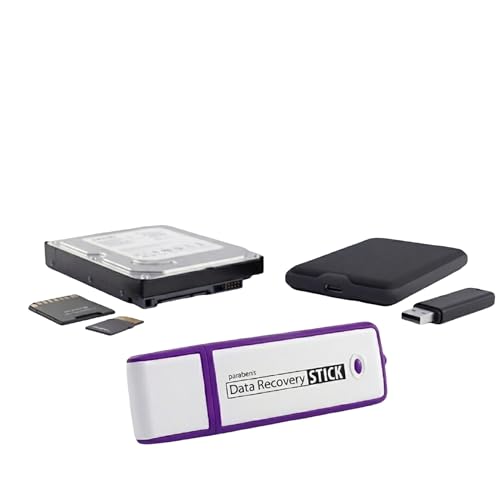
The Data Recovery Stick is a portable option that requires no tech skills. It automates scanning and recovery within minutes after plugging into a Windows computer. It supports FAT and NTFS file systems and covers photos, documents, and a wide range of file types.
Best for: On-the-go recovery whenever software installation is impractical or not permitted. Suitable as a first-step tool for personal or small-business needs.
Limitations: A media reader may be required for certain micro SD cards or larger devices; performance depends on the drives connected.
Data Recovery Professional [Download] (Avanquest)

Avanquest’s Data Recovery Professional emphasizes no-technical-skill recovery and support for recovering folders and more than 300 file types. It can retrieve data from drives, cameras, iPods, CD/DVDs, memory cards, and lost partitions.
Best for: Users who want a broad file-type scope with a simple recovery flow, including removable media and cameras. It’s a practical choice for multi-device environments.
Limitations: As with many recovery tools, results depend on how data was lost and the integrity of the storage medium.
Advanced File Recovery – Systweak

Systweak’s Advanced File Recovery emphasizes deep scans for deleted files, photos, documents, and multimedia across PC, hard drives, USBs, SD cards, and other devices. It supports recovering data from formatted, crashed, or unbootable drives and aims to maximize recovery results with robust scanning algorithms.
Best for: Scenarios involving formatted or severely corrupted drives where deep scanning is required. Choose this if you need a deep-dive recovery approach.
Limitations: Deep scans can take longer; plan time accordingly for large drives or complex data loss events.
Buying Guide
How should you choose the right data recovery software for your needs?
What storage scenarios do you need to cover?
Consider whether you need recovery from internal hard drives, external USB drives, SSDs, memory cards, or cameras. Some tools excel with external media, while others emphasize deep scans for formatted or corrupted drives.
What file types are most important?
If you primarily recover photos, videos, or documents, ensure the tool supports those formats. Tools advertising broad file-type support are typically safer for mixed recoveries.
Do you prefer a portable or installed solution?
Portable options (like the Data Recovery Stick) are convenient when software installation isn’t possible. Installed software may provide more features and deeper scans on a single system.
What is your skill level and budget?
For non-technical users, a straightforward, wizard-guided workflow is helpful. If you face complex data loss, a tool with deep-scan options and robust file-type support is advantageous. Compare licensing: per-PC, subscription, or one-time license models.
Are there limitations or risks to consider?
Some tools perform best when the drive is not further used after data loss to avoid overwriting recoverable data. Always run scans from a separate drive when possible and avoid full-disk writes during recovery attempts.
Quick comparison at a glance
- Best overall broad-coverage option: Stellar Data Recovery Professional (Windows).
- Best for quick, beginner-friendly recoveries: Markt + Technik Data Recovery Software.
- Best portable solution: Paraben Data Recovery Stick.
- Best for wide-file-type recovery with simple steps: Avanquest Data Recovery Professional.
- Best for deep scans on formatted or corrupted drives: Systweak Advanced File Recovery.
Frequently Asked Questions
- Can data recovery software recover files from a wiped drive?
Yes, some tools perform deep scans to detect remnants, but success depends on how data was wiped and subsequent use of the drive. - Is data recovery software safe to use on my main computer?
Yes, but consider using a secondary drive or a bootable recovery environment to minimize overwriting data on the affected drive. - Do I need an internet connection to recover data?
Some tools work offline after installation; others may require activation online. Check the product’s licensing details. - What file systems are most commonly supported?
NTFS, FAT (FAT16/FAT32), and exFAT are widely supported; some tools also handle APFS or HFS+ on macOS drives when applicable. - What’s the difference between a trial and full license?
Trials typically offer limited recovery or scanning features; full licenses enable complete recovery across devices. - Can these tools recover emails?
Some products list email recovery as supported format types; verify compatibility with your email data source before purchase.