Looking for an IPTV-friendly device that delivers crisp 4K video, smooth app performance, and easy navigation? This guide highlights five top options suited for different viewing needs—from home theater setups to on-the-road entertainment. Whether you want a robust Android TV box, a Google TV experience, or reliable remote controls for your IPTV setup, these picks help you choose with confidence. The buyer-friendly table below summarizes the key strengths and best-use cases for each product.
| Product | Brand | Best For | Why Picked |
|---|---|---|---|
| Smart TV Box Android 14.0 4K@60FPS | RUPA | Home theater fans | Latest Android 14.0, 4GB RAM, 32GB storage, HDR10+, 4K@60fps |
| Formuler Z10 Android 10 | Formuler GTV | Budget Android option | Android 10, 2GB RAM, 8GB ROM |
| BuzzTV G-Series Google TV Set Top Box | BuzzTV | Google TV lovers | 4GB RAM, 64GB storage, AI upscaling, Voice remote |
| OTTOCAST Play2Video Ultra 2026 | OTTOCAST | Car or on-the-go streaming | Built-in Netflix/YouTube, CarPlay/Android Auto, WiFi 6 |
| BuzzTV IPTV XPL Remote | BuzzTV | Remote accessory | Factory replacement remote for BuzzTV XPL boxes |
Smart TV Box Android 14.0 4K@60FPS — RUPA

Features: Ultra 2K 4K experience at 60fps with HDR10+, supports 720p to 8K decoding, 64-bit RK3528 quad-core, 4GB RAM, 32GB storage. Runs Android 14.0 for improved security and app compatibility. It can play local videos from SD cards; external hard drives require separate power. Best for viewers seeking a true 4K, HDR experience and a robust home-theater hub.
Best for: Households that want a future-ready Android TV box with high-resolution output and solid multitasking. The device is ideal for streaming apps, local media playback, and a smoother interface due to Android 14.0.
Caution: External storage may require an additional power supply for large drives. Some users may need to verify OTA updates for Android 14 compatibility.
Formuler Z10 Android 10 — GTV

Features: Android 10, 2GB RAM, 8GB ROM. Compact option with essential Android TV capabilities. Best for: Viewers who want a straightforward Android streaming device with reliable performance at a lower price point. Better for lighter multi-tasking and fewer installed apps.
Limitation: Lower RAM means less headroom for heavy multitasking or many simultaneous apps; may feel slower with demanding apps or 4K content.
BuzzTV G-Series Google TV Box

Features: Google TV platform, 4GB RAM, 64GB storage, AI upscaling, Wi-Fi 6, gigabit Ethernet, voice remote. Best for: Those who prefer Google TV’s content recommendations and app ecosystem, with smooth browsing and scalable storage. The AI upscaling helps optimize lower-resolution sources for better clarity.
Limitation: Google TV may require more frequent updates; some users might prioritize simplicity over the full Google TV feature set.
OTTOCAST Play2Video Ultra 2026

Features: All-in-One Car Entertainment Hub with built-in Netflix and YouTube; supports up to 128GB USB drive for offline playback. WiFi 6, Bluetooth 5.4, Android 12. Best for: In-car streaming and family trips, where entertainment is needed on the vehicle display. The offline playback option adds resilience in low-connectivity scenarios.
Limitation: Car-focused UI may differ from home TV experiences; not optimized for fixed-wall entertainment setups. Use primarily in vehicles or as a portable multimedia unit.
BuzzTV IPTV XPL 1000 Remote

Features: Factory replacement remote for BuzzTV XPL 1000, XPL2000 & XPL3000 Android IPTV boxes. Ergonomic design with responsive keys and extended control range. Best for: Users who require a reliable, no-fuss remote to control their IPTV setup and navigate apps seamlessly. Limitation: Replacement remote may not include advanced features of the original bundled remote.
PZL Replacement Remote for LooL Loolbox IPTV
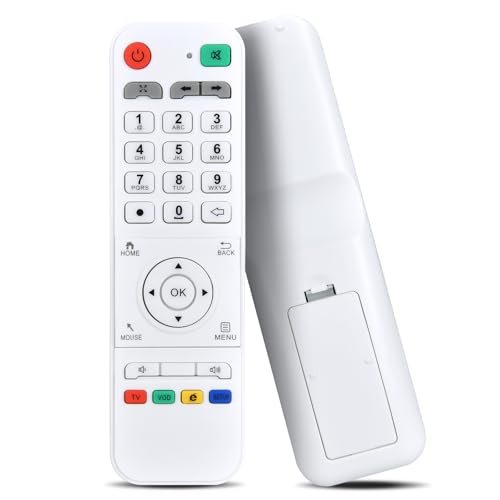
Features: Works with PZL replacement remote for IPTV boxes, infrared 3.0, over 26 feet range, ergonomic ABS build. Best for: Users needing a dependable alternative remote with long-range IR control. Limitation: Only compatible with specific models; verify compatibility before purchase.
Buying Guide: Key Considerations for IPTV Devices
- Platform preferences: Android TV, Google TV, or other ecosystems. Android TV boxes tend to offer broader app compatibility; Google TV emphasizes content discovery.
- RAM and storage: More RAM (3–4 GB) and more storage (32–64 GB) improve multitasking and app load times, especially with streaming apps and downloaded content.
- Video output: Look for 4K @ 60fps with HDR support (HDR10+, Dolby Vision where available) for sharp, vibrant playback.
- Connectivity: Wi‑Fi 6 and Gigabit Ethernet enable stable streaming, especially on busy networks. USB expansion can handle local media drives.
- Local playback vs. streaming focus: If you store media locally, consider drives with sufficient power or dedicated USB hubs; for streaming, prioritize app availability and performance.
- Car vs. home use: Car-focused devices may emphasize offline playback, CarPlay/Android Auto integration, and in-vehicle UI safety considerations.
- Accessories: A reliable remote is crucial for navigation. For higher reliability, opt for factory remotes or replacement remotes with proven compatibility.
Frequently Asked Questions
- What is the best IPTV device for 4K streaming?
– A device with 4K@60fps support, HDR compatibility, adequate RAM (3–4 GB), and solid storage (32–64 GB) is ideal for 4K streaming and app multitasking. - Do I need Android 12/14 for IPTV boxes?
– Not always necessary, but newer Android versions offer better security, app compatibility, and smoother performance for streaming apps. - Is a remote essential for IPTV boxes?
– Yes. A reliable remote improves navigation and control, especially when entering search terms or navigating apps in a living room or car. - What should I consider for in-car streaming devices?
– Look for built-in streaming apps, offline playback, CarPlay/Android Auto compatibility, and robust wireless connectivity (WiFi 6, Bluetooth 5.4). - Can I use a standard TV box for IPTV in a car?
– Some devices are designed for car use, but standard home TV boxes may not be ideal for in-car operation or safety concerns while driving. - Are replacement remotes compatible across devices?
– Replacement remotes are usually model-specific; verify compatibility with your IPTV box model before purchasing.