Answer: For anyone seeking comfort and reduced strain, an ergonomic keyboard and mouse combo is the right choice. These picks emphasize natural hand and wrist positions, supporting prolonged work sessions. Best for office workers, students, and home setups where typing and navigation are frequent. The top five selections below cover different preferences—from split designs to vertical mice—so you can choose based on your grip style, desk space, and whether you prefer 2.4G wireless or Bluetooth connections. A quick summary table follows to compare core features at a glance.
| Product | Best For | Key Benefit | Connectivity |
|---|---|---|---|
| ULSOU Wireless Keyboard And Mouse Combo | Long typing sessions | Wave ergonomic keys with wrist rest | 2.4G USB receiver |
| MEETION Ergonomic Keyboard And Mouse (Split Curved) | Natural typing angle | Split curved layout with cushioned palm rest | 2.4G/Bluetooth |
| Logitech Wave Keys & Lift Vertical Mouse | Compact desk users | Wave keys with Lift vertical mouse for reduced reach | Bluetooth |
| ProtoArc EKM01 Plus Wireless Ergonomic | All-day productivity | Full-size, curved/split keyframe | USB receiver or Bluetooth |
| MEETION Split Design Keyboard & Vertical Mouse | Hands and wrists relief | Pillowed wrist rest with split keyboard | USB-C adapter with USB-A receiver |
ULSOU Wireless Keyboard And Mouse Combo

The UL SOU combo emphasizes a wave-shaped keyboard with a built-in wrist rest designed to align fingers naturally and relieve wrist strain. An adjustable stand lets you set the keyboard to a comfortable height for extended use, making it ideal for writers, data entry specialists, and students who type for hours. The included 2.4 GHz USB receiver supports a single receiver connection that can pair with both devices or be used separately. Best for: users who want a simple plug-and-play solution that minimizes wrist tension during long work sessions. Caution: The USB receiver is located on the back of the mouse, which may complicate setup if you store the mouse away from the keyboard.
Key features include a wireless 2.4G connection with up to 33 feet (10 meters) of range and a design that focuses on comfort for both left- and right-handed users through its contoured mouse shape. The combo aims to provide a balanced desktop footprint, keeping the keyboard and mouse within easy reach for efficient navigation and typing.
Why select this product? It is best for users who want a straightforward, all-in-one ergonomic solution with a dedicated wrist rest and adjustable keyboard height. It may suit both office work and home study environments where a quiet, reliable wireless connection matters more than advanced programmable keys.
MEETION Ergonomic Keyboard And Mouse, Split Curved

The MEETION split curved design provides a natural typing angle by separating the keyboard into two halves. This arrangement reduces shoulder and arm strain, particularly for long typing sessions. The full-size layout ensures all keys are accessible without excessive reach, while a cushioned palm rest supports the wrists. Four adjustable tilt brackets allow users to position the keyboard for optimal ergonomics, whether seated or standing. Best for: users who experience wrist or shoulder discomfort with traditional keyboards and want a more natural typing posture. Caution: The split design requires a short adjustment period to get used to the layout.
Best for: those who value a desk-friendly footprint and need a comfortable palm rest to pair with their ergonomic typing. This MEETION model supports both 2.4G wireless connectivity and Bluetooth, enabling seamless switching across devices, which is useful for multitasking across a laptop and desktop or tablet setup.
Logitech Wave Keys & Lift Vertical Mouse Ergonomic Wireless Combo
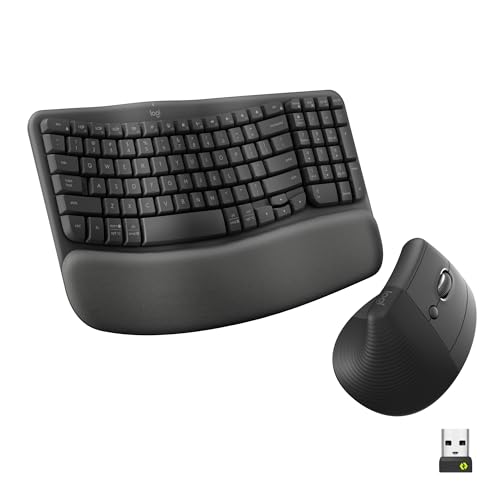
This combo combines Logitech’s Wave Keys with a Lift vertical mouse to promote natural hand, wrist, and forearm alignment. The keyboard’s wave design supports a comfortable typing posture and a palm-friendly rest, while the vertical mouse reduces forearm pronation, which can help minimize strain during prolonged use. The setup is compact, making it suitable for smaller desks or users who want the mouse positioned closer to their body for a more relaxed shoulder posture. Best for: desk workers who prefer a compact footprint and a vertical mouse for reduced reach. Caution: The lift vertical mouse may require some adaptation for users who are accustomed to a traditional horizontal mouse.
Why choose this product? It’s ideal for users who want a cohesive ergonomic experience with a well-known brand, combining a wave-keyboard with a vertical mouse to promote improved posture during daily tasks like typing, scrolling, and web navigation. This model emphasizes palm support and a comfortable overall feel for extended sessions.
Logitech Wave Keys MK670 Wireless Ergonomic Keyboard Mouse Combo

This combo pairs Logitech’s Wave Keys ergonomic keyboard with the Signature M550 L wireless mouse for a balanced all-day typing and navigation experience. The Wave Keys design places hands, wrists, and forearms in a natural position, supporting comfortable typing across long workdays. The compact key design brings the mouse closer to the body, potentially improving shoulder alignment for many users. Best for: those with medium-to-large hands seeking a comfortable, all-day workflow. Caution: The MK670’s compact keys may feel smaller to users who prefer a traditional full-size keyboard.
Why it stands out: The pairing emphasizes sustained comfort with a focus on natural alignment and a closer mouse position, which can reduce tension in the shoulders and upper back during extended computer use. This model suits office workers and students who prioritize ergonomic posture without sacrificing wireless convenience.
ProtoArc EKM01 Plus Wireless Ergonomic Keyboard Mouse Combo

The ProtoArc EKM01 Plus offers a full-size ergonomic keyboard with curved and split keyframes designed to place wrists and forearms in a relaxed typing posture. A cushioned palm rest provides extra wrist support, reducing fatigue over long sessions. This kit supports up to three devices simultaneously via USB receiver or Bluetooth, enabling quick switching between a computer, tablet, or smartphone. Best for: multi-device users who want a consistent ergonomic experience across platforms. Caution: The ergonomic keyboard is not backlit, which may affect visibility in dim lighting.
Why select this product? It targets efficiency and comfort for office work and home use, with a focus on reducing strain through a split design and palm support. The ability to connect to up to three devices makes it a strong choice for users juggling multiple screens or operating systems, provided they rely on a USB receiver for the keyboard and mouse.
MEETION Ergonomic Keyboard And Mouse, Split Design

The MEETION split-design combo features a directors-like split layout to minimize strain across hands, wrists, and arms. A pillowed wrist rest is included to prevent slipping and to promote a stable typing position. The keyboard is designed with a concave curve and angled keys to support a natural typing motion. A note: USB-C is an adapter and must be plugged into a USB-A receiver for operation. Best for: users who want an ergonomic split keyboard with a soft, supportive palm rest. Caution: USB-C usage requires an adapter setup, not a standalone USB-C connection.
Why this option? It suits users who need a generous wrist rest and a split keyboard approach to reduce fatigue during long hours at the desk. The design aims to deliver a natural hand posture while still offering a full-size keyboard with a comfortable key feel for all-day productivity.
Buying Guide: Key Considerations For An Ergonomic Keyboard And Mouse
- Ergo design type: Choose between wave-style keyboards with integrated palm rests, split-keyboard layouts, or vertical mice. Each targets different comfort aspects—wrist neutral positions, shoulder alignment, and forearm rotation.
- Connectivity: Decide between 2.4G wireless, Bluetooth, or USB-C adapters. If you switch devices often, a multi-device setup with easy switching is beneficial.
- Palm support: A cushioned palm rest improves comfort, reduces slip, and stabilizes your wrists during long sessions. Ensure the rest aligns with your natural resting position.
- Key feel: Consider key height and travel, as well as whether you need quieter typing. Some models emphasize tactile feedback while others prioritize silence.
- Desk space: If you have a compact desk, look for compact-key designs and a mouse that can be positioned closer to your body without shoulder strain.
- Adjustability: Tilt legs and angle options help tailor keyboard positioning to your height and posture. A keyboard that can be angled supports a relaxed wrist posture.
- Device compatibility: Ensure the combo is compatible with your operating system and can switch between devices if you use multiple platforms.
Frequently Asked Questions
- What is the main benefit of an ergonomic keyboard and mouse?
Answer: It helps maintain natural hand and wrist positions, reducing strain during long typing sessions and improving overall comfort. - Should I choose a split keyboard or a wave-style keyboard?
Answer: Split keyboards suit users with shoulder or arm discomfort and those who want a more natural typing posture; wave-style keyboards emphasize wrist support and a continuous curved design. - Is wireless connectivity essential for ergonomics?
Answer: Wireless options reduce desk clutter and cables, but ensure reliable range and easy switching between devices if needed. - Do vertical mice really help with posture?
Answer: Vertical mice can reduce forearm pronation and wrist twist, potentially lowering strain for some users. Adaptation may be needed. - Can these combos work with multiple devices?
Answer: Several models support multi-device connections via USB receivers or Bluetooth, enabling quick device switching.