Finding the right fingerprint clocking-in machine helps prevent buddy punching, streamline payroll, and reduce administrative workload. This guide highlights five reliable options suited for small businesses, covering standalone and cloud-based solutions, multiple verification modes, and scalable capacity. Whether you run a growing shop, a rural office, or a multi-department team, these picks balance ease of use with robust attendance features.
| Product | Brand | Mode Type | Highlights |
|---|---|---|---|
| NGTeco APP Time Clock for Small Business | NGTeco | 4-in-1 (Facial, Fingerprint, RFID, PIN) | Remote app control, flexible shifts |
| NGTeco Standalone Time Clock | NGTeco | Standalone | Zero setup, USB export, scalable for growth |
| KUIIYER 4 in 1 Time Clock | KUIIYER | 4-in-1 (Face, Palm, Fingerprint, PIN) | High-capacity biometric options, 4 punch methods |
| NGTeco Cloud Time Clock for Small Business | NGTeco | Cloud/4-in-1 | Remote access, flexible shifts, data security |
| TimeRalo Standalone Time Clock | TimeRalo | Standalone | USB transfer, large employee capacity |
NGTeco APP Time Clock for Small Business
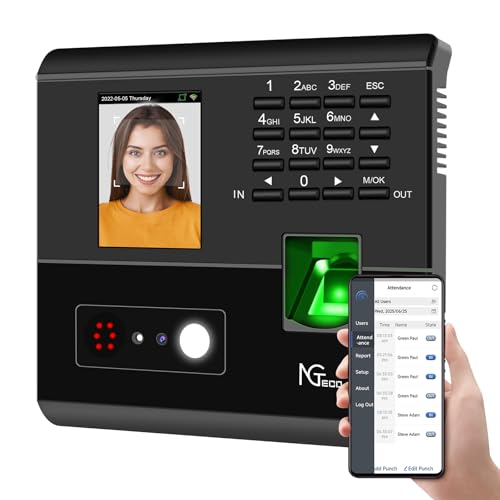
NGTeco APP Time Clock offers four verification modes: facial recognition, fingerprint, RFID card, and PIN. This 4-in-1 setup helps prevent buddy punching and supports accurate wage calculations. Best for teams needing versatile verification and cloud-like reporting without separate software.
Best for: Small businesses that want flexible verification and remote oversight. This model shines when payroll accuracy and real-time attendance visibility matter most.
Caution: Requires a compatible mobile app and network for full remote features; local operation is possible with on-device data, but some reports depend on the app.
NGTeco Standalone Time Clock

NGTeco’s Standalone Time Clock operates without WiFi or software. It exports attendance data via USB with ready-made Excel reports for payroll integration, making it ideal for smaller teams or environments with limited network access.
Best for: Businesses that prefer a plug-and-play, offline solution with simple data export. Good for shops or offices without reliable network access.
Caution: Local-only operation means time data won’t sync across locations in real time; cross-site visibility requires manual data transfer.
KUIIYER 4 in 1 Employees Time Clocks

KUIIYER offers a robust 4-in-1 punch clock with face, palm, fingerprint, and PIN recognition. It supports up to 1000 users and 160,000 records, with up to 16 departments and 24 shifts. It’s designed for mid-sized needs and environments requiring fast biometric checks.
Best for: Teams needing high capacity and multiple biometric options. Choose this if you anticipate growth and a variety of verification preferences.
Caution: High capacity comes with more complex setup; ensure staff are enrolled across multiple modalities for best results.
NGTeco Cloud Time Clock for Small Business

NGTeco Cloud Time Clock provides remote access via mobile app and web portal. It supports data-driven reports, dual-band WiFi for stable connectivity, and advanced fingerprint recognition for quick in-out punches. This is ideal for organizations needing real-time data from anywhere.
Best for: Managers who need real-time oversight and cloud-based reporting across multiple locations. Suitable for hybrid teams with shifting schedules.
Caution: Cloud features rely on internet connectivity; outages may temporarily affect live data access until connections stabilize.
TimeRalo Standalone Time Clock

TimeRalo stands alone with no WiFi or monthly fees. It stores up to 500 fingerprints and 50,000 punch records, making it suitable for growing teams. Data transfer is USB-based with Excel reports for payroll.
Best for: Small to mid-sized teams needing offline, cost-effective attendance tracking with scalable data storage. Choose this when you want straightforward installation and local data control.
Caution: Independent operation means no automatic cross-location syncing; plan for centralized data consolidation if you have multiple sites.
Buying Guide
Key considerations help match the right clocking-in machine to your business needs. Use these questions to compare options.
- What verification methods do you prefer? Decide between fingerprint, face, palm, PIN, or RFID based on your team’s access patterns and privacy concerns.
- Do you need standalone or cloud access? Standalone devices work offline with local data export; cloud devices provide remote access and centralized reporting.
- What capacity is required? Assess maximum users and punch records to ensure future growth isn’t limited by the device.
- How important is data security? Look for encryption, secure cloud storage, and compliance features when data travels over networks.
- How will data be exported and integrated? Check compatibility with payroll or HR software and whether USB or network transfer is needed.
- What are the maintenance and setup requirements? Consider WiFi dependence, software updates, and ease of enrollment for new employees.
Frequently Asked Questions
- What is “buddy punching” and how do these devices prevent it? Buddy punching occurs when one employee clocks in for another. Multi-factor verification (biometrics plus PIN or card) reduces opportunities for impersonation.
- Can these clocks export data for payroll? Yes. Most listed devices offer Excel-compatible exports via USB or cloud-based reports, suitable for payroll integration.
- Are cloud-based clocks safer than standalone? Cloud clocks offer centralized data and remote access, but require internet reliability. Standalone clocks store data locally and avoid online exposure.
- Which device is best for large teams? Devices with high user capacity and multiple biometric options, like KUIIYER, are better suited for larger teams within small-to-medium businesses.
- Do these machines work without internet? Standalone models operate offline. Cloud-enabled models still offer offline options but perform best with network access for real-time reporting.
- Can I switch from offline to cloud later? Many systems support migration to cloud services, but verify data transfer options and compatibility before purchase.