Answering the question “which full-tower case should I buy?” this guide highlights five top options that deliver space, airflow, and mounting flexibility for RTX 40-series builds or heavier hardware. Each pick targets different buyer needs, from extreme cooling potential to stylish dual-chamber layouts. Whether you’re a modder, a streamer, or a hardware enthusiast, these cases help you maximize airflow, GPU length, and radiator capacity while keeping cable management tidy.
Summary table of chosen products:
| Product | Best For | Key Benefit | GPU/Radiator Support |
|---|---|---|---|
| darkFlash DY470 Full-Tower | Power users who want dual 360mm radiators | Dual-chamber layout with easy installation | Up to 410mm GPUs, 360mm radiators |
| Corsair 7000D Airflow | High-airflow builds | Roomy interior and easy cable routing | Up to 3x 360mm radiators |
| LINEDEPOT H2 | Budget-conscious builders with great IO | Six pre-installed PWM ARGB fans and dual tempered glass | GPU up to 420mm, 360mm radiator |
| MUSETEX K2 | Showcase builds | 270° panoramic dual tempered glass | GPU up to 400mm, 360mm radiator |
| darkFlash AIR NOVA | Ultra-ventilated, E-ATX capable | Six-sided ventilation and vertical GPU mount | Up to 420mm radiator, vertical GPU |
DarkFlash DY470 Full-Tower Case With Dual-Chamber Design

The DY470 is designed for builders who want maximum internal space and flexible mounting. It supports up to two 360mm radiators and vertical GPU mounting within a dual-chamber layout. The case emphasizes a panoramic, angled top glass panel for a striking inside view. The note about RGB hub controller not included is important for builders planning complex lighting. Best for: enthusiasts building a dual-radiator, vertically mounted GPU system where easy cable management and visibility matter. Limitation: RGB hub control is not included, which may require a separate controller if you want extensive ARGB synchronization.
CORSAIR 7000D Airflow Full-Tower PC Case

The 7000D Airflow focuses on maximum cooling potential with a high-airflow front panel and a spacious interior. It accepts up to three 360mm radiators and features the RapidRoute cable management system to simplify routing behind the motherboard. Best for: users who prioritize air cooling efficiency and a tidy build with straightforward cable management. Limitation: the interior space is vast, which can be overwhelming for very compact desk setups or smaller work areas.
LINEDEPOT H2: Full-Tower PC Case With Pre-Installed PWM ARGB Fans

The H2 offers a compelling balance of aesthetics and value. It ships with six pre-installed PWM ARGB fans and a 270-degree panoramic transparent display, along with ample interior space to accommodate large GPUs and top-mounted radiators. Best for: builders seeking a feature-rich, easy-installation full-tower without paying a premium. Limitation: the listing notes broad compatibility details, but precise cooler and PSU measurements should be confirmed against your exact parts before purchasing.
MUSETEX K2: Large-Tower PC Case With ARGB Cooling Power

The K2 emphasizes cooling power with seven pre-installed PWM ARGB fans, expandable to ten, and a 270-degree panoramic dual tempered glass design for a wide viewing angle. It supports GPUs up to 400mm and top radiators up to 360mm. Best for: users who want aggressive cooling and a visually striking chassis for showy builds. Limitation: ensure your motherboard and PSU can fit within the partitioned internal layout, as some configurations may require careful cable planning.
darkFlash DY460 Full-Tower PC Case With 330° Glass
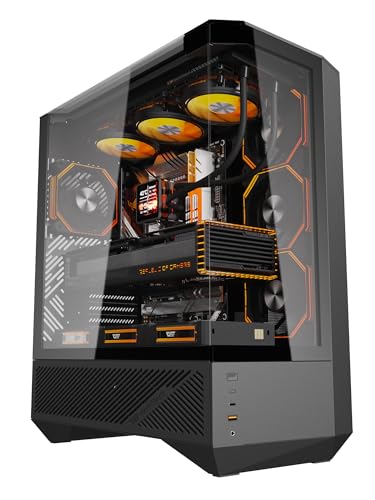
The DY460 emphasizes panoramic readability with a 330° full-view tempered glass design and support for large GPUs up to 400mm, with space for a 360mm radiator. It ships with four ARGB fans for vivid lighting and comes with a separate PSU chamber to improve airflow. Best for: modders and streamers who want a visually expansive build with flexible cooling options. Caution: verify cooler dimensions and radiator thickness before ordering to ensure compatibility with the top/front mounts.
Buying Guide: Key Considerations For Your Full-Tower Choice
- Cooling potential: Decide if you need triple 360mm radiators or specialized airflow for dual GPUs. Look for cases with multiple radiator mounts and high-airflow panels.
- GPU length and vertical mounting: If you plan on a long GPU or vertical mounting, confirm the maximum GPU length and whether vertical mounting hardware is included or optional.
- Chamber design: Dual-chamber layouts improve cable routing and airflow; single-chamber designs are typically simpler but may limit cable management options.
- Glass and aesthetics: Panoramic or panoramic-like tempered glass panels offer better internal visibility; note that large panels can add weight and require careful handling.
- Cable management: Look for cases with trunking, ample space behind the motherboard tray, and accessible cable routing channels.
- Front I/O and ports: Confirm USB Type-C availability and enough USB 3.0/2.0 ports for your peripherals and storage devices.
- Build footprint: Full-tower cases are sizeable. Measure your desk space and ensure your room can accommodate the case height and depth.
FAQ
What is a full-tower PC case best for?
They provide maximum internal space for large GPUs, multiple radiators, and advanced cooling setups, ideal for high-performance builds and enthusiasts who value airflow and expandability.
Do full-tower cases support RTX 40-series GPUs?
Yes, many full-tower cases accommodate long GPUs, including RTX 40-series, up to 400 mm or more depending on the model.
Is vertical GPU mounting necessary?
Not necessary for all builds, but it helps reduce sag and showcase the graphics card. Check if the case includes vertical mounting hardware.
What should I check before buying a full-tower case?
GPU length, radiator compatibility, number of drive bays, cable management features, and whether the chassis supports your motherboard size (ATX, E-ATX, etc.).
Are these cases easy to assemble for beginners?
Many offer intuitive layouts and pre-installed fans, but some high-end designs require careful planning for cable routing and cooler clearance.
Do these cases have good air performance?
Yes, most listed options emphasize airflow with front/top radiator support and multiple ARGB fans for cooling efficiency.