If you’re searching for genealogy software for Mac, you want options that are easy to use, securely store family data, and help you connect with historical records. The following picks are chosen for Mac compatibility, clear features, and practical use for different types of researchers. Ideal buyers: casual hobbyists, serious family historians, and planners who want organized memory archives.
Summary of selected products:
- Family Tree Heritage Gold 16 (Mac) — robust record access and FamilySearch syncing.
- Family Tree Heritage Gold Mac Download — same core features, flexible download option.
- Reunion 8 — a dedicated Mac genealogy solution with visual family tree tools.
- Everplans Smart Digital Vault & Companion — digital memory vault and organization for life documents.
- Family Tree Maker 11 CD Gift Set — classic genealogy software with long-standing use.
Family Tree Heritage Gold 16 — Mac — CD/MAC
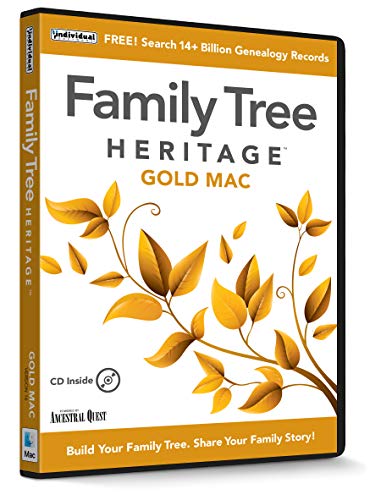
Best for: Mac users who want broad access to historical records and strong FamilySearch integration. This edition emphasizes free searches to a vast database and efficient data entry. The Descendants View helps you see family lines clearly, while chart printing supports physical keepsakes. It is a solid choice for researchers who value source-rich records and easy data capture.
Why selected: It combines historical records access with user-friendly entry workflows and better syncing with FamilySearch, making it a practical all-in-one Mac genealogy tool.
Caution: Some users may prefer newer interfaces on other platforms; ensure your macOS version is compatible with this specific build.
Family Tree Heritage Gold — Mac [Mac Download]

Best for: Mac users who want flexible download options and full access to a large historical database. This version mirrors the CD edition’s capabilities with downloadable convenience.
Why selected: The Mac download option makes it easy to install without physical media, while preserving the same features like extensive historical records access and syncing capabilities.
Caution: Network access and updates may depend on the vendor’s servers; offline capabilities are less emphasized than online features in some workflows.
Reunion 8

Best for: Mac users who want an established, visually oriented genealogy tool with clear tree diagrams. Reunion 8 emphasizes easy navigation and a curated interface for building family trees.
Why selected: It remains a coherent option for Mac users seeking straightforward tree-building features and reliable performance on macOS.
Caution: Some features may feel dated compared to the latest genealogy suites; verify current compatibility with your macOS version before purchase.
Everplans — Smart Digital Vault & Companion Book Bundle

Best for: users who want a secure digital vault to store life documents alongside basic memorial planning. This solution is more about life organization and legacy rather than traditional family tree building.
Why selected: It complements genealogy work by archiving essential documents, wills, and memories in an encrypted, accessible vault for heirs.
Caution: Not primarily a charting or lineage-building tool; best used in conjunction with dedicated genealogy software for full family history projects.
Family Tree Maker 11 CD Gift Set Version 5

Best for: long-standing users who value a traditional, desktop-based genealogy workflow with decades of software history. This gift set includes CD media for installation and legacy data handling.
Why selected: It remains a recognizable option in genealogy software history, useful for users maintaining older family files or migrations from earlier systems.
Caution: The product line is older; confirm compatibility with modern macOS or consider newer cross-platform alternatives for ongoing support.
Buying Guide: Choosing The Right Genealogy Software For Mac
- Data access and sources: Prioritize software with built-in access to large historical databases and strong FamilySearch or other archival integrations if you want quick sourcing of records.
- Mac compatibility: Ensure the product officially supports your macOS version, whether as a Mac app, a downloadable package, or a cross-platform solution with macOS compatibility.
- Tree visualization: Look for intuitive tree views, Descendants/Ancestors displays, and easy chart printing to share or preserve family lines.
- Data entry workflow: Favor programs with efficient data entry forms, relationship tracking, and non-traditional relationships support if relevant to your family.
- Storage and backup: Consider software with built-in cloud or secure local storage, plus options to export GEDCOM or other standard formats for future migrations.
- Additional memory tools: If you want to archive documents, photos, and notes, pairing genealogy software with a digital vault can help keep memories organized and secure.
- Limitations to consider: Some options may be older or Windows-centric; verify macOS compatibility and ongoing support before purchase.
Frequently Asked Questions
- What is the best genealogy software for Mac for beginners?
Look for Mac-native apps with simple interfaces, guided wizards, and strong help resources. Reunion 8 and Family Tree Heritage Mac options are commonly cited for Mac compatibility and straightforward workflows.
- Can I import my family tree from Windows to Mac?
Most modern programs support GEDCOM exports, which can be imported into macOS software. Check specific product documentation for compatibility notes.
- Is online access important for genealogy software?
Online access to archives can speed sourcing, but local data security is also key. Many programs offer offline data storage with optional online syncing.
- Should I buy multiple tools or one comprehensive package?
A single product with strong core features plus a digital memory vault can cover many needs; pairing a genealogy app with a vault like Everplans can enhance memory preservation.
- What format can I export my family data in?
GEDCOM is the standard for genealogy data exchange. Ensure your selected software supports GEDCOM exports for portability and backups.
- Do these tools support advanced relationships?
Some programs offer support for non-traditional relationships, which can be important for certain family structures. Verify this capability in the product features before buying.