Looking for a handheld gaming device that fits your on‑the‑go lifestyle? This guide highlights five strong options for American buyers, covering kids’ handhelds, versatile Android handhelds, and premium portable consoles. Each pick is explained with who it’s best for, why it stands out, and a practical caveat. The top picks include devices ideal for travel, retro gaming fans, and cloud/remote play enthusiasts. A quick summary table follows to help you compare key points at a glance.
| Product | Best For | Why It Stands Out |
|---|---|---|
| WELLST·G Handheld Game for Kids | Young children and family gaming | Kid-friendly design, preloaded classics, compact size |
| Retroid Pocket 5 | Retro and indie gaming on Android | Powerful performance, large screen, no preload limitation |
| Nintendo Switch 2 System | All‑around portable Nintendo gaming | Three play modes, large 7.9” screen, HDR/120 Hz |
| Valve Steam Deck OLED | PC game library on the go | High‑end display, large storage, versatile controls |
| OnePro Cloud Handheld | Cloud/remote play and Android titles | All‑in‑one handheld with cloud and emulation options |
WELLST·G Handheld Game for Kids
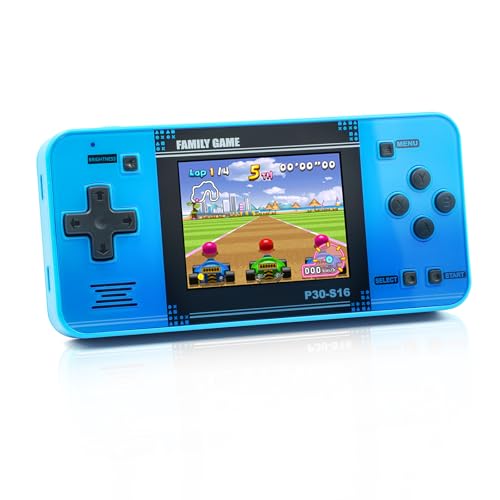
The WELLST·G handheld game is aimed at younger gamers with a kid‑friendly, arcade‑style body and a compact 3.0″ screen. It ships with 220 preloaded games, including entertainment, sports, and adventure titles, designed to help develop hand‑eye coordination and problem‑solving. Best for families seeking a simple, travel‑friendly device for children. A potential limitation is the fixed library; if you want to add titles, you may need a different platform.
Retroid Pocket 5 Retro Handheld

The Retroid Pocket 5 targets retro and modern indie gaming with a 5.5‑inch touchscreen and Android 13. It delivers smooth gameplay on a quad‑core processor and Adreno 650 GPU. Best for players who want a portable Android device with robust performance and the ability to sideload games. Note that preloaded games aren’t included, so initial setup requires user addition of titles. Battery wake‑up may require a full charge after long idle periods.
Valve Steam Deck OLED 1TB

The Steam Deck OLED offers a PC‑like experience on the go with a 1TB NVMe SSD, 1280 x 800 HDR OLED display, and a bright 7.4″ screen. It supports high frame rates up to 90Hz and Wi‑Fi 6E, making it ideal for players who want access to Steam and other PC game libraries in a portable format. Best for serious PC gamers seeking a powerful handheld. A limitation is its larger size relative to dedicated handhelds and higher price point.
OnePro Cloud Handheld Portable Remote Play

The OnePro Cloud Handheld is designed for cloud gaming and remote play, with a 7″ 1080p touchscreen and Android capability. It shines for players who subscribe to cloud services (Xbox Cloud Gaming, GeForce NOW, Luna, etc.) and want to stream games to a handheld. Choose this if you prioritize cloud access and mobile Android titles. Limitation: cloud gaming requires a stable internet connection and active subscriptions.
Buying Guide
- Gaming library vs. platform openness: Some devices come with preloaded games while others rely on app ecosystems or emulation. If you want immediate play out of the box, a preloaded model may suit you; if you prefer flexible libraries, choose Android or cloud‑gaming options.
- Display and form factor: Screen size and resolution affect immersion and battery life. Larger screens are great for long sessions but may reduce portability. For kids, a compact, ergonomic design improves grip and comfort.
- Performance and hardware: Look for processors and GPUs that align with your target games. Retro and indie titles run well on mid‑range chips, while PC‑class titles benefit from high‑end hardware.
- Battery life and charging: Battery life varies with screen brightness, game type, and connectivity. Consider devices with swappable or removable batteries if you travel often.
- Connectivity and expansion: Wi‑Fi capabilities, Bluetooth, and storage options influence gaming flexibility. Some devices support cloud services, while others rely on local storage or external storage.
- Portability vs. versatility: If you want a single device for many uses (cloud, Android, emulation), a larger handheld with robust app support may be preferable. For pure handheld gaming, lighter devices often win on portability.
FAQ
- What’s the best choice for a child under 8? A kid‑friendly handheld like the WELLST·G is designed for small hands and simple controls, with age‑appropriate content.
- Do all handhelds support external storage? Not all do. Check each model’s storage options and whether it supports microSD cards or external drives.
- Is cloud gaming required for some devices? Some devices are built for cloud play (OnePro Cloud Handheld). Others offer local emulation and offline games without internet.
- Which device handles retro games best? Android handhelds with emulation support or dedicated retro handhelds excel, depending on the system compatibility and control layout.
- Can I play Nintendo or PC games on these devices? Nintendo titles are generally available on dedicated Nintendo hardware or via official channels; PC games are accessible on Steam Deck and similar Windows‑based handhelds.
- What should I consider about price and value? Higher performance and larger displays add cost; balance your priority (portability, library access, or power) to maximize value.