Answering the common buyer question: which ID card printer should you choose for reliable, high-quality cards? This guide highlights five top options, tailored for different needs—from basic, low-volume printing to dual-sided, high-volume production. Perfect for schools, small offices, events, or organizations seeking ready-to-use complete packages.
The following summary helps you compare key points at a glance. All selections include starter supplies or complete kits to get you printing quickly. Consider your volume, color needs, and whether you require single- or dual-sided printing when choosing.
| Product | Best For | Notes |
|---|---|---|
| Bodno Seaory S25 Single Sided ID Card Printer | Low-volume users who want an all-in-one starter package | Manual feed, Bronze Edition software with pre-made templates |
| Bodno Magicard 400X Dual Sided ID Card Printer | Small teams needing dual-sided prints | Includes 300-print YMCKO ribbon; complete supplies |
| IDP SMART-21S ID Card Printer Kit | Windows users needing fast, reliable single-sided color prints | PC-only software, 100-print YMCKO ribbon, 100 cards |
| Badgy100 Plastic Card Printer | Immediate, on-demand full-color badges | Badge Studio software and templates included |
| Badgy200 Plastic Card Printer | Full-color, tamper-proof badges for larger groups | Badge Studio+ with database import; comprehensive design options |
Bodno Seaory S25 Single Sided ID Card Printer

Features: All-inclusive package with supplies and Seaory 11011 color ribbon (100 prints). Manual feed system provides precise control for printing one card at a time. Bronze Edition software offers templates and drag-and-drop design for ease of use.
Best for: Small offices or classrooms starting with a single-sided printer and wanting a full starter kit. The manual feed supports careful, low-volume runs, and the Bronze Edition reduces setup complexity.
Why selected: The S25 combines a ready-made package with straightforward software, making it an efficient choice for new users needing predictable results without extra purchases.
Caution: Limited to single-sided printing, which may require upgrading for two-sided card needs in the future.
Bodno Magicard 400X Dual Sided ID Card Printer

Features: All-inclusive package with 300-print YMCKO ribbon; dual-sided printing supports more comprehensive card designs. Bronze Edition software offers user-friendly templates and drag-and-drop features for quick design. Compatible with Windows and Mac.
Best for: Organizations needing professional dual-sided cards with vibrant color for events, staff IDs, or access badges.
Why selected: The built-in dual-sided capability saves time and yields more polished cards, while the included ribbon and software simplify setup.
Caution: Dual-sided prints may require more printer maintenance; ensure you have compatible drivers for your OS.
IDP SMART-21S ID Card Printer Kit

Features: Starter kit with PC-only IDesigner software, 100 print YMCKO ribbon, 100 PVC cards, and USB connection. Produces high-resolution color cards and monochrome options as needed. Speedy system handles over 150 color cards per hour and 600 monochrome cards per hour on Windows 10 & 11.
Best for: Windows-based offices or schools seeking reliable, single-sided color printing with a simple software workflow.
Why selected: The kit provides essential components plus a design-focused software suite, enabling quick production without additional purchases.
Caution: PC-only software means macOS users may need a workaround or different solution for design work.
Badgy100 Plastic Card Printer with Badge Studio

Features: Full-color, on-demand badge printing with Classic Badge Studio software. Designed for quick, professional-looking badges using online templates and designs. Includes a color plastic card output for high-resolution results.
Best for: Small businesses or events requiring on-the-spot color badges with ready-made templates.
Why selected: The Badge Studio software plus immediate print capability makes it ideal for rapid badge production and branding consistency.
Caution: Templates are convenient but may limit some advanced customization without upgrading software.
Badgy200 Plastic Card Printer with Badge Studio+
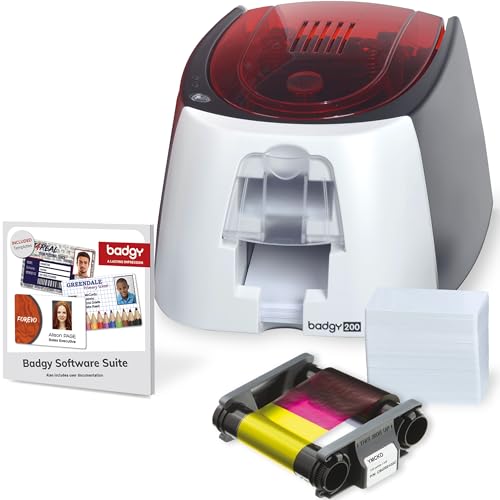
Features: All-in-one solution for full-color, customizable, tamper-proof ID badges. Includes Badge Studio+ with database import, free templates, design wizard, and the ability to start from scratch. Suitable for larger groups needing more diverse badge designs.
Best for: Schools, organizations, or events that require scalable, color-rich badges with more complex designs and data integration.
Why selected: The Studio+ software and database import support create powerful workflows for managing larger badge programs and security features.
Buying Guide
What to consider before buying
- Print volume: Choose single-sided printers for light use and dual-sided models for higher durability and versatility.
- Color depth and resolution: Look for printers with high DPI (e.g., 300 x 1200) for sharp images and vivid colors.
- Software and templates: Bronze or Studio+ software can reduce design time; ensure OS compatibility with your devices.
- All-inclusive kits: Starter ribbons and cards reduce setup frustration and speed up deployment.
- Compatibility: Check Windows, Mac, or Linux compatibility to fit your workspace.
- Security features: For tamper-evident needs, consider printers that support tamper-proof cards or advanced design options.
Questions buyers often ask
- What is included in an all-inclusive package? Typically printer, ribbons, cards, and software.
- Is dual-sided printing worth it for my use case? If you issue badges with photos on both sides or need more room for text, yes.
- Can I use my own card stock or vinyl? Most printers use standard CR80 PVC cards; verify thickness compatibility.
- Do these kits require professional IT support? Most are designed for straightforward setup and minimal IT support.
- What’s the difference between YMCKO and other ribbons? YMCKO ribbons enable full-color front-side printing with black resin for text or bars on the back or front.
- Are there upgrade paths if my needs grow? Many models offer firmware or software upgrades and more ribbon options for expansion.
FAQ
- What is the best all-in-one option for beginners? The Bodno Seaory S25 offers an all-inclusive starter package with easy-to-use Bronze Edition software, ideal for first-time users.
- Which printer is best for dual-sided cards? The Bodno Magicard 400X provides built-in dual-sided printing and a complete supplies package.
- Which kits include enough cards for initial testing? Most kits include 100 cards; Badgy200 and similar packages offer scalable options for larger deployments.
- Do these printers work with Windows and Mac? Some models support both Windows and Mac; check your chosen model’s compatibility in the features list.
- Is a high color DPI necessary for simple ID cards? For clean photos and sharp text, higher DPI like 300 x 1200 helps, especially with photos and logos.