Answer: A key programming tool lets you generate or clone car keys and program remotes at home or in a shop setting. This guide focuses on five reliable options that suit DIY enthusiasts, locksmiths on a budget, and workshop owners seeking flexible key programming capabilities. Each product is evaluated for compatibility, ease of use, and safety. The top picks cover blade key self-programming, universal Bluetooth solutions, and bidirectional diagnostics to aid key work. Suitable buyers include hobbyists, small shops, and professionals who want to reduce trips to dealers.
| Product | Brand | Best For | Key Benefit |
|---|---|---|---|
| Remote2program Universal DIY Programming Car Blade Key Tool | Remote2program | Home DIYers with broad model support | Self-programming without appointments |
| Topdon T-Ninja Pro – 8″ Tablet Key Programming Tool | TOPDON | Professional key learning and cloning | Pin reading, key learning, remote learning |
| Remote2program Car Remote Key Tool (Blade) | Remote2program | Wide model compatibility and portability | Self-programming with video guidance |
| Keyecu for Xhorse VVDI Mini Key Tool | Keyecu | Global key generation and remote cloning | Extensive transponder support |
| OTOFIX IM/M0 Expert IM1 Programmer | OTOFIX | OE-level diagnostics with key programming | DoIP, CAN-FD, 2 years updates |
Remote2program Universal DIY Programming Car Blade Key Tool

What it is: A DIY key programming device designed to work with many car models. The app-based workflow aims to be safe and time-saving. Best for buyers who want to program keys at home or without scheduling service. It supports up to eight keys for some vehicles when allowed by the car system. A note highlights that it isn’t compatible with all models, excluding Audi, BMW, Volkswagen, Land Rover, Porsche, and Benz. Preparation involves downloading the app from an app store or scanning a QR code. If you have one working remote with blade, acquire the blade via a locksmith first.
Best for: Home DIYers and small shop operators who need flexible, self-service key programming and can verify model compatibility in advance.
Caution: Not suitable for all car models. Compatibility should be confirmed with customer service before buying. Blade cutting may require a locksmith if you already have a remote blade in hand.
Topdon T-Ninja Pro – 8″ Tablet Key Programming Tool

What it is: An 8-inch tablet-style key programming tool with pin reading, key learning, and remote control learning. It is positioned for professional use and workshops. Best for: Technicians who need a compact, tablet-based interface with quick access to key learning operations and remote programming support.
Why chosen: It supports essential key programming tasks, including reading pins and learning procedures, which helps streamline the key generation workflow. It integrates a larger display for easier operation, making it a solid option for more frequent key work.
Best for: Automotive locksmiths and repair shops that perform regular key programming and require a robust, portable device with clear instructions.
Limitation: User experience can vary by vehicle model; verify compatibility with your target models before purchase.
Remote2program Car Remote Key Tool / Self Programmable for Many Models

What it is: A self-programming device focused on blade key compatibility and broad model coverage. It emphasizes DIY use with video-guided instructions. Best for: Users who want a self-contained programming workflow that can be performed with minimal external support, provided the key and vehicle model are compatible.
Why chosen: It stresses pre-programming compatibility checks, ensuring the new key matches the vehicle’s year, model, and chip. The device’s compact form factor and built-in safety considerations make it appealing for on-site key work.
Limitation: Compatibility remains model-specific; verify precise year/model and key type before purchase to avoid non-functional results.
Keyecu for Xhorse VVDI Mini Key Tool Remote Key Programmer

What it is: The VVDI Mini Key Tool by Xhorse family compatibility. It’s designed to support transponder generation, remote cloning, and remote data management. Best for: Users requiring broad transponder support and remote cloning capabilities across many brands and models.
Why chosen: This tool offers extensive transponder coverage (TP transponder and others) and supports remote cloning for practical key generation tasks, making it a strong choice for multi-brand environments.
Limitation: The breadth of supported models can vary; ensure your target models are covered by the current VVDI Mini capabilities before purchasing.
OTOFIX IM/M0 Expert IM1 Programmer
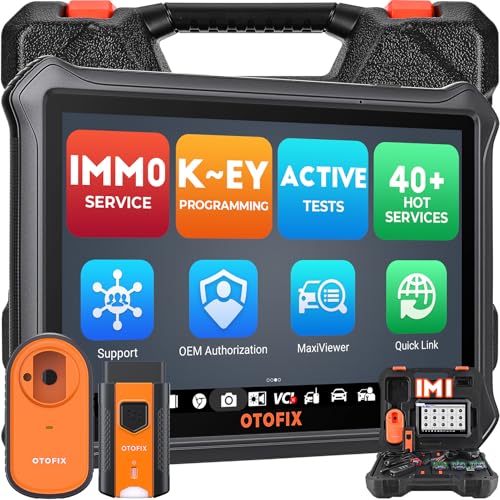
What it is: A professional-grade IM/MO programming and diagnostic tool with an XP1 programmer for key cloning. Best for: Workshop environments that require OE-level diagnostics and advanced key programming across many models. The 2026 software upgrade adds DoIP support and CAN-FD alongside DoIP DoIP diagnostics.
Why chosen: Combines key programming with broad diagnostic capabilities, enabling tasks from key generation to system analysis in one device. The dual benefit is time savings and broader vehicle coverage for auto locksmiths and repair shops.
Limitation: The feature set is extensive; new users should expect a learning curve and ensure the software is kept up to date for best results.
Buying Guide
What should I consider before buying a key programming tool?
Model compatibility is the top priority. Confirm the tool supports your vehicle’s year, make, model, and key type (blade, transponder, remote, or smart key). Look for software updates, online support, and clear instructions.
Is DIY programming safe for my car?
Most tools emphasize safety, with built-in steps to avoid damaging the car’s immobilizer or electronics. Always verify the car’s compatibility and follow vendor instructions to minimize risk.
What about ease of use and charging/storage?
Tablet-style interfaces and compact devices are easier for frequent use. Consider battery life, portability, and whether the device comes with a stand, carrying case, or protective accessories.
Should I choose a universal vs. model-specific tool?
Universal tools offer broader coverage but may require more verification steps. Model-specific tools can be simpler for common vehicles and often deliver quicker results in those cases.
What about support and updates?
Software updates ensure compatibility with new vehicles and security protocols. Prefer devices with active support options and reasonable update terms to protect long-term usability.
How do I compare pricing and value?
Consider total cost of ownership, including app subscriptions, updates, and any required add-ons (like blade keys or transponders). Weigh reliability, compatibility, and support against price to determine value.
Which tool is best for a small shop?
A tool with broad model coverage, strong support, and robust diagnostic features (like the OTOFIX IM1 or VVDI Mini family) tends to deliver the most value in a shop setting.
What is the right approach to model verification?
Before purchasing, compile a list of target vehicles and keys. Contact vendor support to confirm compatibility and required prerequisites for programming specific models.
How should I plan for ongoing learning?
Allocate time for software updates, practice on non-critical keys, and maintain a reference library of vehicle transponder types and key blade options.
What are common pitfalls?
Buying a device without confirming compatibility, ignoring update requirements, or underestimating the learning curve can lead to frustration and wasted investment.
FAQ
- Q: Can I program any key with these tools? A: Not all vehicles are compatible. Always verify model/year and key type with the vendor before purchase.
- Q: Do these tools require professional training? A: Some basic familiarity is helpful, but many provide guided instructions and video tutorials.
- Q: Do all tools update automatically? A: Most offer software updates; check update policies and costs.
- Q: Are there safety concerns with DIY key programming? A: Follow manufacturer steps to avoid damage to vehicle electronics or immobilizer systems.
- Q: Can I clone remote keys? A: Some tools support remote cloning; verify model compatibility and required accessories.
- Q: Is a blade key required for all models? A: No; some models use remotes or smart keys. Confirm the key type needed for your target vehicles.