Developers need reliable, compact keyboards that support multiple devices, offer comfortable typing, and allow quick customization. The following five keyboards are selected for programmers, students, and hybrid workers who want tri‑mode connectivity, hot‑swap switches, and practical layouts. Each product is evaluated for desk space, versatility, and workflow impact to help you pick the right tool for your setup.
| Product | Key Advantage | Best For |
|---|---|---|
| Kisnt KN85 | 75% layout, tri‑mode, hot‑swappable switches | Small desks, multitasking coders, creators |
| AULA F108 Pro | Built‑in display, multi‑mode, hot‑swappable | Streamers, multitaskers needing on‑the‑fly status |
| RK ROYAL KLUDGE S98 | Smart display, knob, BT/2.4G/USB‑C | Developers who want system status at a glance |
| EPOMAKER x Aula F75 | Gasket structure, 75% compact, hot swap | Quiet environments, long coding sessions |
| AULA F99 | Tri‑mode, hot‑swap, macro support | Power users with macro workflows |
Note: The selections emphasize compact layouts, flexible connectivity, and ease of customization—features that streamline development work across Windows, macOS, and mobile devices.
Kisnt KN85 Wireless Mechanical Keyboard

The Kisnt KN85 is a compact 85‑key board that preserves essential function keys, arrows, and shortcuts while saving desk space. Its 75% footprint is suited for small desks, laptop setups, and users who value minimalism. Connections span USB‑C, 2.4GHz, and Bluetooth 5.0, enabling seamless transitions between Windows, Mac, tablets, and mobile devices. A built‑in 4000mAh battery supports long wireless sessions, with wired mode as a fallback when power runs low. The keyboard supports RGB backlighting and programmable macros via Windows‑only software, which is advantageous for developers who remap keys and automate repetitive tasks. Best for: coders and remote workers who need tri‑modal connectivity, a clean desk, and macro capability. Limitation: Windows‑only programming software may limit key remapping on other platforms.
AULA F108 PRO Wireless Mechanical Keyboard
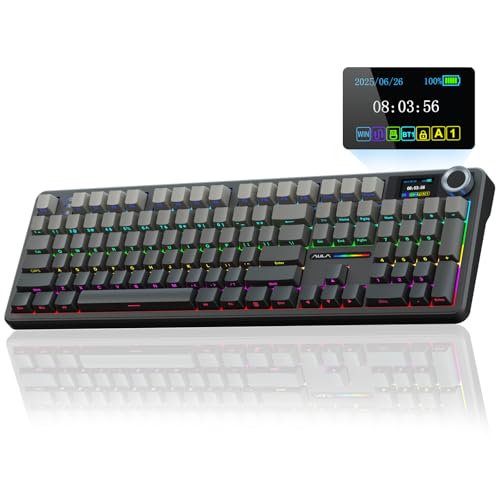
The AULA F108 Pro combines a full‑size layout with a built‑in smart TFT display and a multifunction knob. Its tri‑mode connectivity (BT5.0, 2.4GHz, USB‑C) supports up to five devices, making it ideal for developers who toggle between PC, Mac, and tablets. The keyboard is hot‑swappable and ships with pre‑lubed stabilizers and switches for a smooth typing feel and reduced noise. Note that the display requires Windows software to customize visuals, and Linux users may encounter driver limitations. Best for: developers who want quick visual status at a glance and easy cross‑device work. Limitation: software dependency for full display customization.
RK ROYAL KLUDGE S98 Wireless Mechanical Keyboard

The RK Royal Kludge S98 offers a compact footprint with a smart display and a functional knob, allowing quick volume adjustments and backlight control. It supports BT5.0, 2.4G wireless, and USB‑C wired connections, enabling seamless work across devices. The S98 emphasizes a simple, information‑dense interface ideal for developers who appreciate at‑a‑glance system feedback. Best for: developers who want an always‑visible display of status and easy multi‑device switching. Limitation: the user experience can vary with operating system defaults and driver support.
EPOMAKER x Aula F75 Gasket Mechanical Keyboard

The EPOMAKER F75 blends gasket‑mount design with a 75% layout and hot‑swap capability. Its five‑layer padding reduces typing noise, creating a quieter work environment suitable for long coding sessions. The gasket construction helps with a cushioned feel and stability, while factory lubrication provides smooth key travel. Best for: developers who value a quiet keyboard with a precise, creamy keystroke and easy switch customization. Limitation: gasket setups can feel different to users accustomed to rigid boards.
AULA F99 Wireless Mechanical Keyboard

The AULA F99 provides tri‑mode compatibility (BT5.0, 2.4GHz, USB‑C) and hot‑swappable customization. It supports up to five devices and macro functionality, enabling tailored workflows for coding, debugging, and testing across platforms. Pre‑lubed linear switches deliver smooth actuation, and the gasket structure supports quiet, consistent keystrokes during long sessions. Best for: developers who need robust multi‑device support and macro capabilities for complex tasks. Limitation: feature‑dense software may require setup time to maximize efficiency.
Buying Guide: Key Considerations For Developers
- Layout And Desk Space: For compact setups, 75% or 85% keyboards offer essential keys without a full numeric keypad. Consider whether you need arrow keys, function keys, and a dedicated number row.
- Connectivity: Tri‑mode options (Bluetooth, 2.4GHz wireless, USB‑C wired) let you switch between devices easily. Ensure your primary devices are supported and note latency targets for coding workflows.
- Hot‑Swap And Switch Quality: Hot‑swappable keyboards let you customize feel by swapping switches. Look for pre‑lubed stabilizers and smooth actuation if you type long hours.
- Programmability: Software support for key remaps and macros can speed up coding tasks. Check OS compatibility and whether macro functionality is unlocked in the intended environment.
- Sound And Feel: For quiet environments, gasket or multi‑layer padding reduces noise. If you prefer a “creamy” or tactile feel, consider lubed switches and the overall key travel.
- Display And Feedback: A built‑in display or knob can provide quick status (battery, connection, volume). Verify cross‑platform compatibility and software requirements.
- Ergonomics: Wrist rests and layout design influence comfort during long sessions. A palm rest helps to reduce fatigue during extended development work.
Frequently Asked Questions
- What is a gasket keyboard and why does it matter for developers?
– A gasket keyboard uses padding between the plate and case to dampen sound and provide a more cushioned typing feel. This can reduce fatigue during long coding sessions and improve typing consistency. - Do I need hot‑swap switches for programming?
– Not strictly, but hot‑swap capability lets you tailor switch feel and noise without soldering, which can be beneficial when experimenting with different typing preferences or improving comfort over time. - Is tri‑mode connectivity important for a developer setup?
– Yes, if you work across multiple devices (PC, Mac, tablet, laptop). Tri‑mode keyboards simplify switching between environments and maintain consistent input across devices. - Can a built‑in display assist development tasks?
– A display can show battery status, time, or custom images. It’s a helpful ergonomic feature, but make sure it is supported by the software and OS you use. - Are these keyboards suitable for Windows and macOS?
– Most models support both, but some features (like full macro software) may be Windows‑only. Verify cross‑platform compatibility before purchase. - What should I consider when choosing between 75% and 85% layouts?
– 75% saves more desk space and is highly portable, while 85% retains essential keys like F1–F12 and arrows in a slightly larger footprint. Pick based on space and key needs for your workflows.