Finding the right laptop for podcasting means prioritizing strong CPU performance for editing, ample RAM for multitasking, reliable storage, and solid battery life for on-the-go recording. This guide highlights five suitable options across different budgets and ecosystems. Each pick is evaluated for podcasting practicality, including microphone handling, editing workflow, and portability. The intended buyers include students, remote workers, hobbyists, and professionals who need dependable audio and production workflow capabilities.
The following quick-reference table compares the five selected models on core podcasting-friendly attributes such as display size, CPU type, RAM, storage, and notable strengths.
| Product | Display | CPU / RAM | Storage | Best For |
|---|---|---|---|---|
| HP OmniBook 3 17.3″ | 17.3″ FHD | AMD Ryzen 3 30, 8GB | 512GB SSD | |
| HP 15.6″ Laptop – Productivity | 15.6″ | Intel N100, 8GB | 128GB UFS + 512GB SD | |
| Apple MacBook Neo 13″ (A18 Pro) | 13″ Retina-like | 8GB Unified Memory | 512GB SSD | |
| ASUS 2026 15″ Chromebook | 15″ IPS | Intel up to 2.80GHz | 128GB Storage | |
| HP 14″ 2026 Edition | 14″ | Intel N150, 4GB | 128GB UFS + 500GB Ext |
HP OmniBook 3 17.3 Inch Laptop PC

Features include a FULL HD IPS display with wide viewing angles and an AMD Ryzen 3 30 processor. It offers 8 GB RAM and a 512 GB SSD, plus AMD Radeon 610M graphics, and Windows 11 Home. Best for: Podcasters on a mid-range budget who need a large screen for editing and comfortable multitasking. Limitation: Integrated graphics may be less capable for heavy editing workflows compared to higher-end dedicated GPUs.
HP 15.6″ Laptop – Productivity Solution

Powered by an Intel 4-core N100 processor with 8 GB RAM and flexible storage (128 GB UFS and 512 GB SD card). The 15.6″ display supports comfortable editing and reference monitoring. Best for: Podcasters who value ample screen real estate and robust multitasking at a reasonable price. Limitation: Smaller built-in storage can require frequent external or SD card management for large audio projects.
Apple MacBook Neo 13″ (A18 Pro)

Features include a compact, durable aluminum design with the A18 Pro chip, up to 16 hours of battery life, and 8 GB unified memory with a 512 GB SSD. Best for: Podcasters who need portability, macOS-native editing workflows, and AI-assisted note taking. Limitation: Smaller screen size may challenge long editing sessions without external display support.
ASUS 2026 15″ FHD IPS Chromebook
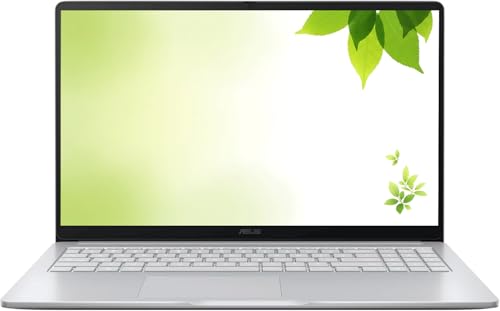
This Chromebook offers a 15″ FHD IPS display, up to 2.80 GHz, 4 GB DDR4 RAM, and 128 GB storage with Chrome OS. Best for: Podcasters who rely on browser-based editing tools and quick cloud workflow. Limitation: Limited local storage and Chrome OS compatibility with some desktop audio editing software.
HP 14″ Laptop for 2026 Students

Equipped with 4-core Intel N150 processor, 4 GB RAM, and 628 GB total storage (128 GB UFS + 500 GB Ext). It includes Wi‑Fi 6 and Copilot AI features. Best for: Budget-conscious podcasters who need a reliable device for editing on the go and basic production tasks. Limitation: The 4 GB RAM can limit heavy editing and multitasking with multiple apps open.
Buying Guide
What matters most for podcasting laptops?
- Processing Power: Look for a modern multi-core CPU (ideally quad-core) and at least 8 GB RAM for smooth audio editing and multitasking.
- Storage: SSD storage speeds boot time and project load times. 512 GB is comfortable for larger podcast libraries; consider external storage for longer series.
- Audio and Microphone Handling: Favor models with quiet fans and good overall acoustics. Consider external USB mics for higher-quality recordings regardless of laptop internals.
- Battery Life: Long battery life reduces interruptions during recording sessions away from power outlets.
- Display Size and Comfort: Larger displays ease editing and script reference; consider external monitors for long sessions.
- Operating System and Software Compatibility: macOS, Windows, and Chrome OS each have distinct editing ecosystems; pick the one that aligns with preferred DAWs (digital audio workstations) and plugins.
Frequently Asked Questions
- What laptop spec is most important for podcasting?
– A multi-core CPU, at least 8 GB RAM, and fast SSD storage are crucial for smooth editing and processing of audio files. - Should I choose Windows, macOS, or Chrome OS for podcasting?
– It depends on your preferred editing software. macOS often integrates well with many DAWs; Windows offers broad software compatibility; Chrome OS can be suitable for cloud-based workflows. - Is 4 GB RAM enough for podcasting?
– For basic editing and light multitasking, 4 GB can work, but 8 GB or more is recommended for better performance with more complex projects. - Is screen size important for editing podcasts?
– A larger display helps with timeline visibility and multitasking, but external monitors can compensate for small screens. - Do I need a dedicated graphics card for podcasting?
– Not necessary for standard audio editing; integrated graphics are sufficient. A dedicated GPU is beneficial only if you also do video editing or rendering. - Can battery life impact recording sessions?
– Yes. Long battery life helps avoid mid-session power interruptions, especially when recording on-location.