Answering the common buyer question, these laptops are solid options for users who want strong performance without breaking the bank. The list favors capable multitaskers and creators who need reliable specs at a practical price range. Ideal buyers include students, professionals on a budget, and creative workers who run design software, light video editing, or 3D programs. Below is a quick, comparable overview of five strong choices, followed by detailed sections for each model and a practical buying guide.
| Product | CPU / GPU | RAM / Storage | Display |
|---|---|---|---|
| Dell Precision 7680 (Two Variants) | i5-13600HX / NVIDIA RTX 1000 Ada 6GB | 32GB DDR5 / 1TB NVMe | 16″ FHD+ or 4K OLED options |
| HP ZBook X G1i | Intel Ultra 7 265H / NVIDIA RTX PRO 1000 | 64GB DDR5 / 1TB NVMe | 16″ WUXGA / 4K options |
| Dell Pro Max 16 Plus | Intel Ultra 9 285H / NVIDIA RTX PRO 1000 | 32GB / 512GB | 16″ FHD+ / OLED variants |
| HP ZBook G11 | Intel Ultra 7 165H / NVIDIA RTX 1000 Ada | 32GB / 1TB | 16″ FHD+ |
| HP EliteBook 860 G9 | Intel Core i7-1270P / Iris Xe | 32GB / 512GB | 16″ FHD |
Dell Precision 7680 Laptop: Creative Powerhouse

The Dell Precision 7680 is designed for demanding professional workloads, featuring an NVIDIA RTX 1000 Ada 6GB GPU and a robust i5-13600HX vPro processor. This configuration suits users who run design, architecture, and photography software and need stable performance for long projects. Best for: professionals who require workstation-grade capabilities in a portable form. Limitation: high-end configurations may stretch the budget, so consider models with balanced RAM and storage for value.
HP ZBook X G1i: AI‑Enhanced Workhorse

The HP ZBook X G1i combines powerful AI-assisted performance and a strong thermal system, making it well-suited for 3D rendering, simulation, and AI development. With 64GB RAM and a 1TB NVMe SSD, it supports heavy multitasking and large datasets. Best for: professionals needing reliability and enterprise features in a mobile workstation. Caution: higher RAM and storage options can push the price beyond a modest £1000 threshold, so balance needs with core performance.
Dell Precision 7680: Another High‑End Choice

This variant of the Dell Precision 7680 carries similar flagship-grade design with a 16″ display, 4K OLED options, and a CUDA-capable RTX 1000 Ada GPU. Best for: creators who want the crispest possible visuals and top-tier display quality. Caution: OLED panels come with burn-in risk for static UI elements during long work sessions; adjust brightness and keep static elements varied.
Dell Pro Max 16 Plus: Enterprise‑Grade Power

The Dell Pro Max 16 Plus offers flagship mobile workstation performance with an Ultra 9 processor and RTX PRO 1000 graphics. It includes 32GB RAM and a 512GB SSD, prioritizing fast access and multitasking. Best for: professionals who need strong CPU/GPU balance for complex apps. Limitation: the 512GB SSD may fill quickly with large projects; consider expanding storage where possible.
HP ZBook G11 16″ Workstation

The HP ZBook G11 focuses on delivering AI capabilities and robust rendering in a balanced mobile package, with 32GB RAM and 1TB SSD. Best for: users who run AI-powered tasks or simulations alongside standard productivity. Caution: the high-end GPU is capable, but battery life can vary with heavy workloads.
HP EliteBook 860 G9: Renewed Value
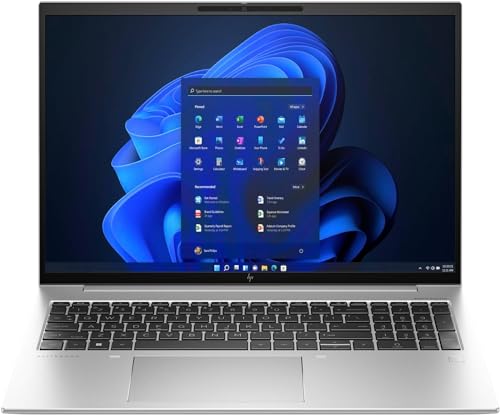
The HP EliteBook 860 G9 Renewed offers a balanced mix of performance and cost savings, featuring a strong i7-1270P and 32GB RAM with 512GB SSD. Best for: cost-conscious buyers who still need enterprise-grade features and security. Limitation: renewed devices may have shorter warranty windows than new units, which should factor into the decision.
Buying Guide: How To Choose A £1000 Laptop For Practical Power
- What workload will you run? Prioritize CPU cores for multitasking and GPU for rendering tasks. Look for latest Intel or AMD CPUs and a dedicated GPU if software relies on graphics acceleration.
- How much RAM is enough? 16GB is a baseline for smooth multitasking; 32GB benefits heavy workloads like design, video editing, and large datasets.
- Storage needs matter. At least 512GB NVMe is recommended, with an expandability option or an external drive for media files.
- Display quality matters for creators. Consider OLED or high-color-gamut panels for accurate visuals; 4K panels are nice but heavier on battery life and cost.
- Battery life vs. performance. Workstation-class laptops often trade some battery life for higher performance; choose a model with a balanced power profile for mobility.
- Durability and security. Enterprise features such as vPro, ISV certifications, and privacy webcams can matter in professional settings.
- Upgrade paths. Check for RAM and storage upgrade options to extend the laptop’s usable life without replacing the device.
Frequently Asked Questions
- What defines a laptop around £1000 for professionals? A balance of CPU power, decent RAM (16–32GB), fast storage, and a capable GPU for graphics tasks.
- Is a 4K OLED display worth it at this price? It’s visually impressive for design work, but can impact battery life and price; choose based on usage and portability priorities.
- Should I buy renewed or refurbished? Renewed units save money but may come with shorter warranties; verify warranty terms and return options before purchase.
- Do I need a dedicated GPU for design software? For many CAD, 3D, and video apps, a dedicated GPU improves rendering and viewport performance beyond integrated graphics.
- How important is RAM in real-world use? More RAM reduces swapping and improves multitasking with large files, especially in creative software and virtual machines.
- What about ports and expansion? Look for USB-C with Thunderbolt, HDMI, and adequate USB-A ports if you use external drives or displays frequently.