The best laptop for school blends performance, portability, and value. This guide highlights five student-friendly options, each chosen for different study needs—from budget-friendly Chromebooks to capable Windows machines and a portable Mac alternative. Whether you’re tackling long research papers, online classes, or campus multitasking, there’s a fit here. The top picks are ideal for: entry-level learners (budget constraints), frequent note-takers needing good screen real estate, students who rely on office productivity, and those seeking longer battery life in a compact chassis.
Summary table (quick comparison):
| Product | Best For | Key Strength | CPU/Storage |
|---|---|---|---|
| AKCHART 15.6″ AI Laptop | Student budget with productivity needs | 12GB RAM, 256GB SSD, Windows 11 with AI features | Celeron J4105 / 256GB |
| HP 14″ Chromebook for Students | Always-connected browsing and cloud tasks | Chrome OS, long battery life | N4120 / 64GB |
| Unowo 15.6″ Windows Laptop | Balanced daily tasks and media | 15.6″ FHD, solid value | N4020 / 128GB |
| HP 14″ HD Windows 11 (Renewed) | Low-cost Windows 11 option | Renewed budget choice | Celeron / 64GB |
| Apple 2026 MacBook Neo 13″ | Creative work and AI-enabled study | Apple Intelligence features, portability | A18 Pro / 256GB |
AKCHART 15.6″ AI Laptop With Office 365

Best for students who need a ready-to-use Windows 11 machine with productivity software included. This AKCHART model offers a 15.6″ FHD IPS display, a capable 12GB RAM configuration, and a 256GB SSD for fast start times and responsive multitasking. Built-in AI features assist with writing and scheduling, making it suitable for daily coursework and office tasks. The 1-year warranty and 24/7 support add value for first-time buyers.
- Best for: students who want a Windows 11 laptop with Office 365 pre-installed.
- Why selected: solid multitasking ability with ample RAM and a fast SSD, plus AI features to boost productivity.
- Caution: Celeron J4105 processors are entry-level; heavy gaming or advanced video editing may be limited.
HP 14″ Chromebook Laptop for Students

This Chromebook emphasizes simplicity and efficiency for cloud-based learning. It uses the Intel Celeron N4120 with 4GB RAM and 64GB eMMC, which is adequate for note-taking, web research, and streaming lectures. The 14″ display offers comfortable viewing during virtual classes, and Chrome OS tends to boot quickly and stay user-friendly for students who rely on Google Workspace and web apps.
- Best for: students who primarily use cloud apps and web-based tasks.
- Why selected: strong value with long battery life and easy maintenance.
- Caution: limited local storage may require cloud reliance or external storage for large files.
Unowo 15.6″ Laptop With Win 11

This Windows 11 laptop from Unowo focuses on a larger display for multitasking and media consumption. The 15.6″ FHD IPS panel provides clear visuals for classes and assignments. The device is powered by the N4020 processor with 4GB RAM and 128GB storage, offering a balanced setup for students who need more screen space without a heavy price tag.
- Best for: students who want a larger display for research and document work.
- Why selected: good screen real estate with adequate daily performance.
- Caution: 4GB RAM may feel limited during heavy browser tab usage; consider upgrading if possible.
HP 14″ HD Laptop (Renewed)
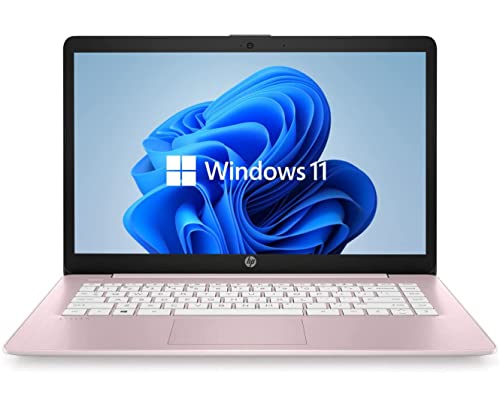
This renewed HP option targets budget-conscious students who still want Windows 11. The 14″ HD display and basic processor are enough for everyday tasks like note-taking, browsing, and Zoom classes. Renewed devices can offer substantial savings for students who are careful with usage and support a light workload.
- Best for: students on a tight budget who can manage lighter workloads.
- Why selected: affordable entry into Windows 11 with a reputable brand.
- Caution: refurbished status means variable battery life and potential cosmetic wear; verify warranty terms.
Apple 2026 MacBook Neo 13″ Laptop

The MacBook Neo 13″ targets students who prioritize portability and AI-enabled features. The A18 Pro chip and 256GB SSD offer strong daily performance and smooth multitasking for note-taking, presentations, and media workloads. It is best for learners who benefit from macOS, Apple Intelligence, and a compact form factor for travel between classes.
- Best for: students who prefer macOS and AI-assisted note-taking and summaries.
- Why selected: standout integration of AI features and portability for class-to-class mobility.
- Caution: premium price versus Windows options; not ideal for students who require Windows-specific software compatibility.
HP OmniBook 3 17.3″ Laptop

This HP OmniBook is a larger-screen option for students who need an expansive display for design work, data analysis, or heavy document editing. The Ryzen 3 processor and 8GB RAM provide a balanced level of performance for multitasking and light multimedia editing, while 512GB SSD offers ample local storage. Best for: students who value screen real estate for coursework and presentations.
- Best for: students who want a bigger display for complex tasks and editing.
- Why selected: strong RAM and storage combination with reliable Ryzen performance.
- Caution: larger size reduces portability; battery life can vary with tasks and brightness.
Buying Guide: Key Purchase Considerations
What should you consider when choosing a school laptop?
- Purpose and workload: If you mainly browse and take notes, Chromebooks or entry Windows laptops can suffice. If you run word processors, spreadsheets, and light design tasks, aim for 8–12GB RAM and 128–256GB storage.
- Operating system: Windows offers broad software compatibility; macOS provides strong ecosystem integration and AI features; Chrome OS excels in cloud tasks and quick boot times.
- Screen size and weight: a 14–15.6″ display balances readability with portability for daily classroom use. Consider lighter models for frequent travel between classes.
- Battery life: prioritize devices with 8+ hours of real-world battery life for long lecture days and libraries.
- Storage and expandability: SSD storage speeds matter for boot and app load times. Look for models with SSD expansion options if you expect file growth.
- Built-in software: Office suites and cloud storage can be included or easily added. Check whether Office 365 or equivalents come pre-installed.
- Durability and warranty: student use can be rough. A reliable warranty or manufacturer support adds value for education budgets.
Frequently Asked Questions
- What spec matters most for school work?
– For most students, sufficient RAM (8–12GB) and a solid-state drive (128–256GB) provide smooth multitasking and quick file access. - Is a Chromebook enough for college courses?
– Yes for web-based tasks and Google Workspace-heavy coursework, with caution for software that requires Windows. - Should I buy a MacBook for school?
– If you value portability and Apple ecosystem features, a MacBook can be a strong option, especially for creative work and AI-assisted tasks. - How important is screen size?
– A 14–15.6″ screen is generally ideal for note-taking, video viewing, and documents, while still fitting in backpacks. - Is Renewed or refurbished a good idea?
– It can save money, but verify warranty terms and cosmetic condition and ensure return options. - What about AI features?
– AI-assisted tools can improve note-taking and summarization, but ensure software compatibility with your coursework.