Answering your search for a laptop that handles Zoom meetings smoothly, this guide highlights five practical choices across Chromebooks and Windows laptops. Ideal buyers include students attending online classes, remote workers on daily video calls, and anyone needing reliable video conferencing with decent battery life. The selections favor models with reliable webcams, comfortable keyboards, stable Wi‑Fi, and enough RAM to manage calls alongside browser apps. A quick summary table follows to compare the top picks at a glance.
| Product | Why It Was Selected |
|---|---|
| HP 14″ HD Chromebook Laptop for Students | Chromebook option with Chrome OS, lightweight, long battery life, optimized for Zoom via web app |
| HP 14″ Ultra‑Light Laptop for Student & Home | Long battery life, Windows 11, 14″ display, supports Zoom-ready apps |
| HP 14″ Laptop Computer for 2026 Student Business Productivity | Win11 Pro environment, Copilot AI, solid multitasking |
| Amzboy 15.6” Laptop | Large screen, quiet operation, up to 1TB expansion possible |
| NIMO 15.6” FHD Copilot AI-Laptop | High RAM option and fast storage for heavy multitasking and calls |
HP 14″ HD Chromebook Laptop for Students

Key features include an Intel Celeron N4120 quad-core processor, 4 GB RAM, and 64 GB eMMC storage. The 14″ HD display with anti-glare helps reduce eye strain during long Zoom sessions. Built for everyday web tasks, it handles multiple browser tabs and video calls with dependable performance. Best for students or light users who primarily rely on web apps for conferencing. Caution: Chrome OS limits local software installation; some enterprise or specialized apps may require web equivalents.
Best for: students or remote workers who favor a lightweight, budget-friendly device with long battery life and strong Chrome OS integration for Zoom.
HP 14″ Ultra‑Light Laptop for Student & Home

This model uses an Intel Celeron N4500 processor, 4 GB RAM, and 128 GB storage (plus a 64 GB SD card). It features a 14″ micro-edge display with anti-glare, and 12‑hour battery life, suitable for back-to-back Zoom meetings and coursework. It supports external monitors via HDMI or USB‑C, expanding your conferencing workspace. Best for: students or home users who need all-day battery and a Windows environment with Office 365 included for productivity alongside Zoom. Limitation: affordable performance may lag with heavy professional editing tasks.
Best for: long conference days with manageable multitasking and a need for Windows convenience and optional external display support.
HP 14″ Laptop Computer for 2026 Student Business Productivity

Powered by a Quad‑Core Intel N150 processor with 4 GB RAM and 628 GB total storage (128 GB SSD + 500 GB external), this laptop emphasizes versatile multitasking and file management. The 14″ display with anti-glare technology supports clear visuals for video calls and presentations. Best for: students and professionals who need substantial local storage and Windows 11 capabilities, including Copilot AI. Caution: 4 GB RAM may limit heavy multitasking with many open apps—consider RAM-light workflows or external storage planning.
Best for: users who want Copilot AI features, robust Windows 11 home/capabilities, and extra storage for documents and media while on Zoom.
Amzboy 15.6” Laptop

This 15.6″ notebook uses an Intel N4020 CPU, 4 GB RAM, and 128 GB eMMC. It provides a large, vibrant Full HD display and a quiet, fanless design—useful for Zoom calls in quiet environments or classrooms. Expandable storage up to 1 TB via external media offers room for meeting recordings and files. Best for: those who want a larger screen for multitasking during calls and easy portability. Limitation: modest CPU power; may struggle with heavy multitasking and 1080p video editing.
NIMO 15.6″ FHD Copilot AI-Laptop
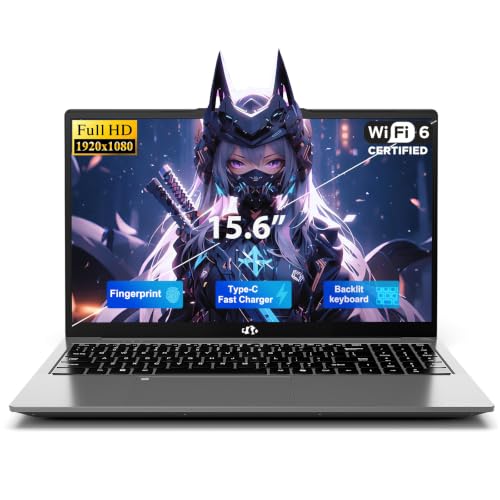
Powered by an Intel N150 CPU with 16 GB RAM and a 512 GB NVMe SSD, this laptop is designed for heavy multitasking and quick Zoom video calls across many tabs. It ships with Windows 11 Home and supports fast boot times and expandable storage options. Best for: students or professionals who run many apps in parallel during Zoom meetings and need robust RAM and fast storage. Caution: higher RAM and storage come at a larger price and power draw compared with budget models.
Buying Guide: Key Purchase Considerations
Display type and size matter for Zoom. A larger screen with anti-glare helps reduce eye strain during long sessions, while high brightness improves visibility in bright environments. Consider the webcam quality and microphone clarity; Windows or Chrome OS should align with your preferred conferencing apps. RAM is crucial for multitasking during calls alongside browsers and documents. Storage should accommodate meeting recordings, downloaded files, and apps. Battery life influences whether you can join remote meetings all day without charging. Connectivity options, including Wi‑Fi 6 and reliable Bluetooth, support stable video calls. Operating system—Chrome OS for lighter tasks and web apps, Windows for full software compatibility—affects app availability and updates. Weight and build quality influence portability for travel or commuting. Expansion options, such as HDMI or USB-C docking, can create a better conference setup with external displays.
FAQ
- Which type of laptop is best for Zoom on a budget? A Chromebook with Chrome OS offers solid Zoom performance and long battery life at a lower price point, though the app ecosystem is web-first.
- Is more RAM always better for Zoom? More RAM helps when you run many apps and browsers during a meeting; 8 GB is generally comfortable, while 4 GB can be limiting for heavy multitasking.
- Should I prioritize a larger display for Zoom? A larger, anti-glare display improves visibility and reduces eye strain during longer calls, especially with shared content.
- Is Windows 11 essential for Zoom meetings? Not essential; Windows 11 offers broad app support and Copilot AI features, but Chrome OS and Linux options can handle Zoom well via web clients.
- What about webcam quality? Look for laptops with at least a 720p or better webcam; some models emphasize privacy shutter and improved mic arrays, which benefit conferencing.
- Can I connect multiple displays for Zoom? Yes, many models support HDMI or USB-C docking to drive external monitors for a more productive conferencing space.