Looking for a light, versatile 2-in-1 laptop that easily folds into a tablet for travel, study, or remote work? This guide highlights five compact, capable options and explains who each is best for. These picks emphasize portability, battery life, and daily multitasking at an affordable price point. The top picks range from Chromebooks with built-in security to Windows 11 foldables with flexible modes. Below is a quick buying-ready summary table, followed by detailed product sections and practical buying guidance.
| Product | Best For | Key Benefit |
|---|---|---|
| Lenovo Chromebook 2-in-1 | Students and minimalist users | Lightweight, fast boot with Google apps |
| dahongyun 11.6″ 2-in-1 | Daily commuters and travelers | Ultra-portable 360° convertible with solid RAM/SSD |
| HP Chromebook Plus x360 14″ | Students and professionals on a budget | Full Windows-like Chrome OS with reliable performance |
| HP Chromebook Plus x360 (14″) | Casual multitaskers with emphasis on versatility | Flexible modes and long battery life |
| ASUS VivoBook Go 14 Flip | Everyday users needing value | Slim, light, touchscreen with reliable basic specs |
Lenovo Chromebook 2-in-1 — Lightweight, 14″ Touch
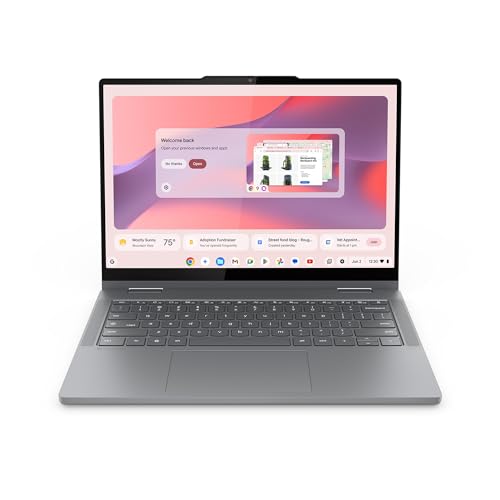
Best for: Students or light road-warriors who want quick startup and seamless Google apps. This model focuses on portability with a slim profile and military-grade durability in a 3.3-pound frame. It ships with ample on-device storage for everyday tasks and reliable web-based productivity.
Why selected: It combines a thin build (0.69″ thick) with long battery life and fast boot, helping users stay productive while away from a power outlet. The Intel-based performance supports everyday browsing, document editing, and media needs.
Caution: Being a Chromebook, it relies on Chrome OS apps and cloud storage for some tasks; offline productivity is possible but limited compared to Windows or macOS ecosystems.
dahongyun 11.6″ 2-in-1 — Compact Power

Best for: Busy students or travelers who want a compact device with robust RAM and storage for multitasking. The 11.6″ FHD touchscreen offers clear visuals and the 360° hinge enables laptop, tablet, or stand modes for varied tasks.
Why selected: The combination of 8GB RAM and 256GB SSD supports smoother multitasking and faster data access, while the slim profile makes it easy to carry.
Caution: It uses an Intel Celeron processor; performance is solid for everyday apps but not a heavy-duty multitasker with demanding software.
HP Chromebook Plus x360 14″ — Business-Ready

Best for: Students and professionals who need a capable, budget-friendly 2-in-1 with robust connectivity. The 14″ FHD touchscreen and modern ports support everyday productivity tasks and collaboration needs.
Why selected: The Core i3-N305 option provides efficient multitasking, while 256GB UFS storage supports quick wake-ups and responsive performance for common work applications.
Caution: Chrome OS devices depend on Google services; some users may prefer Windows software ecosystems for compatibility with specialty apps.
HP Chromebook Plus x360 14″ (Second Variant)

Best for: Light multitaskers who want four modes (laptop, tent, stand, tablet) with reliable battery life. This model emphasizes versatility for both study and light work tasks.
Why selected: The 14″ FHD display, touch functionality, and 8GB RAM help maintain smooth navigation across multiple browser tabs and cloud-based apps.
Caution: Some users may prefer higher RAM or storage for heavy workloads; consider your typical daily tasks before choosing.
ASUS VivoBook Go 14 Flip — Value 2-in-1

Best for: Everyday users seeking a budget-friendly 2-in-1 with reliable basic performance. The flip design supports flexible working and learning environments.
Why selected: The 14″ touchscreen with an Intel Celeron N4500 and 4GB RAM offers adequate web browsing, document editing, and streaming for casual use. The detachable keyboard option isn’t present, but the flip form factor adds versatility.
Caution: 4GB RAM may limit heavy multitasking; consider upgrading RAM if your routine includes many browser tabs or demanding apps.
ASUS Chromebook CM30 Detachable — Compact 2-in-1

Best for: Students and professionals who want a detachable tablet-style Chromebook for reading, note-taking, and light tasks on the go. This device emphasizes modular versatility in a compact footprint.
Why selected: The detachable form offers tablet-style convenience with Chrome OS simplicity, extended battery life, and the flexibility of Chrome apps for quick tasks away from a desk.
Caution: The 10.5-inch screen keeps overall footprint small, which may be less comfortable for long reading sessions or extended document editing; a larger screen may suit those tasks better.
Buying Guide: Light 2-in-1 Laptop Considerations
- Operating System: Choose Chrome OS for fast, security-focused daily tasks and cloud-based work, or Windows for broad software compatibility and offline productivity.
- Display Size and Type: 11–14 inches balances portability and usability. Touchscreen clarity and brightness matter for visual comfort during long sessions.
- CPU and RAM: For light multitasking, an efficient CPU with 4–8GB RAM works well. 8GB RAM helps with many open tabs and apps simultaneously.
- Storage: 64–256GB is typical for budget 2-in-1s; consider cloud storage if you opt for lower onboard capacity.
- Battery Life: Look for devices advertised with all-day use in real-world conditions (6–12+ hours). Fast charging is a plus for travelers.
- Build and Portability: A slim profile and light weight improve travel ease. Check hinge durability if you expect frequent tablet-mode usage.
- Connectivity: Ensure Wi-Fi standards (Wi-Fi 6 is common) and available ports (USB-C, USB-A) align with your accessories and peripherals.
- Accessories: Some models include stylus support or backlit keyboards; evaluate whether these features meet your daily tasks.
Frequently Asked Questions
- What is a 2-in-1 laptop?
– A 2-in-1 combines a keyboard and a touchscreen that can rotate or detach, enabling laptop, tablet, or other modes for versatility. - Are Chromebooks a good choice for students?
– Yes, they offer fast boot times, easy updates, and built-in Google apps ideal for note-taking and collaboration. - Is 4GB RAM enough for a 2-in-1?
– For light multitasking and basic web use, 4GB can be sufficient, but 8GB improves performance with more tabs and apps. - What should I consider before buying a 2-in-1?
– Consider OS, screen size, battery life, RAM, storage, and how you plan to use it (study, travel, work). - Do detachable 2-in-1s offer better portability?
– Detachables are highly portable, but all-in-one flip designs often provide more robust keyboard experiences for typing. - Can these devices run Windows software?
– Some are Chrome OS and will rely on cloud-based alternatives; Windows-based 2-in-1s handle broader software compatibility.