Find the right micro SD card for your device and usage. This guide highlights five top options, explaining who each card is best for, and why they were chosen. Ideal buyers include Android users needing extra storage, content creators capturing 4K or high-bitrate video, and multitasking laptop users who need portable high-speed memory. The comparison table below summarizes key strengths to help you decide quickly.
| Product | Best For | Key Speed | Typical Use |
|---|---|---|---|
| SanDisk Ultra 128GB + Adapter | Everyday Android use | Up to 195 MB/s read | Photos, Full HD video, apps |
| Amazon Basics 128GB | Budget-friendly 4K and speed | Up to 100 MB/s | General use, gaming, media |
| SanDisk Ultra 64GB + Adapter | Compact secondary storage | Up to 145 MB/s | Travel, backups |
| SanDisk 128GB Ultra microSDXC | Smartphones and Chromebooks | Up to 140 MB/s | App load, media |
| TOPESEL 32GB 2-pack | Low-cost, extra cards | 80 MB/s read | Dash cams, basic storage |
SanDisk 128GB Ultra microSD Card + Adapter

This microSD card offers strong all-around performance with substantial storage and fast read speeds. It’s well-suited for Android smartphones and tablets, digital cameras, and even some laptops when used with an appropriate adapter. The card family emphasizes high-capacity options up to 1.5TB across models, enabling hours of Full HD video, large photo libraries, and expansive media collections.
Best for: Android power users and content creators who need reliable expansion without compromising app performance or media storage. The 195 MB/s read speed (on higher capacities) helps with quick offloads and faster transfer to a PC or reader.
Limitation: Real-world write speeds may be lower than the advertised read speeds on some hosts, and actual usable capacity varies by device formatting.
Amazon Basics microSDXC Memory Card with Full Size Adapter, 128GB

This entry from Amazon Basics emphasizes practical capacity labeling and broad device compatibility. It is designed to work well with Nintendo Switch and other devices that support high-bitrate video recording and burst photography. It includes an adapter for use in full-size SD slots, making it versatile for cameras and laptops.
Best for: Shoppers seeking a budget-friendly microSD option with reliable everyday performance and easy expansion for cameras, tablets, and portable game devices. The card’s capacity labeling helps set expectations about usable space after formatting.
Limitation: Performance is solid but not as fast as premium UHS-I U3 cards; avoid if you need the absolute fastest speeds for tasks like 4K video capture on high-end cameras.
SanDisk 128GB Ultra microSDXC UHS-I Memory Card

This card targets Android devices and Chromebooks, delivering up to 140 MB/s transfer speeds. The A1 performance rating helps with app loading and multitasking on supported devices, making it a practical choice for smartphones and tablets that require quick access to apps and media.
Best for: Smartphone and Chromebook users who want dependable, easy-to-use storage for media, apps, and light video capture. It provides a balanced mix of capacity and speed without breaking the bank.
Limitation: Actual speeds can vary by device and file type; users with high-end 4K video workflows should consider faster options if available.
TOPESEL 32GB Micro SD Card 2 Pack

This two-pack offers a low-cost option with modest performance suitable for everyday tasks and devices that don’t demand high-speed bursts. Each card’s usable capacity is around 28.8GB per 32GB card, a standard consideration due to formatting and binary/decimal calculations.
Best for: Budget-conscious buyers who need extra cards for dash cams, backups, or occasional storage in devices where top speed isn’t critical. Use caution in high-speed write scenarios like 4K recording on demanding devices.
Limitation: Lower sustained write performance means it’s not ideal for fast-action capture or heavy app usage on slower hosts.
SanDisk 128GB Extreme microSD Card + Adapter

This card targets high-demand use cases with fast read and write speeds, making it suitable for action cameras, high-bitrate video, and burst photography. The capacity up to 2TB supports long recording sessions and large media libraries. It’s optimized for speed classes like U3 and V30, which helps ensure steady performance under pressure.
Best for: Creators who need reliable, high-speed memory for 4K or 5K video capture, professional photography, and devices that benefit from rapid offloads. Choose this if you routinely work with large video files and fast transfers.
Limitation: Premium speed comes at a higher price; ensure your device supports the higher performance class to realize the full benefit.
Lexar E-Series 32GB Micro SD Card 3 Pack
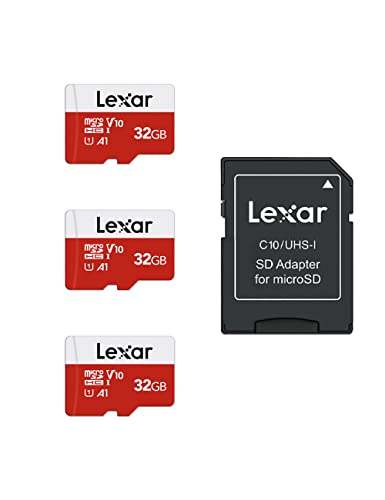
Lexar E-Series focuses on broad compatibility and practical performance. With UHS-I support and up to 100 MB/s, these cards are suitable for security cameras, digital cameras, dash cams, and smartphones. The A1 rating helps app performance on compatible devices, making it a versatile option for mixed usage.
Best for: Users who need a multi-pack for various devices, including cameras and dash cams, with dependable everyday speed. It suits enthusiasts who want a general-purpose memory upgrade without premium pricing.
Limitation: Lower maximum speeds mean it’s not ideal for high-speed video recording or heavy app workloads on devices that support faster interfaces.
Patriot 64GB Micro SD V30 A1

This card emphasizes app performance and video speed with a V30 rating and A1 performance class. It’s a straightforward option for Android devices and action cameras that require dependable app loading and smooth video capture. It balances capacity with adequate speed for everyday tasks, photography, and light video work.
Best for: Users needing consistent app performance and reliable video recording on mid-range devices. Consider this when you want a stable, no-fruss upgrade for everyday multimedia tasks.
Limitation: The 64GB capacity may feel limiting for users with large media libraries or long-term video projects; plan for additional storage if needed.
Buying Guide: Micro SD Card Essentials
- Capacity vs. device support: Verify maximum card size supported by your device. Higher capacities require compatible hardware and file systems.
- Speed class matters: UHS-I/U3/V30 combos benefit 4K video and rapid app loading. For photography, higher write speeds reduce buffering in burst modes.
- Application use: A1-rated cards perform better for launching apps on mobile devices. For cameras and dash cams, prioritize U3 and above.
- Endurance and environment: Consider cards designed for durable use in extreme temperatures, moisture, or high-vibration contexts if you work outdoors or in challenging settings.
- Adapter compatibility: If you need to transfer to a full-size SD reader, choose a card with a reliable adapter. Some readers may not support the fastest speeds.
Frequently Asked Questions
- What is the difference between A1 and A2 ratings?
– A1 and A2 indicate app performance; A1 is sufficient for most smartphones, while A2 targets higher demands for complex app workloads. - Do all micro SD cards work in cameras and phones?
– Most do, but check device compatibility for capacity limits and speed requirements. - Can I use a micro SD card in a laptop?
– Some laptops include micro SD slots; otherwise, you’ll need an adapter or reader with USB. - Is 128GB enough for 4K video storage?
– It depends on your recording length and frame rate. For long sessions, higher capacities like 256GB or 512GB are often better. - How do I know if a card is genuine?
– Buy from reputable sellers, verify packaging, and compare model numbers and speed ratings with official specifications.