Finding the right monitor for coding means prioritizing clarity, comfort, and features that support long sessions. The following five picks cater to developers, engineers, and students who spend hours writing and navigating code. Each option balances screen real estate, color accuracy, and eye comfort to reduce strain and improve productivity. The list features a mix of 4K and high-refresh coding-focused panels, plus USB-C hubs and ergonomic adjustments for versatile workstations.
Summary Table
| Product | Best For | Key Features | Limitations |
|---|---|---|---|
| BenQ RD280U 28.2″ 4K | Code with 3:2 aspect, MoonHalo lighting | 3:2 aspect, Nano Matte, MoonHalo, KVM, 90W USB-C | Higher price point |
| Dell S3425DW 34″ Ultrawide | Multitasking with wide workspace | 34″ VA, 120Hz, FreeSync, color coverage | Curved design may not suit everyone |
| Philips 24″ FHD 241V8LB | Budget coding setup, compact desk | 24″, VA, Flicker-Free, wide viewing angle | 1080p may feel limited for large text |
| BenQ GW2486TC 24″ USB-C | Ergonomic, USB-C hub | 1080p IPS, Eye-Care, Daisy Chain, USB-C | Smaller 1080p panel |
BenQ RD280U 28.2″ 4K Coding Monitor

The BenQ RD280U is designed for programmers who benefit from a 3:2 aspect ratio and high pixel density. Its Nano Matte panel reduces glare, while MoonHalo backlighting provides comfortable illumination for long coding sessions. The monitor includes coding-specific modes to differentiate code blocks more clearly and facilitate focus. It also supports a 90W USB-C connection and KVM switching for easier workflow management. Best for developers who want screen clarity with reduced glare and centralized device control.
Best for: Developers who code for long hours and need precise text rendering, better for multi-loss-free focus with a focused coding environment. Limitations: Higher price point and larger desk footprint may be a consideration.
Dell 34 Monitor S3425DW

The Dell S3425DW provides a wide 34″ panel with a VA matrix, ideal for developers who manage multiple files or dashboards side-by-side. It delivers a smooth 120Hz refresh rate for responsive navigation and FreeSync Premium for tear-free motion. Although primarily marketed for entertainment and productivity, its color coverage and HDR readiness make it a strong all-around coding monitor for multitaskers who want expansive screen real estate. Best for users who need a broad workspace and consistent color, with fast motion handling.
Best for: Multitaskers who want a wide, immersive coding setup. Limitation: Ultrawide curves may require readjustment of posture for some users.
Philips 24 Inch FHD 241V8LB

The Philips 241V8LB offers an affordable, compact option with Full HD resolution and a wide viewing angle. It uses a VA panel to deliver strong contrast and vivid colors, which helps readability for code blocks and terminal windows. Its Flicker-Free technology reduces eye strain during long sessions. Best for budget-conscious coders who need reliable performance in a smaller form factor.
Best for: Beginners or tight-budget setups. Limitation: 1080p resolution may feel restricted for larger text or detailed UI work.
BenQ GW2486TC Office USB Hub Monitor
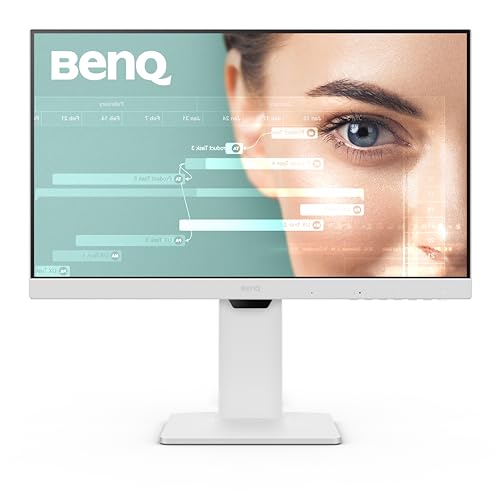
The BenQ GW2486TC focuses on office usability with a 24″ 1080p IPS panel and built-in USB-C connectivity. It emphasizes Eye-Care features and adaptive brightness to reduce eye fatigue during long coding sessions. The monitor includes a daisy chain and a no-nonsense design that’s easy to adjust on a busy desk. Best for developers who want a compact, ergonomic 24″ setup with a single-cable USB-C workflow.
Best for: Coders who value USB-C hub capability and ergonomic adjustments. Limitation: 1080p resolution and 24″ size may feel small for some users.
BenQ Programming Monitor RD280UG 28.2″ 4K+

The BenQ RD280UG offers a 4K+ resolution with a 3:2 aspect and a 120Hz refresh rate, paired with a Nano Matte panel to minimize reflections. Its exclusive coding modes enhance code readability, and MoonHalo backlight provides a gentle ambient glow that reduces eye strain. Best for developers who want crisp text, smoother scrolling, and a dedicated coding-focused display. Limitation: Higher brightness and feature set may require acclimation for some users.
ASUS ProArt PA278QV 27″ QHD Professional Monitor

The ASUS ProArt PA278QV is a color-accurate professional monitor with 27-inch QHD resolution and IPS panel. It targets creative work but also suits developers who require precise color and wide viewing angles for complex UI coding tasks. Calman Verified with Delta E < 2 accuracy helps ensure consistent color across projects. Best for developers who also do design or color-sensitive work. Limitation: Not specifically tuned for coding modes, compared to dedicated coding monitors.
Buying Guide: How To Choose The Right Coding Monitor
- Panel type and resolution: For crisp code text, 4K or QHD with a high pixel density helps. IPS panels provide wide viewing angles and color fidelity, while VA panels offer strong contrast.
- Aspect ratio and screen real estate: A 3:2 or 4:3 aspect can reduce vertical scrolling and fit more lines of code, while ultrawide monitors support multiple windows side by side.
- Eye comfort features: Look for flicker-free technology, low blue light modes, and parabolic or ambient backlighting to reduce strain during long sessions.
- Connectivity and ergonomics: USB-C with power delivery simplifies cabling; height adjust, tilt, pivot, and swivel enable comfortable placement and posture.
- Special coding enhancements: Some monitors offer coding profiles, anti-glare Nano Matte panels, or MoonHalo backlighting designed to emphasize text clarity and reduce eye fatigue.
- Size and desk fit: Larger screens improve readability but require more desk space and proper viewing distance. Consider your desk setup and seating position.
- Budget balance: Prioritize essential features (text clarity, adjustability, and eye comfort) first, then add features like ultrawide or 4K if the workflow demands them.
Frequently Asked Questions
- What resolution is best for coding text readability?
- Higher resolutions like 1440p and 4K deliver denser text and more code lines per screen, improving readability when paired with appropriate scaling.
- Is an ultrawide monitor good for coding?
- Yes, ultrawide monitors provide expansive horizontal space for multiple windows, which can boost multitasking and navigation efficiency.
- Do I need a 120Hz monitor for coding?
- Not essential for coding itself, but a higher refresh rate can make cursor movement and scrolling feel smoother during development tasks.
- What is MoonHalo backlight and is it worth it?
- MoonHalo is ambient lighting designed to reduce eye strain and provide a subtle glow behind the screen. It can improve comfort during long sessions for some users.
- Should I choose a 3:2 monitor for coding?
- 3:2 aspect ratios can reduce vertical scrolling and show more code lines, which some programmers prefer for readability.
- Are USB-C hubs important for developers?
- USB-C hubs simplify connectivity by powering the monitor, video, and accessories from one cable, reducing desk clutter.