The best mice for tennis elbow prioritize vertical design, comfortable grip, and low strain on the forearm. This guide highlights five ergonomic options ideal for reducing wrist and elbow tension during long work or gaming sessions. Each pick targets different needs—from multi-device connectivity to rechargeable power and quiet clicks—so you can choose based on how you work. The top picks are best for users seeking relief from forearm strain, chronic elbow soreness, or extended computer use without sacrificing precision.
Buying snapshot:
- TECKNET Ergonomic Mouse: versatile multi-connection, high DPI, silent clicks.
- Anker 2.4G Wireless Vertical: straightforward, comfortable, and budget-friendly.
- ProtoArc EM11 NL: multi-device, rechargeable, compact for travel.
- Logitech Lift: premium vertical design, refined comfort for daily use.
- UGREEN Vertical Mouse: adjustable DPI, quiet clicks, wide compatibility.
Product Comparison Table
| Product | Best For | Key Benefit | Connectivity | DPI Options |
|---|---|---|---|---|
| TECKNET Ergonomic Mouse | Multiple devices, quiet work | Multi-mode connectivity and adjustable DPI | Bluetooth + 2.4GHz USB receiver | 800–4800 |
| Anker 2.4G Wireless Vertical Ergonomic Optical Mouse | Simple, reliable verticals | Comfortable neutral grip, easy browsing | 2.4 GHz USB receiver | 800/1200/1600 |
| ProtoArc EM11 NL Wireless Ergonomic Mouse | Multi-device workstations | Up to 3 devices, rechargeable | Bluetooth + USB-A receiver | Multiple via device settings |
| Logitech Lift Vertical Ergonomic Mouse | Daily long-hours use | Natural hand position, long-lasting comfort | Wireless USB receiver or Bluetooth | Standard DPI presets |
| UGREEN Vertical Mouse | Quiet workspace, broad OS support | Quiet clicks, multiple DPI levels | Bluetooth + USB (2.4G) | 1000–4000 |
TECKNET Ergonomic Wireless Vertical Mouse

Best for users who want seamless device switching. This mouse supports Bluetooth and 2.4GHz USB connections, allowing quick shifts between three devices. The elevated DPI options (up to 4800) deliver precise cursor control for detailed tasks, while a quiet click profile helps maintain a calm work environment. Best for multi-device users and those who want flexible connectivity to reduce forearm strain. Caution: Silent clicks apply mainly to left and right buttons; some secondary functions may be audible.
Anker 2.4G Wireless Vertical Ergonomic Optical Mouse

Best for straightforward comfort and precise tracking. The Anker vertical design promotes a natural wrist position, reducing strain during long work sessions. It offers 800/1200/1600 DPI options for adaptable sensitivity, making it a solid pick for both productivity tasks and light precision work. Best for: budget-conscious buyers who want a reliable ergonomic option. Caution: Bluetooth is not supported on this model; uses USB receiver only.
ProtoArc EM11 NL Wireless Ergonomic Mouse

Best for multi-device workflows with rechargeable power. The EM11 NL supports up to three devices via dual Bluetooth and USB-A connectivity, making it ideal for users juggling a laptop, desktop, and tablet. Its rechargeable battery eliminates frequent battery replacements. Caution: USB-C receiver is not included, and setup focuses on Bluetooth plus USB-A pairing.
Logitech Lift Vertical Ergonomic Mouse

Best for long days at the desk with a premium feel. Logitech Lift emphasizes a natural 57-degree vertical angle, a soft grip, and a thumb rest to promote a comfortable forearm posture. This is a strong choice for users with ongoing elbow discomfort who want a refined, durable option. Caution: Higher price point compared to entry-level vertical mice.
UGREEN Vertical Mouse
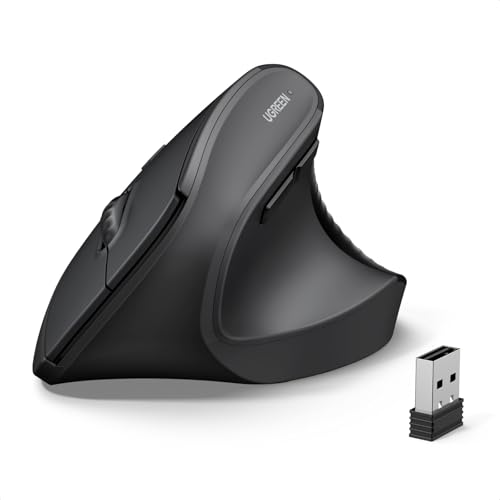
Best for broad compatibility and quiet operation. The UGREEN vertical design reduces wrist rotation and muscle strain, while the 5-button layout offers efficient navigation. Four DPI levels allow quick adaptation from document editing to scrolling. Caution: Some users may require a brief adjustment period to adapt to the vertical orientation.
Buying Guide: How to Choose a Mouse for Tennis Elbow
- Ergonomic shape: Look for a vertical or “elbow-friendly” design that keeps your wrist in a neutral position and reduces forearm pronation.
- Multi-device connectivity: If you work across devices, consider mice with Bluetooth and USB receiver options to minimize repetitive USB dongle use and wrist reach.
- DPI and precision: Higher DPI is helpful for precise cursor control on smaller screens or high-resolution displays. Choose a model with adjustable DPI to tailor sensitivity.
- Type of clicks: Quiet or silent clicks can lessen background noise and be beneficial in shared spaces. Check which buttons are silent in each model.
- Rechargeable power: If you prefer not to replace batteries often, choose rechargeable models with USB-C or micro-USB charging and long battery life.
- Build and grip: A comfortable grip (palm, claw, or fingertip) influences comfort over long sessions. Ensure the size fits your hand and grip style.
- Software and customization: Some mice offer software that allows button remapping and macro creation, useful for accessibility and efficiency.
FAQ
- What features help tennis elbow in a mouse?
Vertical or ergonomic designs that reduce forearm rotation and strain, quiet clicks for low-noise environments, and adjustable DPI for precise control.
- Are wireless mice better for elbow pain than wired?
Both can be comfortable if designed ergonomically. Wireless reduces cable tugging and allows easier positioning, but ensure reliable connectivity.
- How many devices should a multi-device ergonomic mouse connect to?
At least two to three devices is common, enabling seamless switching between a laptop, desktop, and tablet as needed.
- Is a higher DPI always better for elbow relief?
Higher DPI offers more precise control but may not reduce strain by itself. Choose DPI levels that match your typical tasks and screen size.
- What maintenance helps extend comfort with a tennis elbow?
Regular hand breaks, proper desk height, and rotating resting positions can complement ergonomic mice to reduce strain over time.
- Should I choose silent-click models?
Silent or quiet-click options can reduce sound-related distractions, which is beneficial in shared spaces or libraries.