Answering the demand for synchronized, room-to-room sound, a multi room wireless speaker system lets you play the same music across several speakers or pair speakers for bigger spaces. This guide highlights five solid options, each suited for different living situations—from apartments to larger homes and small offices. The top picks cover low latency, easy setup, and Apple AirPlay 2 compatibility. Use the quick comparison table to decide which system fits your needs.
| Product | Best For | Key Advantage |
|---|---|---|
| Avantree Harmony 2 | Homes and meeting rooms | Ultra-low latency for sync |
| Dio Node (5-Pack) | Apple ecosystem fans | AirPlay 2 compatibility |
| Venucast Harmony A3 | Parties and events | Long range transmission |
| Sonos Era 100 SL | Compact setups | WiFi and Bluetooth versatility |
| Dio Node (3-Pack) | Smaller homes or budgets | Great multi-room value |
Avantree Harmony 2 – Multi-Room System

Best for: Small offices, classrooms, and home environments that need consistent audio across several rooms with minimal setup. The Avantree Harmony 2 supports multi-room indoor audio for background music, TV sound, and spoken word content with room-to-room sync.
Why selected: It emphasizes ultra-low latency—under 30 ms—so audio stays in sync while watching TV or video content across rooms. The system is designed for easy setup without apps, letting users connect the transmitter to a TV, phone, or laptop via optical, AUX, or Bluetooth. Comfortably suited for spaces that require quick, reliable expansion as needs grow.
Caution: The system relies on a transmitter for synchronization; ensure your primary source has compatible outputs (optical, AUX, or Bluetooth) for best results. If you plan to expand, verify compatibility with additional speakers in the future.
Dio Node Multiroom Wi-Fi Home Speakers (5-Pack)

Best for: Apple users who want a ready-to-go multi-room setup with AirPlay 2 compatibility across multiple rooms. The 5-pack offers a strong option for even distribution in larger homes or party setups.
Why selected: The Dio Node line emphasizes seamless audio across the home with lossless sound and privacy-conscious design, featuring no built-in microphones. AirPlay 2 compatibility allows easy casting from iPhones and iPads, with broad device compatibility to reach over 100 speaker models. Ideal when user privacy and ease of use matter most.
Caution: While AirPlay 2 is widely supported, some non-Apple devices may require additional setup steps. The system is designed for simple use but relies on a stable Wi‑Fi network for best performance when expanding beyond a few rooms.
Venucast Harmony A3 – Auracast Wireless System

Best for: Home parties, patio setups, and events where you want reliable, synchronized audio across multiple powered speakers within a long-range network.
Why selected: The Harmony A3 supports multi-speaker synchronization across receivers with a documented 328 ft range, making it suitable for larger homes or small venues. It is designed to connect to various powered speakers and spread the same source to all units without frequent re-pairing, which is convenient for casual, frequent reconfiguration.
Caution: Long-range performance can depend on environmental factors; walls, furniture, and interference may affect range. Ensure your layout accommodates multiple receivers to achieve even coverage.
Sonos Era 100 SL — Compact, Microphone-Free
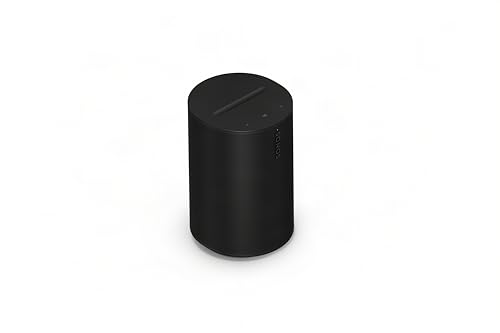
Best for: Small apartments or desktops where space is at a premium and users want flexible streaming options. The Era 100 SL emphasizes a compact footprint with strong core Sonos performance.
Why selected: It combines WiFi streaming with optional Bluetooth and line-in connectivity, giving a straightforward path to a multi-room setup without taking up much space. While small, it maintains sound quality and expands the potential to add more Sonos devices later. It is ideal for users prioritizing brand ecosystem and streamlined control.
Caution: The Era 100 SL relies heavily on a WiFi network; in crowded networks, performance can depend on router quality and bandwidth. If you’re adding more rooms, confirm reliable WiFi coverage before expanding.
Dio Node Multiroom Wi-Fi Home Speakers (3-Pack)

Best for: Mid-sized homes or budgets where a four- to six-room setup is desired but a smaller initial package makes sense to start with.
Why selected: This 3-pack offers efficient multi-room coverage with the same privacy-conscious design and AirPlay 2 compatibility as the 5-pack option. It provides a balanced approach for users who want to test multi-room audio without committing to a larger system right away.
Caution: A smaller number of units may require careful placement planning to avoid stereo gaps in larger rooms. Ensure that the source device stays within reliable range of all units.
Buying Guide: Key Considerations for a Multi Room Wireless Speaker System
- Room coverage and range: Consider the total square footage and whether you need a single hub or multiple synchronized streams across different floors. Check whether a long-range option (like Venucast Harmony A3) suits your home layout.
- Latency and sync: If you watch TV or stream video across rooms, prioritize ultra-low latency and reliable synchronization (under 30 ms is a strong benchmark).
- Source compatibility: Determine whether you need AirPlay 2, Bluetooth, optical, AUX, or WiFi-based ecosystems. Apple users often favor AirPlay 2 compatibility for seamless casting.
- Privacy and mic usage: Some systems or configurations minimize or eliminate microphones built into speakers, which is preferable for privacy-conscious households.
- Expandability: Consider how easily you can add more speakers in the future and whether a vendor’s ecosystem supports multi-room expansion without complicated reconfiguration.
- Setup and control: Evaluate whether setup requires an app, or if the system is plug-and-play with an intuitive transmitter/receiver model. Non-app setups can be less intimidating for first-time users.
- Source versatility: If you want to connect turntables, TVs, or computers, check line-in, optical, and Bluetooth compatibility to ensure a seamless listening experience.
Frequently Asked Questions
- What is a multi room wireless speaker system? It is a setup that allows several speakers to play the same audio source in sync across different rooms or zones.
- Do I need a dedicated hub? Some systems use a dedicated transmitter or hub, while others rely on WiFi or AirPlay 2 to synchronize speakers.
- Can I mix brands in a multi-room setup? It can be possible, but it may require compatibility checks (AirPlay 2 or a common protocol) to ensure synchronized playback.
- Is Bluetooth enough for multi-room audio? Bluetooth can work for basic multi-room setups, but WiFi and mesh-based systems generally offer more reliable range and easier expansion.
- Will these systems work with TVs? Yes, many support optical or AUX connections from TVs, enabling synchronized TV audio across rooms.
- Are there privacy concerns with smart speakers? Some models avoid built-in microphones, focusing on playback only to address privacy considerations.