Best note taking laptops blend portability with reliable performance for writing, sketching, and document work. This guide highlights five strong options suited for students, professionals, and casual writers who want a light, responsive device for taking notes, organizing ideas, and staying productive away from a desk. Each pick is evaluated for keyboard comfort, screen clarity, battery life, and note-taking features. A quick buying table follows to compare core specs at a glance.
| Product | Best For | Why It Stands Out |
|---|---|---|
| Samsung Galaxy Chromebook Go | Students On The Move | Ultra-slim, durable, all-day battery; ChromeOS simplicity suits quick notes and cloud work |
| Lenovo IdeaPad 3i Chromebook | Budget Note Takers | Solid display and responsive Celeron N4500; ample RAM for multitasking |
| Samsung Galaxy Book4 | Serious Word/Spreadsheet Users | Powerful Core i7-150U, long battery, robust storage; strong for multitasking |
| ASUS Vivobook Go Slim | Education Focused | Windows 11 Home in S Mode, Celeron N4500, lightweight and budget-friendly |
| HP Chromebook 11A G8 Education | School Classrooms | Rugged design, spill-resistant keyboard; ideal for note-taking in class |
Samsung Galaxy Chromebook Go Laptop PC

The Samsung Galaxy Chromebook Go is a slim, lightweight note-taking companion built for on-the-go study and tasks. Its durable chassis helps it survive daily bumps, while the long-lasting battery supports an extended workday from campus to coffee shop. Best for students who want a simple, fast device for typing notes, browsing, and cloud-based work with minimal setup.
Key features include a durable build, a long battery life of about 12 hours, and a form factor optimized for busy lifestyles. The note-taking workflow is streamlined through ChromeOS and Google Workspace integration, making it easy to capture ideas, sync across devices, and annotate documents. Caution: ChromeOS may limit some Windows-only software compatibility.
Who this is for: students who value portability and cloud-based productivity, and professionals who rely on Chrome apps for note-taking and collaboration.
Lenovo IdeaPad 3i Chromebook

The Lenovo IdeaPad 3i Chromebook provides a solid balance of performance and price for note taking. Its 15.6″ FHD display offers clear visuals for reading and writing, while the Intel Celeron N4500 handles multitasking across docs, web apps, and research. This model suits students and light researchers who need a larger screen for documents and diagrams.
Best for: budget-conscious note takers who still want a comfortable display and adequate RAM. Limitation: ChromeOS app selection may differ from Windows, influencing software choices.
Samsung Galaxy Book4 Laptop

The Samsung Galaxy Book4 is a high-performance option suitable for heavy note takers who also need power for data work, presenting a capable Core i7 processor, ample RAM, and a fast SSD. It excels for students and professionals who frequently juggle documents, research, and complex note organizing across multiple apps. The larger 15.6″ display aids reading and writing with clarity, while the Copilot AI may enhance productivity.
Best for: users who require robust multitasking and data-heavy note taking. Caution: premium features may come at a higher price point and increased power use.
ASUS Vivobook Go Slim Laptop

The ASUS Vivobook Go Slim offers Windows 11 Home in S Mode, a 15.6″ FHD display, and an Intel Celeron N4500 processor. It is a strong choice for students who want a familiar OS and the flexibility to switch out of S Mode for broader software access. It balances screen real estate with portability and is ideal for note-taking, classwork, and light media tasks.
Best for: students who need Windows compatibility and a clear display without a high price. Caution: performance may lag with very heavy multitasking or media editing tasks.
HP Chromebook 11A G8 Education Edition
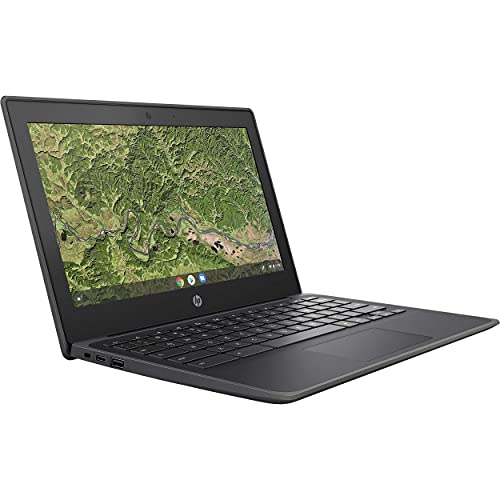
The HP Chromebook 11A G8 Education Edition is designed for classroom use with a rugged chassis and spill-resistant keyboard. It runs ChromeOS, focuses on note-taking and classroom collaboration, and provides an approachable option for younger students or budget-focused environments. The device prioritizes durability and simplicity over all-day performance for heavy multitasking.
Best for: school environments needing a tough, affordable device for basic notes and assignments. Caution: smaller display may be less ideal for extensive writing or reference-heavy tasks.
Buying Guide: Note-Taking Laptop Essentials
- Operating System and Notes Ecosystem: Consider whether you prefer ChromeOS for quick cloud-based notes or Windows for broader software access. ChromeOS shines for simple note apps and web-based tools; Windows supports heavier apps and offline work.
- Display Size And Type: A larger, matte or anti-glare display helps reduce eye strain during long note-taking sessions. 14–15.6 inches is a common sweet spot for portability and readability.
- Keyboard Comfort: A comfortable keyboard with good travel makes long typing sessions easier. Look for well-spaced keys and a responsive touchpad.
- Battery Life: Long battery life is crucial for note-taking away from power outlets. Aim for at least 8–12 hours of mixed use.
- RAM And Storage: 4–8 GB RAM is typical for note-taking tasks; 64 GB eMMC or 128 GB SSD provides enough space for documents and apps. For cloud-first users, storage is less critical than RAM and battery.
- Portability And Durability: If you’ll carry the laptop daily, sturdiness and light weight matter more. Some models offer military-grade builds or rugged keyboards.
- Special Note Features: Some devices offer stylus support or pen inputs. If handwriting or diagrams are essential, consider models with stylus compatibility or digital notebook features.
Frequently Asked Questions
- What’s the best note-taking laptop for students on a tight budget? A Chromebook with a comfortable keyboard and long battery life, such as the Lenovo IdeaPad 3i Chromebook, typically offers good value and cloud-based note-taking with easy setup.
- Is Windows necessary for note taking? Not always. Windows adds flexibility for desktop apps, while ChromeOS provides fast, reliable cloud-based note apps and long battery life.
- Should I get a larger screen for notes? A 15.6″ display can help with reading longer documents and jotting diagrams, but 14″ models are more portable for travel.
- Do I need a stylus for note-taking laptops? If handwriting or drawing diagrams is important, choose a model with pen support and a note-taking app integration.
- Which device balances price and performance best for exams? A lightweight Chromebook with a responsive keyboard and long battery life often balances price and performance well for exams and quick notes.
- Can a Chromebook handle offline note taking? Yes, most Chromebooks support offline notes via local apps and offline Google Docs or Microsoft Office apps.