Answering the question “which PC speakers are best for gaming?” these picks deliver clear dialogue, strong bass, and vibrant lighting for different setups. They suit gamers who want compact desk‑side setups, feature‑rich RGB, or simple two‑speaker configurations. This guide highlights five reliable options, noting who each is best for and why. A quick summary table below helps you compare at a glance and decide which is right for your rig.
| Product | Best For | Key Benefit | Connection |
|---|---|---|---|
| Redragon GS520 | Gamers needing RGB ambience | Touch‑controlled RGB with solid 2.0 sound | USB + 3.5mm |
| LENRUE G11 | Desk‑space conscious setups | Surge lighting and compact design | USB + AUX |
| OFFSIR 2‑in‑1 PC Speakers | Multi‑use spaces (lab, dorm) | Two speakers that form a soundbar | USB + 3.5mm |
| Nylavee | Budget gamers seeking bass depth | 2 bass‑boost ports and 6 lighting modes | USB + 3.5mm |
| Edifier G2000 | Powerful, feature‑rich set for desktops | 32W total power with multiple inputs | USB, AUX, Bluetooth |
Redragon GS520 RGB Desktop Speakers

Best for gamers who want bold visuals alongside solid sound. Redragon GS520 delivers a full 2.0 channel setup with enhanced stereo and a dedicated LED light bar. The touch‑controlled RGB modes offer six color themes to match game vibes or mood. The compact form suits small desks and adds a modern, brushed finish to your setup. Limitation: this model is a two‑speaker system without a dedicated subwoofer, so ultra‑deep bass may be less impactful for music or cinema‑style gaming.
LENRUE G11 Computer Speakers

Best for desk‑space‑conscious gamers who want clean aesthetics and accessible lighting. The LENRUE G11 emphasizes surge lighting with a single touch to switch lights on or off, plus dual amplifiers for clearer sound. Its all‑in‑one compact footprint keeps clutter down while preserving desk real estate. Caution: the perceived bass response may be leaner for players who prefer earth‑shaking lows in the game soundtrack.
OFFSIR 2‑in‑1 PC Speakers

Best for multi‑use desktops where a compact two‑speaker setup can also double as a soundbar. OFFSIR includes a 2‑in‑1 design that unfolds into a soundbar, offering a convenient, space‑saving solution. It features dual 5W drivers for enhanced stereo sound. Limitation: the system relies on two speakers without a separate subwoofer, so deep bass might not satisfy bass‑heavy games or movies.
Nylavee Computer Speakers
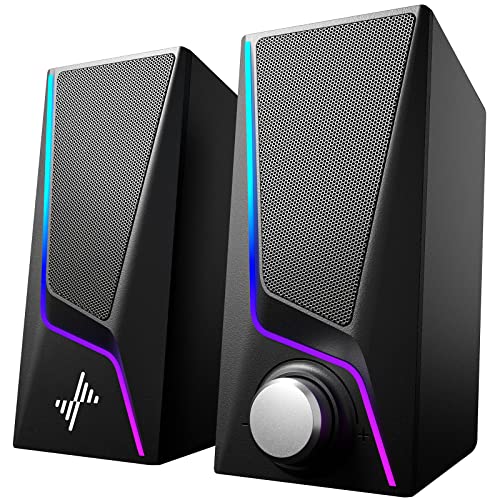
Best for budget‑minded gamers who still want quality audio and ambience. The Nylavee setup emphasizes Hi‑Fi stereo sound with two bass‑boost ports and six touch lighting modes. It’s a straightforward USB‑powered system that reduces desk clutter. Caution: the included audio outputs are basic; for more expansive rooms or larger screens, users may notice modest power compared with higher‑end systems.
Edifier G2000 32W PC Gaming Speakers

Best for players seeking robust power and versatility. Edifier G2000 delivers a total of 32W peak power with a dedicated subwoofer output and multiple inputs (Bluetooth, 3.5mm, USB). It suits gaming rigs that demand dynamic sound across genres. Limitation: the extra inputs can be overkill for very minimalistic setups, and the larger footprint may require more desk space.
Sanyun SW208 3″ Active Bluetooth 5.0 Bookshelf Speakers

Best for compact, high‑quality sound with precise imaging. The Sanyun SW208 uses carbon fiber drivers and a built‑in DAC for a 24‑bit audio path, delivering a bright, detailed sound stage. Suitable for smaller desks or secondary setups. Limitation: as bookshelf speakers, they may require a stand or wall space to achieve optimal placement for image accuracy.
Buying Guide
- Sound goals: Do you prioritize gaming immersion, movies, or music? If your focus is gaming, look for strong directional cues and clear voices (2.0 systems with good midrange are often enough). If you want bass, consider a 2.1 setup or a compact subwoofer option.
- Desk space: Measure your available surface. Compact two‑speaker models fit smaller desks, while powered soundbars or bookshelf styles may require more depth but offer better sound staging.
- Connectivity: USB power is convenient for many PCs; ensure the system includes a 3.5mm AUX if you plan to connect to consoles, laptops, or devices without USB audio.
- Lighting and aesthetics: RGB or ambient lighting adds atmosphere. If lighting is a priority, pick models with customizable color modes and easy access controls.
- Placement: For best imaging, place two speakers at ear level, equidistant from your head, and angled slightly inward. Subwoofers, if present, should be placed to reduce room nodes and boomy bass.
- Durability and setup: Look for simple controls, cable management, and sturdy stands or bases to prevent tipping in fast‑moving gaming sessions.
Frequently Asked Questions
- What is the difference between 2.0 and 2.1 speaker systems for gaming?
Answer: 2.0 delivers two full‑range drivers with clear stereo; 2.1 adds a subwoofer for deeper bass, which can enhance immersive effects in games with rich soundtracks. - Do gaming speakers require a subwoofer to sound good?
Answer: Not always. Many 2.0 systems provide enough punch for casual gaming, while subwoofers benefit action games and movies with intense low frequencies. - Is RGB lighting important for performance?
Answer: RGB lighting is primarily aesthetic; it enhances the ambiance and can reflect in‑game mood, but it does not improve audio clarity. - Can these speakers be used with laptops or consoles?
Answer: Yes. Most models offer USB power and 3.5mm AUX inputs, which are common on laptops and many consoles. Bluetooth versions add wireless flexibility where available. - What placement optimizes gaming sound?
Answer: Position both speakers at ear level, angled toward you, with the center between them. If there is a subwoofer, place it near the front wall to reduce room nulls. - Are more expensive speakers worth it for gaming?
Answer: Higher price often correlates with louder, clearer audio, better imaging, and more input options. For tight budgets, prioritize clear mids and reliable connectivity over extra features.