Looking for a compact, reliable PDF e-book reader that keeps your digital library accessible on the move? This guide highlights five solid options that excel at displaying PDFs and common e-book formats, with features that suit different reading styles. Ideal buyers include: commuters who want a light pocket reader, students needing portable document access, and readers who value long battery life or eye-friendly displays. The table below compares key strengths to help you choose quickly.
| Product | Best For | Key Benefit |
|---|---|---|
| XTEINK X3 3.7″ Pocket E-Ink | Highly portable readers | Lightweight with physical buttons |
| Domary E Reader 6″ | Wide format support | Supports PDFs and many formats |
| VIWOODS AiPaper 6.13″ | Premium display | Carta 1300, adjustable front light |
| Appseen PDF Reader | Fast PDF viewing | Fast loading, night mode, search |
| Yunir 5″ Color E-Reader | Note-taking and color content | Color display with writing features |
XTEINK X3 3.7″ Pocket E-Ink eBook Reader

The XTEINK X3 is a compact 3.7-inch e-reader designed for ultra-portability and distraction-free reading. It weighs approximately 58g and is about 5.1mm thin, making it ideal for readers who want a pocketable device for books, manga, notes, and light reading during commutes or travel. The paper-feel E-Ink display helps reduce eye strain, and gyroscope page-turn with physical buttons supports one-handed use in various positions. Best for readers who prioritize portability and focus over large screens.
Best for: commuters, travelers, and note-takers who want a pocketable, focused reading device with tactile controls. Limitation: smaller screen may require frequent page turns for dense PDFs or long documents.
Domary E Reader 6″ – 6 Inch Screen

The Domary E Reader features a 6-inch display with eye-friendly visuals and adjustable font sizes for comfortable long reading sessions. It supports multiple document formats, including PDF, TXT, DOC, EPUB, RTF, MOBI, and more, with a memory card slot for easy storage expansion. Large page control buttons improve navigation at home or on the go. Best for readers who need flexible format support and expandable storage.
Best for: students and casual readers who encounter diverse document types. Limitation: depending on file complexity, some PDFs may require font adjustments for optimal readability.
VIWOODS AiPaper 6.13″ Pocket E-Reader
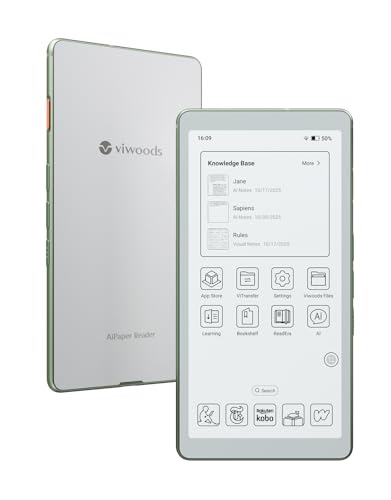
The VIWOODS AiPaper reader weighs about 138g with a slim 6.7mm body and a 6.13-inch Carta 1300 E-Ink display. It delivers fast refresh rates and a true paper-like feel for comfortable reading. It also offers 20 levels of adjustable front light to suit various lighting environments. Best for readers who want a premium e-ink experience in a compact form factor.
Best for: commuters who want a high-contrast, glare-free display with adjustable lighting. Limitation: larger displays can feel a bit bulkier than ultra-pocket options for some pockets.
Appseen PDF Reader For Fire Tablet & Ebook Reader
The Appseen PDF Reader focuses on fast, smooth PDF viewing with features like Night Mode, quick search, and bookmarking. It is designed to handle PDF files efficiently on compatible devices and supports viewing and editing tasks without excessive clutter. Best for readers who primarily consume PDFs and need solid navigation tools.
Best for: readers who prioritize quick PDF access and night reading. Limitation: may not optimize non-PDF formats as effectively as multi-format devices.
5 Inch Color Ebook Reader With Writing Tablet

This 5-inch color e-reader combines a vivid display with writing capabilities. It supports PDF, EPUB, MOBI, TXT, and DJVU, and runs on Android 5.1, enabling access to third-party apps via WiFi. It also pairs with Bluetooth for headphones or keyboards, making it a versatile small-book and notetaking device. Best for color content and quick note-taking on the go.
Best for: readers who want color content and light note-taking. Limitation: smaller screen size may not be ideal for long PDFs or dense layouts.
Buying Guide
What should you consider when choosing a PDF e-book reader?
- Screen size and display quality: If you read mostly PDFs and documents, larger screens (6 inches or more) with glare-free E-Ink or Carta displays reduce eye strain and improve readability.
- Format support: Look for devices that handle PDFs alongside common formats like EPUB, MOBI, TXT, and DJVU to maximize compatibility with your library.
- Portability vs. functionality: Ultra-compact readers are easiest to carry but may offer fewer features. A mid-sized device balances portability with readability.
- Storage and expandability: Built-in memory plus microSD or card slots can matter if you carry many large documents or comics.
- Lighting and eye comfort: Adjustable front lighting or night mode helps reading in varied lighting without eye strain.
- On-device controls: Physical page-turn buttons or gyroscope features can improve single-handed reading during travel.
- Battery life: Longer battery life is beneficial for long trips or daily commutes without frequent recharging.
- Software ecosystem: Android-based readers offer app flexibility; dedicated readers provide a simpler, distraction-free experience.
Practical buying questions
- Do you primarily read PDFs or multi-format e-books? Choose a device with strong PDF support and broad format compatibility.
- Is ultra-lightweight design important for your daily carry? Opt for a compact model under 150g with a slim profile.
- Do you value a high-quality display for long sessions? A Carta 1300 or similar advanced E-Ink panel is recommended.
- Will you read in low-light environments? Ensure front lighting or night mode features are available.
FAQ
- What is the best portable PDF reader for travel? A compact device with strong PDF support and long battery life, like a 6-inch E-Ink reader, is ideal for travel.
- Can these devices handle image-heavy PDFs? Some models handle images well, but image-heavy documents may render slower; check format support specifics.
- Do these readers support annotation or notes? Some models offer note-taking capabilities or writing pens, while others focus on pure reading.
- Is color display useful for e-books? Color displays help with magazines or comics but can reduce battery life compared to E-Ink options.
- Are Android-based readers better for apps? AndroidOS devices allow third-party apps, increasing versatility but may compromise distraction-free reading.
- Can I read on these devices without a constant internet connection? Yes, most allow offline access to downloaded files.