Finding the right point-of-sale software for a small business requires balancing price, features, and ease of use. This guide highlights five practical POS solutions that fit typical small-business needs—retail, food service, and service-based operations. Each pick is chosen for its suitability to small teams, straightforward setup, and essential management features. Read on to see who each option best serves and why it stands out.
Product overview at a glance:
| Product | Brand | Best For | Key Benefit |
|---|---|---|---|
| Square Terminal | Square | Retailers needing portable, all-in-one payment and receipt printing | Accepts all major cards with a simple per-transaction rate |
| NWIQ POS Inventory Retail Software | Nandvarik | Booths, counters, and small stalls needing a one-time purchase | Comprehensive modules and 51 functions for core operations |
| Express Accounts Accounting Software Free | NCH Software | Small businesses seeking robust financial controls | Payments, deposits, balances, and reports in one package |
| MyInvoices & Estimates Deluxe | Avanquest | Invoicing-heavy businesses needing custom invoices | Invoices, estimates, statements, and payment tracking |
| iOS Point of Sale Cash Register Software POS System | MR.BOSS | iPad/iPhone-based stores needing cloud printing and multi-platform support | No-install setup, remote updates, multi-function orders and tax support |
Square Terminal – Credit Card Machine To Accept All Payments

Overview: Square Terminal integrates payment acceptance, sales, and receipt printing in a single device. Best for brick-and-mortar counters or staff who need to process payments on the go within a store. It supports major credit and debit cards with a straightforward rate structure and no long-term commitment.
Key features and implications:
- All-in-one device for sales and receipts.
- Accepts cards with a simple, transparent rate.
- Flexible use at counter or mobile locations in-store.
Who this is best for: merchants who want a compact, portable card-present solution with easy setup and minimal hardware management. Caution: Square Terminal requires a compatible internet connection and ongoing service terms; review any processing costs for your typical sales mix.
NWIQ POS Inventory Retail Software

Overview: NWIQ POS Inventory Retail Software is designed for booths, counters, food vans, or stalls with a one-time purchase model. It emphasizes comprehensive functionality across multiple modules and reports, aiming to cover core operating needs in smaller, independent operations.
Key features and implications:
- One-time purchase option, appealing to cost-conscious buyers.
- 52+ functional modules and reports targeted at retail and service settings.
- Built to fit compact spaces and limited staff resources.
Who this is best for: owners who prefer a long-term ownership model without ongoing subscription fees and need a broad, modular feature set. Limitation: the one-time purchase model may come with older interfaces or fewer frequent updates compared with subscription-based solutions.
Express Accounts Accounting Software Free
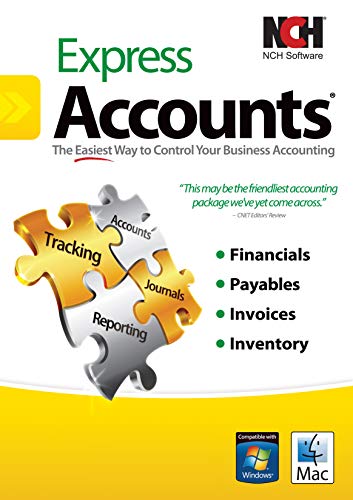
Overview: Express Accounts offers a robust accounting-focused POS integration, suitable for small businesses needing clear financial tracking. It supports payments, deposit tracking, balances, and report generation to monitor business finances and share data with accountants.
Key features and implications:
- Payment and deposit tracking integrated with general finances.
- Balances and reports help monitor cash flow and profitability.
- Email and fax reporting options to accountants streamline collaboration.
Who this is best for: small businesses seeking strong accounting alignment with their POS data, especially those that require straightforward reporting flows to external accountants. Caution: the software’s emphasis is accounting rather than line-item POS management; verify fit for day-to-day sales operations.
MyInvoices & Estimates Deluxe

Overview: MyInvoices & Estimates Deluxe focuses on creating and tracking invoices, estimates, and payment collection from a centralized place. It’s designed for businesses where invoicing is a primary activity, such as service providers and contractors.
Key features and implications:
- Custom invoices, estimates, and statements in one tool.
- Payment receipt and tracking capabilities integrated into workflows.
- Industry-leading invoicing convenience for small teams.
Who this is best for: service-based businesses that rely heavily on formal invoicing and payment tracking. Caution: may require synergy with your POS process if you need real-time sales data alongside invoicing.
iOS Point Of Sale Cash Register Software
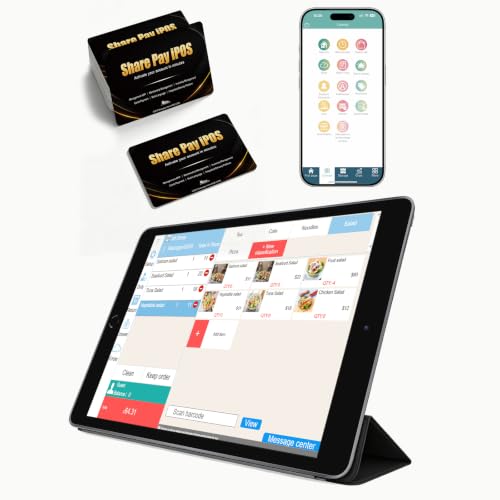
Overview: This MR.BOSS iOS POS solution is designed for iPad or iPhone deployments with cloud printing and multi-platform compatibility. It emphasizes a no-install approach and ongoing updates, suitable for small businesses prioritizing mobility and remote support.
Key features and implications:
- No installation required; runs on idle tablets.
- Cloud printing, remote support, and free software updates.
- Multifunction capabilities including customizable receipts, tax rate handling, and delivery platform integrations.
Who this is best for: retailers and cafes that value quick setup on existing iOS devices and want flexible, cloud-assisted management. Caution: dependence on cloud services means reliable internet access is important for continuous operation.
Buying Guide: Key Purchase Considerations
What core features matter most for your small business?
- Payment acceptance: Ensure the solution supports the payment types you use and review per-transaction costs.
- Inventory and sales management: Look for real-time stock updates, simple item lookup, and straightforward reporting.
- Invoicing and accounting: If you bill clients often, choose software with strong invoicing and financial reporting.
- Hardware footprint: Decide between all-in-one devices, tablets, or desktop setups based on your space and staff.
- Ease of setup and updates: Cloud-based solutions with remote updates reduce maintenance time for small teams.
- Scalability: Consider whether you’ll add locations or more products and if the software can grow with you.
How to compare options quickly
- Best for cash-heavy environments: All-in-one terminals and mobile POS devices with built-in receipts.
- Best for service-heavy operations: Invoicing and estimates integrated with payment tracking.
- Best for tight budgets: One-time purchase options that avoid ongoing subscription costs.
What to verify before purchasing
- Data migration: Can you import existing inventory, customers, and invoices?
- Support model: What levels of remote or on-site support are included?
- Security and compliance: Ensure data protection and PCI compliance for card processing.
FAQ
- What is the simplest POS for a small coffee shop?
Answer: A compact, cloud-based system that accepts mobile payments and prints receipts at the counter tends to be easiest to implement quickly. - Do small businesses need a separate accounting package with POS?
Answer: Not always; many POS systems include basic accounting and reporting, but if you require detailed financial analyses, choose an option with strong accounting features or easy data export to your preferred software. - Is one-time purchase better than a subscription for POS?
Answer: One-time purchases can be cost-efficient upfront, but subscriptions often offer ongoing updates and support, which may be advantageous for longer-term use. - Should I prioritize POS with invoicing features?
Answer: If you frequently bill customers or run a service-based business, strong invoicing and payment tracking can streamline operations and cash flow. - What hardware is required to run these POS systems?
Answer: Hardware varies—from tablets and cloud-connected devices to standalone terminals. Confirm compatibility with your existing devices and space constraints. - Can these POS systems integrate with delivery platforms?
Answer: Some options explicitly offer integrations with delivery services; verify availability if you rely on Uber Eats, DoorDash, or similar platforms.